
導入
The Korg TMR-50 is a versatile device designed to assist musicians in improving their pitch and rhythm. It integrates a tuner, metronome, and recorder into a single compact unit. These three functions can be used independently or simultaneously, offering comprehensive support for practice and performance. The TMR-50 also features high-quality linear PCM recording, allowing up to 100 tracks to be stored, and a USB port for easy data transfer to a computer. With its built-in microphone, speaker, and various rhythm variations, the TMR-50 is an essential tool for any musician.
安全上の注意
- Do not expose the unit to extreme temperatures, direct sunlight, high humidity, or dusty environments.
- 落としたり、強い衝撃を与えたりしないでください。
- ユニットを分解したり改造したりしないでください。修理は必ず資格のある専門家にご依頼ください。
- 指定されたタイプの電池 (AAA) のみを使用し、取り付け時に正しい極性を確認してください。
- 長期間使用しない場合は、液漏れを防ぐため電池を取り外してください。
- Keep the unit away from sources of strong electromagnetic interference.
パッケージ内容
パッケージに以下のすべての項目が含まれていることを確認してください。
- Korg TMR-50 Tuner Metronome Recorder unit
- 2 x AAA batteries (for initial use)
- ユーザーマニュアル(このドキュメント)
各部の名称と機能
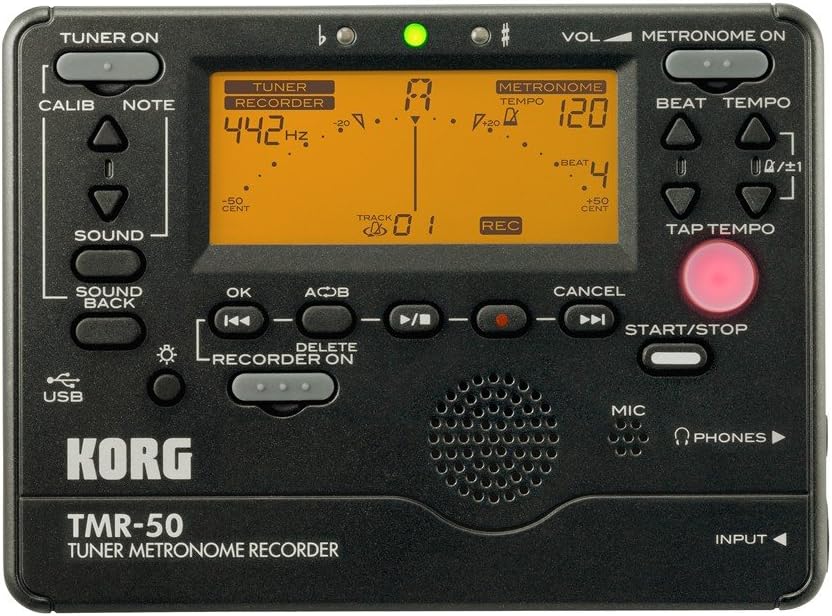
図1: フロントパネルオーバーview of the Korg TMR-50, showing all controls and the display.
チューナーコントロール
- TUNER ON Button: Activates or deactivates the tuner function.
- CALIB Button: Adjusts the calibration frequency (standard is 440Hz, often adjustable to 442Hz as shown).
- NOTE Buttons (Up/Down Arrows): Selects the target note for tuning.
- サウンドボタン: Activates the Sound Out function, which outputs a reference tone from the internal speaker.
- SOUND BACK Button: Engages the Sound Back function, allowing the unit to detect the input pitch and output the closest correct pitch for comparison.
メトロノームコントロール
- METRONOME ON Button: Activates or deactivates the metronome function.
- VOL (Volume) Slider: Adjusts the output volume of the metronome and other audio.
- BEAT Buttons (Up/Down Arrows): Adjusts the number of beats per measure.
- TEMPO Buttons (Up/Down Arrows): Adjusts the metronome tempo in beats per minute (BPM).
- タップテンポボタン: Allows you to set the tempo by tapping the button in time with the desired beat.
Recorder Controls
- RECORDER ON Button: Activates the recorder function.
- REC Button (Red Dot): Initiates recording when the recorder is active.
- OKボタン: 選択またはアクションを確認します。
- Rewind/Fast Forward Buttons (Double Arrows): Navigates through recorded tracks or within a track.
- Play/Pause Button (Triangle/Two Vertical Bars): Starts or pauses playback of a recorded track.
- Stop Button (Square): 再生または録音を停止します。
- A<->B Button: Sets a loop playback region within a recorded track.
- 削除ボタン: Deletes selected recorded tracks.
- スタート/ストップボタン: A general control for starting and stopping various functions, including recording and metronome.
表示とインジケータ
- LCDディスプレイ: Shows tuning information (note, cent deviation, calibration), metronome tempo and beat, and recorder track number and status.
- Flat (b) / Sharp (#) Indicators: Lights up to indicate if the detected pitch is flat or sharp.
- 緑のインジケーターライト: Illuminates when the detected pitch is in tune.
Input/Output and Other Features
- MIC(マイク): Built-in microphone for recording and tuning.
- PHONES(ヘッドフォンジャック): Output for connecting headphones.
- 入力ジャック: Input for connecting an external microphone or instrument pickup.
- USBポート: For connecting to a computer to transfer recorded data.
- スピーカー: Built-in speaker for metronome clicks, reference tones, and playback.
設定
バッテリーの取り付け
- 本体背面の電池ケースカバーを開きます。
- 電池ボックス内の指示に従って、極性 (+/-) が正しいことを確認して、単 4 電池 2 本を挿入します。
- 電池カバーをしっかりと閉じてください。
電源オン/オフ
- 電源を入れるには、 チューナーオン or METRONOME ON ボタンを約 XNUMX 秒押します。
- 電源を切るには、 を長押しします チューナーオン or METRONOME ON button again for approximately one second. The unit will also automatically power off after a period of inactivity to conserve battery life.
Operating the Tuner
- を押す チューナーオン button to activate the tuner. The display will show tuning information.
- Adjust the calibration frequency using the キャリブ button if needed. The default is typically 440Hz, but can be set to 442Hz or other values.
- Play a single note on your instrument. The TMR-50 will detect the pitch via its built-in microphone or an external input.
- ディスプレイを観察します。
- The note name will be displayed.
- The meter indicates pitch deviation. Adjust your instrument until the meter is centered and the green indicator light illuminates.
- The 'b' (flat) or '#' (sharp) indicators will light up if the pitch is significantly off.
- 使用 音 button to output a reference pitch for ear training.
- 関与する SOUND BACK function to hear the closest correct pitch while you play, aiding in intonation practice.
Operating the Metronome
- を押す METRONOME ON メトロノームを起動するボタン。
- テンポを調整するには テンポ Up/Down arrow buttons. The tempo range is typically from 30 to 252 BPM.
- Set the desired beat pattern using the ビート Up/Down arrow buttons. This controls the number of beats per measure and rhythm variations.
- または、 タップテンポ button to set the tempo by tapping it at your desired speed.
- を押す スタート/ストップ button to begin or end the metronome click.
- Adjust the metronome volume using the 巻 スライダー。
レコーダーの操作
- を押す RECORDER ON button to enable the recording function.
- 録音を開始するには、 記録 button (red dot). The display will show "REC" and the track number.
- Play your instrument or sing into the built-in microphone.
- 録音を停止するには、を押します 停止 ボタン。
- To play back a recorded track:
- Use the Rewind/Fast Forward buttons to select the desired track.
- を押す 再生/一時停止 ボタンをクリックして再生を開始します。
- を押す 停止 再生を終了するボタン。
- To use the Loop Play function:
- 再生中に、 A<->B button at the desired start point (A).
- を押す A<->B button again at the desired end point (B). The section between A and B will loop continuously.
- プレス A<->B a third time to cancel the loop.
- To delete a track:
- Select the track you wish to delete using the Rewind/Fast Forward buttons.
- を押す 消去 ボタン。
- Confirm the deletion if prompted (usually by pressing OK).
コンピュータへの接続
The TMR-50 features a USB port for transferring recorded audio files to your computer. Connect the unit to your computer using a standard USB cable (not included). The device should appear as a removable storage device, allowing you to copy files. Refer to your computer's operating system instructions for managing external storage devices.
メンテナンス
- 本体は柔らかく乾いた布で拭いてください。研磨剤入りの洗剤や溶剤は使用しないでください。
- 長期間使用しない場合は、液漏れや腐食を防ぐために電池を取り外してください。
- 直射日光を避け、涼しく乾燥した場所に保管してください。
トラブルシューティング
| 問題 | 考えられる原因 / 解決策 |
|---|---|
| ユニットの電源が入りません。 |
|
| チューナーが不正確または応答しません。 |
|
| メトロノームの音が小さすぎるか、聞こえません。 |
|
| Recorded audio is too quiet or distorted. |
|
| 転送できません fileUSB 経由で。 |
|
仕様
| 特徴 | 詳細 |
|---|---|
| モデル番号 | TMR-50 |
| 寸法(幅×奥行き×高さ) | 5.2×5.2×1.3インチ(約) |
| 重さ | 6.7オンス(電池を除く) |
| 電源 | 単2電池XNUMX本 |
| チューナーレンジ | A0(27.50 Hz)– C8(4186.01 Hz) |
| 校正範囲 | A4 = 410 – 480 Hz |
| メトロノームのテンポ範囲 | 30 – 252 ビート |
| Metronome Beat Settings | 0 – 9 beats, duplets, triplets, quadruplets, etc. (15 variations) |
| 記録フォーマット | Linear PCM (WAV) |
| 記録容量 | Up to 100 tracks (approx. 20 minutes total) |
| 入力/出力 | INPUT jack (mono), PHONES jack (stereo), USB port (Type B) |
保証とサポート
For warranty information and technical support, please refer to the warranty card included with your product or visit the official Korg website. Keep your proof of purchase for warranty claims. Do not attempt to repair the unit yourself, as this may void your warranty.
公式コルグ Webサイト: www.korg.com