
1. はじめに
The D-Link GO-SW-5G is a 5-Port Unmanaged Gigabit Desktop Switch designed for home and small office environments. This device provides a simple and cost-effective solution to expand your network connectivity, offering high-speed Gigabit Ethernet ports for reliable data transfer. It incorporates D-Link's Green Technology for energy efficiency, reduced heat generation, and extended product lifespan.
This switch is a plug-and-play device, requiring no complex configuration or software installation, making it easy to integrate into an existing network.
2. パッケージ内容
以下にリストされているすべてのアイテムがパッケージに含まれていることを確認してください。
- D-Link GO-SW-5G 5-Port Gigabit Desktop Switch
- 電源アダプター
- クイックインストールガイド
不足または破損している品目がある場合は、販売店にご連絡ください。
3. セットアップ手順
The D-Link GO-SW-5G switch is designed for easy plug-and-play installation. Follow these steps to set up your device:
3.1.電源アダプタを接続する
- Locate the power input port on the side of the D-Link GO-SW-5G switch.
- 付属の電源アダプターをこのポートに接続します。
- 電源アダプタのもう一方の端を標準の電源コンセントに差し込みます。
- The power LED on the front of the switch will illuminate, indicating that the device is receiving power.

図1: 側 view of the D-Link GO-SW-5G switch with the power input port.
3.2. ネットワークに接続する
- Using a standard Ethernet cable (RJ45), connect one end to an available LAN port on your router (not your modem).
- Connect the other end of this Ethernet cable to any of the five available ports on the back of the D-Link GO-SW-5G switch.
- The corresponding LED on the front of the switch will light up, indicating an active connection.
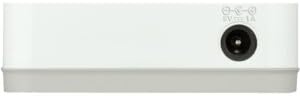
図2: 後方 view of the D-Link GO-SW-5G switch with five Ethernet ports.
3.3. Connect Network Devices
- Connect your network devices (e.g., computers, gaming consoles, network printers, smart TVs) to the remaining available Ethernet ports on the D-Link GO-SW-5G switch using Ethernet cables.
- Each connected device will have its corresponding LED on the front of the switch illuminate, confirming a successful connection.

図3: フロント view of the D-Link GO-SW-5G switch showing active port LEDs.
4. 操作手順
The D-Link GO-SW-5G is an unmanaged switch, meaning it operates automatically without requiring user configuration. Once connected as described in the Setup section, it will begin forwarding network traffic between connected devices.
- 自動ネゴシエーション: The switch automatically detects the network speed (10/100/1000 Mbps) and duplex mode (half/full) of connected devices and adjusts accordingly.
- 自動MDI/MDIX: All ports support automatic MDI/MDIX crossover, eliminating the need for crossover cables when connecting to other switches or hubs.
- LEDインジケーター: Each port has an LED indicator on the front panel. A lit LED indicates an active link, and blinking indicates network activity.
5. メンテナンス
To ensure optimal performance and longevity of your D-Link GO-SW-5G switch, consider the following maintenance guidelines:
- 配置: スイッチは、直射日光、熱源、過度の湿気を避け、涼しく乾燥した場所に設置してください。機器の周囲には十分な換気を確保してください。
- クリーニング: Use a soft, dry cloth to clean the exterior of the switch. Avoid using liquid or aerosol cleaners, as they may damage the device.
- ケーブル管理 イーサネット ケーブルは、絡まりや誤って外れることのないようにきちんと整理しておいてください。
- 電源サイクル: If you experience network issues, a simple power cycle (unplugging the power adapter for 10 seconds and then plugging it back in) can often resolve minor problems.
6。 トラブルシューティング
If you encounter issues with your D-Link GO-SW-5G switch, refer to the following common troubleshooting steps:
- 電源LEDなし:
- 電源アダプタがスイッチと正常な電源コンセントの両方にしっかりと接続されていることを確認します。
- 別のデバイスを接続して、電源コンセントが機能していることを確認します。
- No Link/Activity LED for a Connected Device:
- イーサネット ケーブルがスイッチ ポートとネットワーク デバイスの両方にしっかりと接続されていることを確認します。
- ケーブルに欠陥がないか確認するため、別のイーサネット ケーブルを試してください。
- 接続されているデバイスの電源がオンになっており、ネットワーク アダプターが正しく機能していることを確認します。
- デバイスをスイッチの別のポートに接続してみてください。
- ネットワーク速度が遅い:
- Verify that all connected devices and cables support Gigabit Ethernet (1000 Mbps) for optimal performance. The switch will operate at the lowest common speed.
- Ensure your router and internet service provider (ISP) plan support the desired speeds.
- Perform a power cycle on the switch and your router.
- 断続的な接続:
- ケーブル接続が緩んでいないか確認してください。
- Ensure the switch is not overheating; provide adequate ventilation.
- さまざまなイーサネット ケーブルでテストします。
7. 仕様
| ブランド | Dリンク |
| モデル番号 | GO-SW-5G/B |
| ポート数 | 5 |
| スイッチタイプ | 管理されていない |
| データ転送速度 | 1 ギガビット/秒 (10/100/1000 Mbps) |
| インタフェース | RJ45 |
| 色 | 白 |
| アイテム重量 | 0.22 ポンド |
| 巻tage | 100-240ボルト |
| 対応デバイス | PC, Mac, and other Ethernet-enabled devices |
| スイッチングファブリック | 10Gbps |
| 欧州連合 | 790069365669 |
8. 保証とサポート
限定保証: The D-Link GO-SW-5G switch comes with a 3-year limited warranty. For detailed terms and conditions, please refer to the warranty information included in your package or visit the official D-Link webサイト。
テクニカルサポート: For technical assistance, product registration, or to download the latest firmware and documentation, please visit the D-Linkサポート Webサイト or contact D-Link customer service.