
Quad Lock QLM-BMP-BL
Quad Lock Stem/Handlebar Bike Mount Pro User Manual
Model: QLM-BMP-BL
1. はじめに
The Quad Lock Stem/Handlebar Bike Mount Pro is designed to securely attach your smartphone to your bicycle's stem or handlebars. Featuring a patented dual-stage locking mechanism, it provides a strong and reliable hold, allowing you to access your phone's apps on the go with confidence. This mount is compatible with all Quad Lock Cases and Universal Adapters (sold separately).

Image: The Quad Lock Stem/Handlebar Bike Mount Pro, showcasing its compact design and dual-stage locking mechanism.
2. 箱の中身
Your Quad Lock Stem/Handlebar Bike Mount Pro package includes the following components:
- 1 x Quad Lock Stem / Handlebar Bike Mount
- Mounting Hardware (4 x EPDM O-Rings, 2 x Zipties)

画像: クローズアップ view of the Quad Lock Bike Mount Pro and its included mounting hardware.
3. 主な特徴
- Lightweight, Strong, and Secure: Engineered for maximum security and minimal weight.
- 特許取得済みのデュアルStageロック: Ensures your phone is held securely to your bike, even over bumps and jumps.
- クイックアタッチ/デタッチ: Simple twist and lock system provides easy access to your smartphone.
- 簡単なインストール: Designed to fit stems or handlebars with a tube diameter of 25-40mm.
- 互換性: Works seamlessly with all Quad Lock Cases and Adapters (not included).
4. セットアップとインストール
Follow these steps to install your Quad Lock Bike Mount Pro:
- 取り付け場所を選択: Identify a suitable position on your bike's stem or handlebars. Ensure the surface is clean and dry. The mount is designed for tube diameters between 25-40mm.
- マウントを固定する: Use either the provided EPDM O-Rings or Zipties to firmly attach the mount to your chosen location. For O-Rings, stretch them around the mount and the handlebar/stem, ensuring a snug fit. For Zipties, thread them through the mount's designated slots and tighten securely.

Image: A hand securing the Quad Lock Bike Mount Pro to a bicycle handlebar using a zip tie.
- テストの安定性: Once installed, gently try to move the mount to ensure it is stable and does not rotate or slide. Adjust as necessary.

Image: The Quad Lock Bike Mount Pro securely installed on a bicycle handlebar, ready for phone attachment.
5. 操作手順
Using your Quad Lock Bike Mount Pro is simple and intuitive:
- 携帯電話を接続する: Align your Quad Lock equipped phone (with a Quad Lock Case or Universal Adapter) with the mount. The phone's adapter should fit into the mount's receiver.
- ツイストしてロック: Once aligned, gently push your phone down onto the mount and twist it 45 degrees until you hear and feel a click. This engages the patented dual-stage locking mechanism, securing your phone firmly in place.

Image: A hand demonstrating the twist-and-lock motion to secure a phone onto the Quad Lock Bike Mount.
- ロックを確認: Before riding, always ensure your phone is fully locked by gently pulling upwards on it. It should not detach.
- Detach Your Phone: To remove your phone, press down on the blue lever located on the mount and twist your phone 45 degrees in the opposite direction. Once unlocked, lift your phone off the mount.
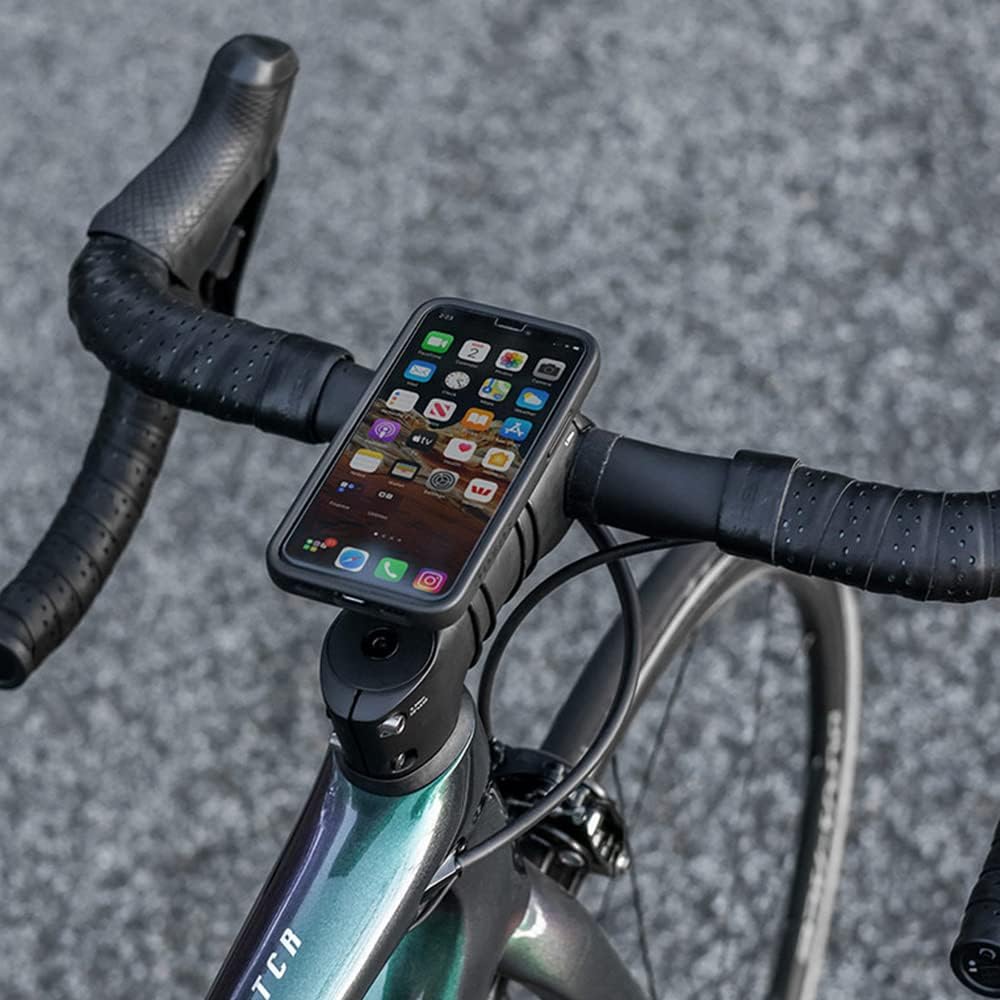
Image: An iPhone securely mounted on a bicycle handlebar using the Quad Lock Bike Mount Pro, displaying a map application.

Image: A Samsung Galaxy phone mounted on a bicycle handlebar, showing its secure and accessible position for cycling.
6. メンテナンス
To ensure the longevity and optimal performance of your Quad Lock Bike Mount Pro, follow these simple maintenance guidelines:
- クリーニング: Periodically wipe down the mount with a damp 布で汚れや油汚れを拭き取ってください。刺激の強い化学薬品や研磨剤入りの洗剤は使用しないでください。
- コンポーネントの検査: Regularly check the O-Rings or Zipties for signs of wear, stretching, or damage. Replace them if necessary to maintain a secure fit.
- 潤滑: The locking mechanism is designed for smooth operation. If it feels stiff, a small amount of silicone-based lubricant can be applied to the moving parts.
7。 トラブルシューティング
If you encounter any issues with your Quad Lock Bike Mount Pro, consider the following:
- Mount Slipping on Handlebar/Stem: Ensure the O-Rings or Zipties are tightened sufficiently. If using O-Rings, try using an additional set or replacing worn ones. For Zipties, ensure they are pulled taut.
- 電話が安全にロックされない: Verify that your phone is equipped with an official Quad Lock Case or Universal Adapter. Ensure the phone is properly aligned with the mount and twisted a full 45 degrees until a distinct click is heard/felt. Check for any debris in the locking mechanism.
- Difficulty Detaching Phone: Ensure you are fully depressing the blue release lever on the mount before twisting the phone. The mechanism requires a firm press to disengage.
8. 仕様
| 特徴 | 詳細 |
|---|---|
| 製品寸法 | 1.69 x 1.26 x 5.12インチ |
| アイテム重量 | 1.41オンス |
| 商品型番 | QLM-BMP-BL |
| 色 | ブラック/ブルー |
| メーカー | Annex Products Pty Ltd |
| 原産国 | 中国 |
| 対応デバイス | Smartphones (with Quad Lock Cases) |
| 取り付けタイプ | ハンドルバー・ステム |
9. 保証とサポート
For information regarding product warranty, returns, or additional support, please refer to the official Quad Lock website or contact Quad Lock customer service directly. You can also visit the AmazonのQuad Lockストア 詳細と製品情報については、
Ask a question about this manual
Ask about setup, troubleshooting, compatibility, parts, safety, or missing instructions. Manuals+ will review the question and use this page’s manual context to help answer it.