
1. はじめに
Thank you for choosing the Coby LEDTV3216 32-Inch 720p 60Hz Slim-Bezel LED HDTV. This manual provides essential information for the safe and efficient operation of your television. Please read these instructions thoroughly before use and retain them for future reference.
The Coby LEDTV3216 offers a 32-inch widescreen display, a built-in digital TV tuner (ATSC/NTSC/QAM), and multiple connectivity options including HDMI and VGA. It features energy-efficient technology, digital noise reduction, and V-chip parental control.
2. 安全情報
安全な操作を確保し、損傷を防ぐために、次の注意事項を守ってください。
- 電源: テレビはAC 100~240V、50/60Hzの電源にのみ接続してください。
- 換気: 通気口を塞がないでください。テレビの周囲に十分なスペースを確保し、空気の流れを確保してください。
- 水と湿気: Do not expose the TV to rain, moisture, or place objects filled with liquids on or near it.
- 熱源: テレビをラジエーター、暖房送風口、ストーブ、その他の熱を発生する器具から遠ざけてください。
- クリーニング: 清掃する前に、テレビのプラグを壁のコンセントから抜いてください。柔らかく乾いた布を使用してください。液体洗剤やエアゾール洗剤は使用しないでください。
- サービス: この製品を自分で修理しようとしないでください。 すべてのサービスを資格のあるサービス担当者に依頼してください。
- 壁掛け: If wall-mounting, ensure the mount is VESA 200mm x 200mm compatible and installed by qualified personnel.
3. パッケージ内容
パッケージにすべてのアイテムが揃っていることを確認します。
- Coby LEDTV3216 32-Inch LED HDTV
- テレビスタンド
- リモコン(単4電池2本必要、付属)
- 電源コード
- ユーザーマニュアル(このドキュメント)
4. セットアップ
4.1 スタンドの取り付け
付属のスタンドを取り付けるには:
- 画面の損傷を防ぐため、テレビを画面を下にして柔らかく清潔な表面に置いてください。
- スタンドベースをテレビの下部にある取り付け穴に合わせます。
- 付属のネジを使用してスタンドを固定します。すべてのネジがしっかりと締められていることを確認してください。
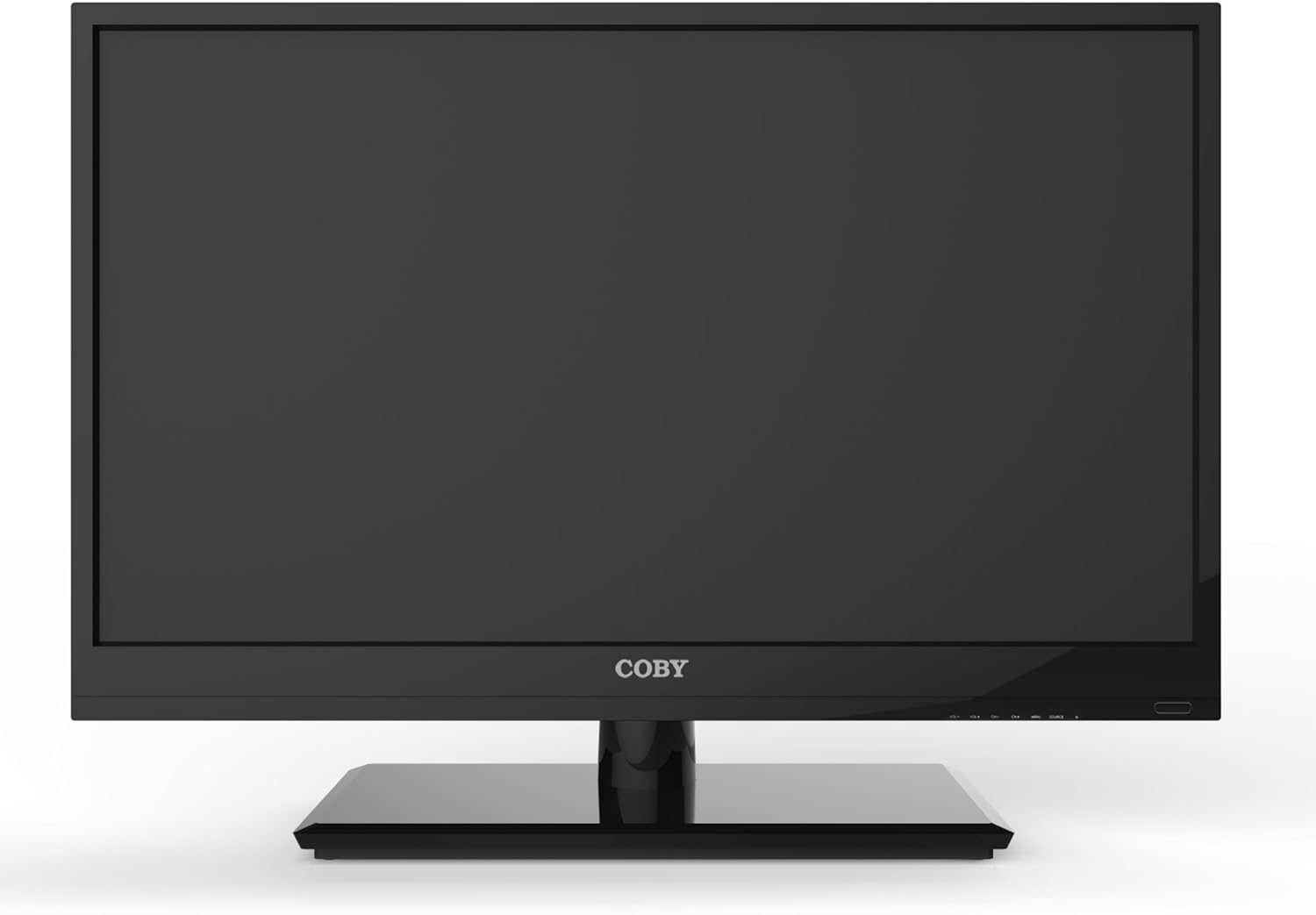
図4.1: 前面 view of the Coby LEDTV3216 with stand.
4.2 壁掛け(オプション)
The TV supports VESA 200mm x 200mm wall mounts. Wall mount hardware is not included. For safe installation, it is recommended to have the TV wall-mounted by a professional.
4.3 デバイスの接続
The Coby LEDTV3216 offers various input ports on the rear panel for connecting external devices.
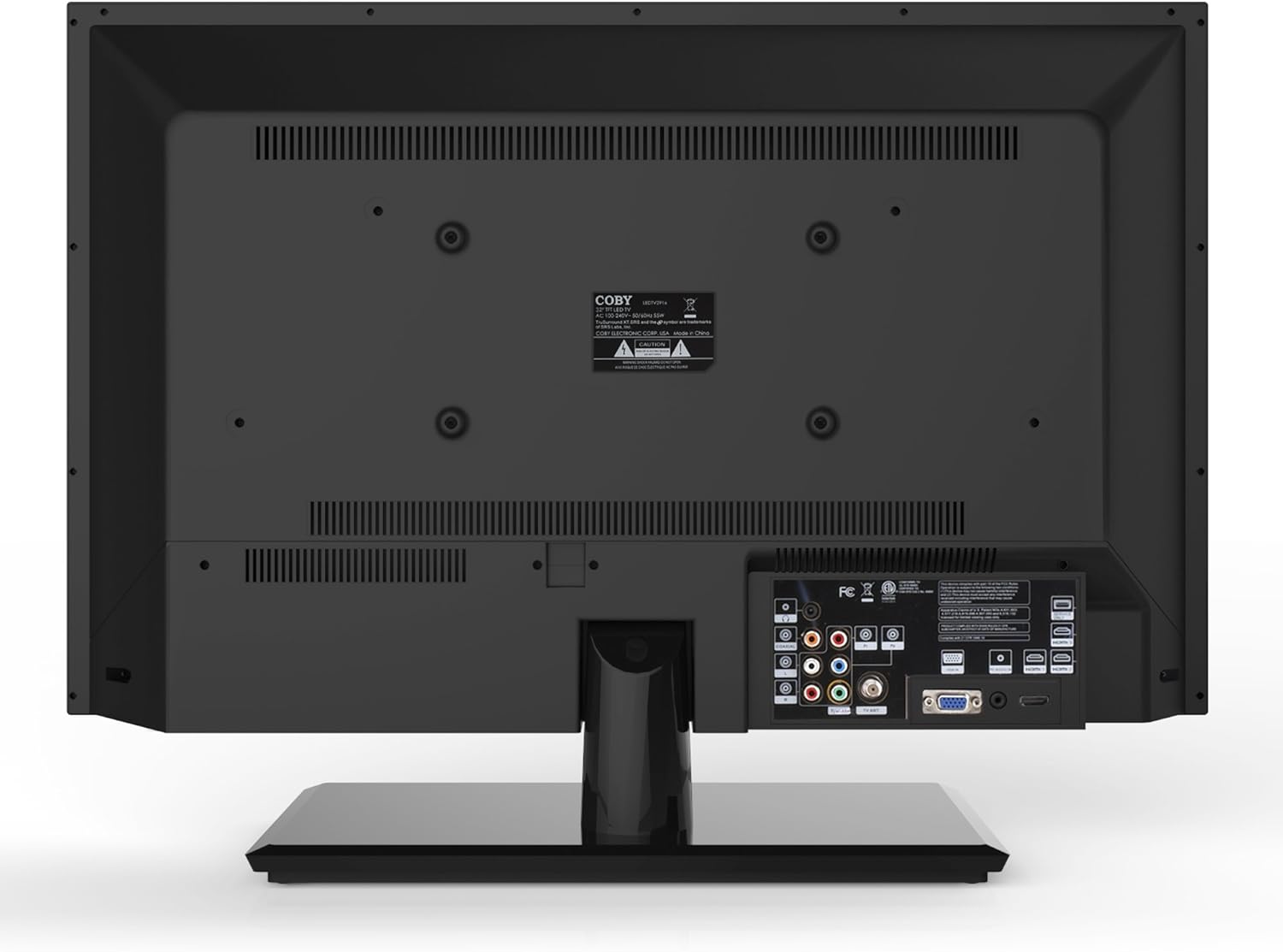
図4.2:背面 view 入力ポート付き。
- HDMI: Connect high-definition devices such as Blu-ray players, game consoles, or cable/satellite boxes using an HDMI cable. The TV has 1 HDMI port.
- VGA (PC Input): Connect a computer to use the TV as a monitor. Use a VGA cable for video and a 3.5mm audio cable for audio input.
- アンテナ/ケーブル: Connect an antenna or cable TV feed to the RF input for receiving broadcast channels.
- コンポーネントビデオ(YPbPr): Connect devices using component video cables (red, green, blue) and corresponding audio cables (red, white).
- コンポジットビデオ(AV): コンポジットビデオ (黄色) ケーブルとステレオオーディオ (赤、白) ケーブルを使用して古いデバイスを接続します。
4.4初期電源オン
After connecting all desired devices and the power cord, press the Power button on the TV or remote control. Follow the on-screen prompts for initial setup, including language selection and channel scanning.
5. テレビの操作
5.1リモコン機能
The remote control allows you to access all TV functions. Insert the two included AAA batteries into the remote control, observing polarity.
- 力: テレビの電源をオンまたはオフにします。
- 入力/ソース: Selects the input source (HDMI, VGA, TV, AV, Component).
- ボリューム(+/-): 音量レベルを調整します。
- チャンネル(CH +/-): テレビのチャンネルを変更します。
- メニュー: オンスクリーン ディスプレイ (OSD) メニューを開きます。
- ナビゲーション ボタン (上/下/左/右): メニュー オプションをナビゲートします。
- OK /入力: 選択を確定します。
- 出口: メニューを閉じます。
- ミュート: サウンドをミュートまたはミュート解除します。
- 情報: Displays channel or program information.
5.2メニューナビゲーション
を押す メニュー button on the remote to access the main menu. Use the navigation buttons to select categories such as Picture, Sound, Channel, Time, and Setup. Press OK to enter a sub-menu and adjust settings. Press 出口 メニューを終了します。
5.3画像設定
Adjust settings like Brightness, Contrast, Color, Tint, and Sharpness to optimize your viewing experience. Picture modes (e.g., Standard, Dynamic, Movie, User) are available for quick adjustments.

Figure 5.1: Coby LEDTV3216 displaying an image.
5.4 サウンド設定
Adjust Bass, Treble, and Balance. Sound modes (e.g., Standard, Music, Movie, User) are available. The TV features premium sound powered by SRS Labs.
5.5 チャンネル設定
Perform auto-scan or manual scan to find available channels. The built-in digital TV tuner supports ATSC, NTSC, and QAM standards.
5.6 Parental Control (V-Chip)
The V-chip parental control feature allows you to block programs based on their rating. Access this setting through the menu and follow the on-screen instructions to set up a password and content restrictions.
6. 特徴
Key features of the Coby LEDTV3216 include:
- Energy efficient technology (standby power less than 0.5W).
- Extended backlight life expectancy (30,000 hours).
- Built-in digital TV tuner (ATSC/NTSC/QAM).
- HDMI digital connection for perfect signal transmission.
- PC VGA connection for use as a computer monitor.
- Premium sound powered by SRS Labs.
- デジタルノイズリダクション。
- V-chip parental control, Closed-Caption, and Electronic Program Guide support.
- Energy Star 5.3 compliant.
- Multi-language on-screen display.
- Wall-Mountable design (200mm x 200mm VESA Mount).
7. 仕様
| 特徴 | 仕様 |
|---|---|
| モデル名 | LEDTV3216 |
| 画面サイズ | 32インチ |
| ディスプレイ技術 | 導かれた |
| 解決 | 720p |
| リフレッシュレート | 60Hz |
| コントラスト比 | 3,000:1 |
| 応答時間 | 6ミリ秒 |
| 接続技術 | HDMI、VGA |
| HDMIポートの総数 | 1 |
| チューナータイプ | ATSC、NTSC、QAM |
| ペアレンタルコントロール | Vチップ |
| VESAマウント規格 | 200×200ミリ |
| アイテム重量 | 18.08 ポンド |
| 色 | 黒 |

Figure 7.1: Estimated Yearly Energy Cost for LEDTV3216.
8. メンテナンス
8.1 画面のクリーニング
柔らかく糸くずの出ない布で画面を優しく拭いてください。頑固な汚れには、軽くamp布に水または専用のスクリーンクリーナーを含ませてください。スクリーンに直接クリーナーを吹き付けないでください。
8.2 キャビネットの清掃
テレビキャビネットは柔らかく乾いた布で拭いてください。仕上げを傷める可能性のある研磨剤入りの洗剤や溶剤の使用は避けてください。
9。 トラブルシューティング
テレビで問題が発生した場合は、次の一般的な問題と解決策を参照してください。
| 問題 | 考えられる原因 / 解決策 |
|---|---|
| 電源なし | Ensure the power cord is securely plugged into the TV and a working electrical outlet. Check the power indicator light. |
| 映像はないが、音声はある | 正しい入力ソースが選択されていることを確認してください。外部デバイスへのケーブル接続を確認してください。 |
| 音はないが、映像は表示される | 音量レベルを確認し、テレビがミュートされていないことを確認してください。外部機器のオーディオケーブルの接続を確認してください。 |
| 画質が悪い | Adjust picture settings (brightness, contrast, sharpness). Ensure the antenna or cable connection is secure. For digital channels, perform a channel scan. |
| リモコンが動作しない | Check and replace batteries if necessary. Ensure there are no obstructions between the remote and the TV's IR sensor. |
10. 保証とサポート
The Coby LEDTV3216 comes with a limited warranty. Please refer to the warranty card included with your product for specific terms and conditions. For technical support or service inquiries, please contact Coby customer service through their official webサイトまたは保証書に記載されている連絡先情報を参照してください。