
1. はじめに
This user manual provides essential information for the safe and efficient installation, operation, and maintenance of the TRU Components LAS0-A3Y-20X/31 Rotary Switch. Please read this manual thoroughly before using the product and retain it for future reference.
2.製品オーバーview
The TRU Components LAS0-A3Y-20X/31 is a robust rotary switch designed for various electrical applications. It features three switching positions and an IP40 protection rating, making it suitable for environments where protection against solid objects larger than 1mm is required.
主な特徴:
- 3 switching positions (ON-OFF-ON)
- Rated for 250V/AC and 5A
- 2 x 45° switching angles
- IP40保護等級
- Panel mount design with screw terminals
- Durable plastic construction with brass contacts
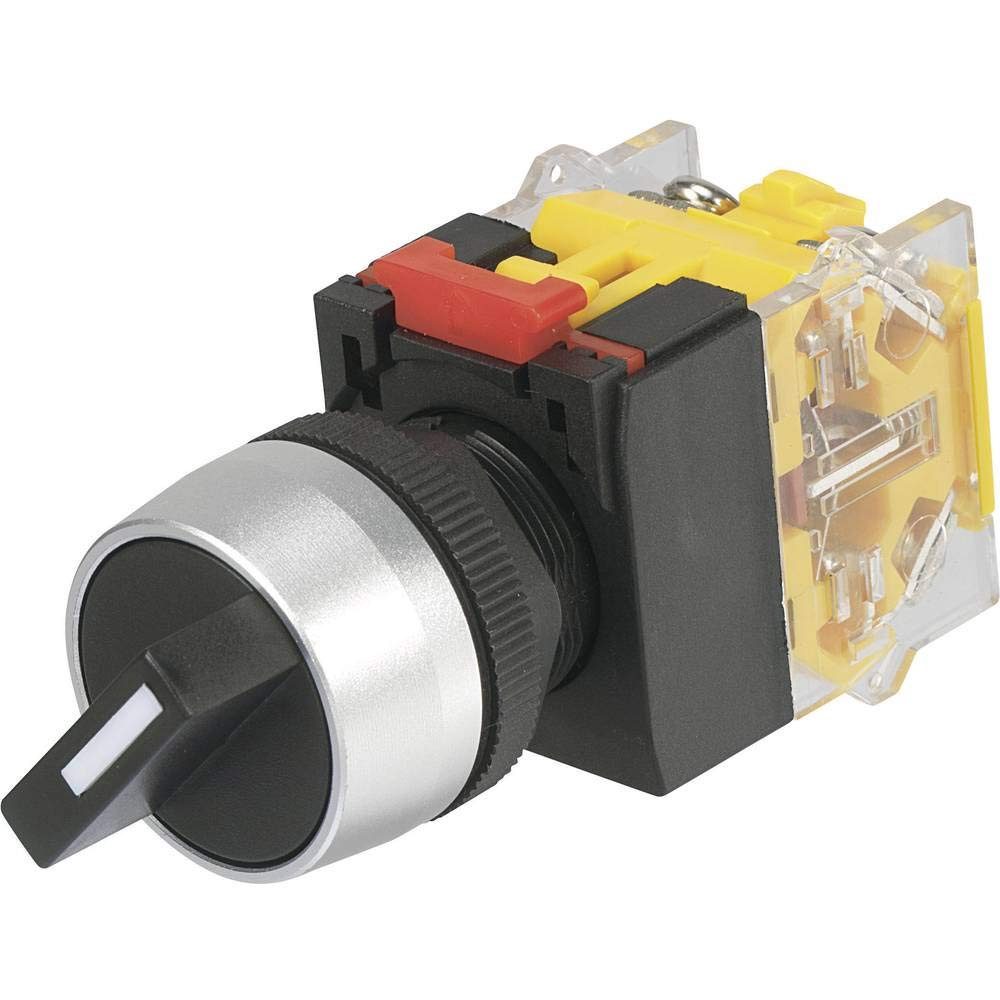
This image shows the TRU Components LAS0-A3Y-20X/31 Rotary Switch, highlighting its black body and rotary actuator.
3. 安全情報
怪我や製品の損傷を防ぐために、常に次の安全上の注意事項を守ってください。
- 電気による危険: Installation and wiring should only be performed by qualified personnel. Ensure power is disconnected before installation or maintenance.
- 巻tageと現在: 指定された容量を超えないでくださいtage (250V/AC) and current (5A) ratings.
- 環境: The IP40 rating provides protection against solid objects but not against water ingress. Do not expose the switch to liquids or high humidity.
- 適切なツール: Use appropriate tools for installation to avoid damaging the switch or terminals.
- 検査: Regularly inspect the switch for any signs of damage or wear. Replace if necessary.
4. 仕様
| 仕様 | 価値 |
|---|---|
| モデル番号 | LAS0-A3Y-20X/31 |
| ブランド | TRU Components |
| メーカー | コンラッド |
| 動作モード | オン-オフ-オン |
| 現在の評価 | 5 Ampここで |
| 営業巻tage | 250 Volt AC |
| 連絡先の種類 | 通常オープン |
| コネクタタイプ | スクリュー |
| 端末タイプ | スクリュー |
| 材料 | Plastic (Body), Brass (Contacts) |
| 回路タイプ | 3ウェイ |
| スイッチタイプ | ロータリースイッチ |
| 取り付けタイプ | パネルマウント |
| アクチュエータタイプ | ロータリー |
| ポジション数 | 3 |
| コントロールタイプ | マニュアル |
| 対応デバイス | General electrical installations and equipment |
| 色 | 黒 |
| 国際保護格付け | IP40 |
| コンプライアンス | CE、IP40 |
5. インストール
Follow these steps for proper installation of the rotary switch:
- 電源を切る: Ensure all power to the circuit is completely disconnected before beginning installation. Verify with a voltageテスター。
- 取り付け穴の準備: Drill or cut a suitable hole in the panel according to the switch's dimensions for panel mounting. Ensure the hole is clean and free of burrs.
- スイッチを取り付けます。 Insert the switch into the prepared panel hole. Secure it using the provided mounting hardware (e.g., nut and washer) from the rear of the panel. Tighten firmly but do not overtighten.
- 結線: Connect the electrical wires to the screw terminals on the back of the switch. Ensure correct polarity and secure all connections tightly. Refer to your circuit diagram for specific wiring requirements.
- インストールの確認: すべての接続を再確認し、スイッチがしっかりと取り付けられていることを確認してください。
- 電力を回復する: インストールが完了して検証されたら、回路への電源を復元します。
6. 操作
The TRU Components LAS0-A3Y-20X/31 is a 3-position rotary switch with an ON-OFF-ON operating mode. To operate the switch:
- ポジション1(オン): Rotate the actuator to the first 'ON' position. This will close the circuit for the first function.
- 位置2(オフ): Rotate the actuator to the center 'OFF' position. This will open the circuit, disconnecting power to both functions.
- ポジション3(オン): Rotate the actuator to the third 'ON' position. This will close the circuit for the second function.
The switch provides tactile feedback for each position, ensuring clear indication of the selected state.
7. メンテナンス
The TRU Components LAS0-A3Y-20X/31 Rotary Switch requires minimal maintenance. Adhere to the following guidelines:
- 定期清掃: Keep the switch surface clean and free from dust and debris. Use a soft, dry cloth for cleaning. Do not use abrasive cleaners or solvents.
- 接続を検査する: Periodically check the screw terminals to ensure they remain tight and free from corrosion.
- 目視検査: Inspect the switch body and actuator for any signs of physical damage, cracks, or excessive wear.
- 環境条件: Ensure the operating environment remains within the specified IP40 rating. Avoid exposure to moisture.
8。 トラブルシューティング
If you encounter issues with your rotary switch, consider the following common troubleshooting steps:
- スイッチが機能しない:
- 回路に電力が供給されているか確認してください。
- すべての配線接続が安全かつ正しいことを確認します。
- スイッチがマウントに正しく固定されていることを確認します。
- 断続動作:
- 端子の配線接続が緩んでいないか点検します。
- Check for any internal damage or debris obstructing the switch mechanism.
- Stiff Actuator:
- Ensure no foreign objects are lodged around the actuator.
- Avoid applying excessive force; if the actuator is stiff, it may indicate internal damage or incorrect installation.
If problems persist after performing these checks, it is recommended to consult a qualified electrician or contact TRU Components customer support.
9. 保証とサポート
This product is manufactured by Conrad under the TRU Components brand. For specific warranty information, please refer to the terms and conditions provided at the point of purchase or contact your retailer. For technical support or inquiries, please reach out to TRU Components customer service or your local distributor.