1. はじめに
This manual provides comprehensive instructions for the safe and effective operation of the KORAD KA3005P Programmable DC Power Supply. The KA3005P is a high-precision, variable, and adjustable linear power supply designed for laboratory, educational, and industrial applications. It offers stable and reliable DC power output with advanced features such as programmable control, memory storage, and multiple safety protections.

図1.1: KORAD KA3005P Programmable DC Power Supply. This image shows the front and side view of the power supply unit, highlighting its compact design and the clear digital display.
2. 安全に関する注意事項
To ensure safe operation and prolong the life of your KORAD KA3005P power supply, please observe the following safety precautions:
- 電源は常に適切に接地された AC コンセントに接続してください。
- Do not operate the unit in a wet or damp 環境。
- Ensure adequate ventilation around the unit to prevent overheating. Do not block the ventilation openings.
- cを開けないでくださいasin電源装置のg。内部にはユーザーが修理できる部品はありません。修理はすべて資格のある担当者にご依頼ください。
- 入力ボリュームを確認してくださいtage selector switch (110V/220V) on the rear panel is set correctly for your local power supply before connecting to AC mains.
- Disconnect the power cord before performing any maintenance or when the unit is not in use for extended periods.
- Avoid short-circuiting the output terminals. Although the unit has short-circuit protection, prolonged short circuits can cause damage.
- Use appropriate test leads and ensure they are rated for the voltage and current levels you intend to use.
3. 箱の中身
Upon unpacking your KORAD KA3005P, please verify that all the following items are included:
- 1 x KORAD KA3005P Power Supply Unit
- 1 x AC電源コード
- USBケーブル1本
- 5個セット×1 Amp Test Leads (Banana plug to Crocodile clip)
- ユーザーマニュアル x 1
- 1 x CD containing Remote Control Software
4 製品の特徴
The KORAD KA3005P is equipped with a range of features designed for precision and ease of use:
- 高精度出力: Provides stable and accurate 0-30V and 0-5A DC output.
- 4桁LEDディスプレイ: Bright and clear display for precise voltage (0.001V resolution) and current (0.001A resolution) readings.
- プログラム可能な制御: USB and RS232 ports for remote control via PC software.
- メモリストレージ: Four dedicated memory locations (M1-M4) to save and recall frequently used voltage と現在の設定。
- コンスタントボリュームtage(CV)および定電流(CC)モード: Automatically switches between modes to maintain stable output.
- 包括的な安全保護: Includes Over-Current Protection (OCP), Over-Voltage Protection (OVP), and Short-Circuit Protection.
- 出力オン/オフボタン: Allows safe connection and disconnection of loads without powering down the unit.
- ロック機能: 操作中に誤って設定が変更されるのを防ぎます。
- 切り替え可能な入力ボリュームtage: Supports 110V/220V AC input, making it suitable for international use.
- 静音冷却ファン: Built-in variable speed fan for efficient heat dissipation and reduced operational noise.

図4.1: Key features of the KORAD KA3005P. This image illustrates the power and protection mechanisms, memory settings, the bright 4-digit LED display, and the switchable power input on the rear panel.
5. パネルオーバーview
5.1フロントパネル

図5.1: Front Panel Layout of the KORAD KA3005P. This image provides a detailed view of the front panel with numbered labels indicating the function of each control and indicator.
- 巻tage 読み出し (V): 出力ボリュームを表示しますtagボルトのe。
- 電流値(AまたはmA): Displays the output current in Ampエレスまたはミリampそうです。
- 電力表示(ワット): Displays the calculated output power in Watts.
- コンスタントボリュームtage モードインジケーター (CV): ユニットが定電圧で動作しているときに点灯しますtageモード。
- 定電流モードインジケーター(CC): ユニットが定電流モードで動作しているときに点灯します。
- メモリ設定インジケーター(M1-M4): Indicates which memory preset is currently active.
- 過電流保護インジケーター(OCP): 過電流保護が作動しているときに点灯します。
- オーバーボリュームtage 保護インジケーター (OVP): 過電圧時に点灯tage Protection is active.
- フロントパネルロックインジケーター(LOCK): フロントパネルのコントロールがロックされているときに点灯します。
- Output On/Off Indicator (ON): 出力がアクティブなときに点灯します。
- A/mA Button: 間で切り替えます Amperage and milliAmperage display, and also serves as the Panel Lock button when held.
- OCP ボタン: 過電流保護を有効/無効にします。
- OCP SET Button: Used to set the Over-Current Protection limit.
- OVPボタン: Activates/deactivates Over-Voltage保護。
- OVP SET Button: Used to set the Over-Voltage 保護制限。
- オン/オフボタン: Toggles the output power ON or OFF.
- Memory Save/Recall Buttons (M1-M4): Used to save and recall voltage と現在の設定。
- ビープボタン: Toggles the audible feedback (beeper) ON or OFF.
- SENSE Button: (Functionality may vary, typically for remote sensing).
- 設定調整ダイヤル: ボリューム調整用ロータリーエンコーダtageと現在の値。
- Digit Selection Buttons (Left/Right Arrows): Used to select the digit to be adjusted by the Setting Adjustment Dial.
- 巻tage/Current Adjustment Selector: Toggles between adjusting voltage と現在。
- 出力端子: 負荷を接続するための赤 (+) および黒 (-) 端子。
- アース端子(GND): シャーシアース接続用の緑色の端子。
- 電源ボタン: ユニットの主電源スイッチ。
5.2 背面パネル
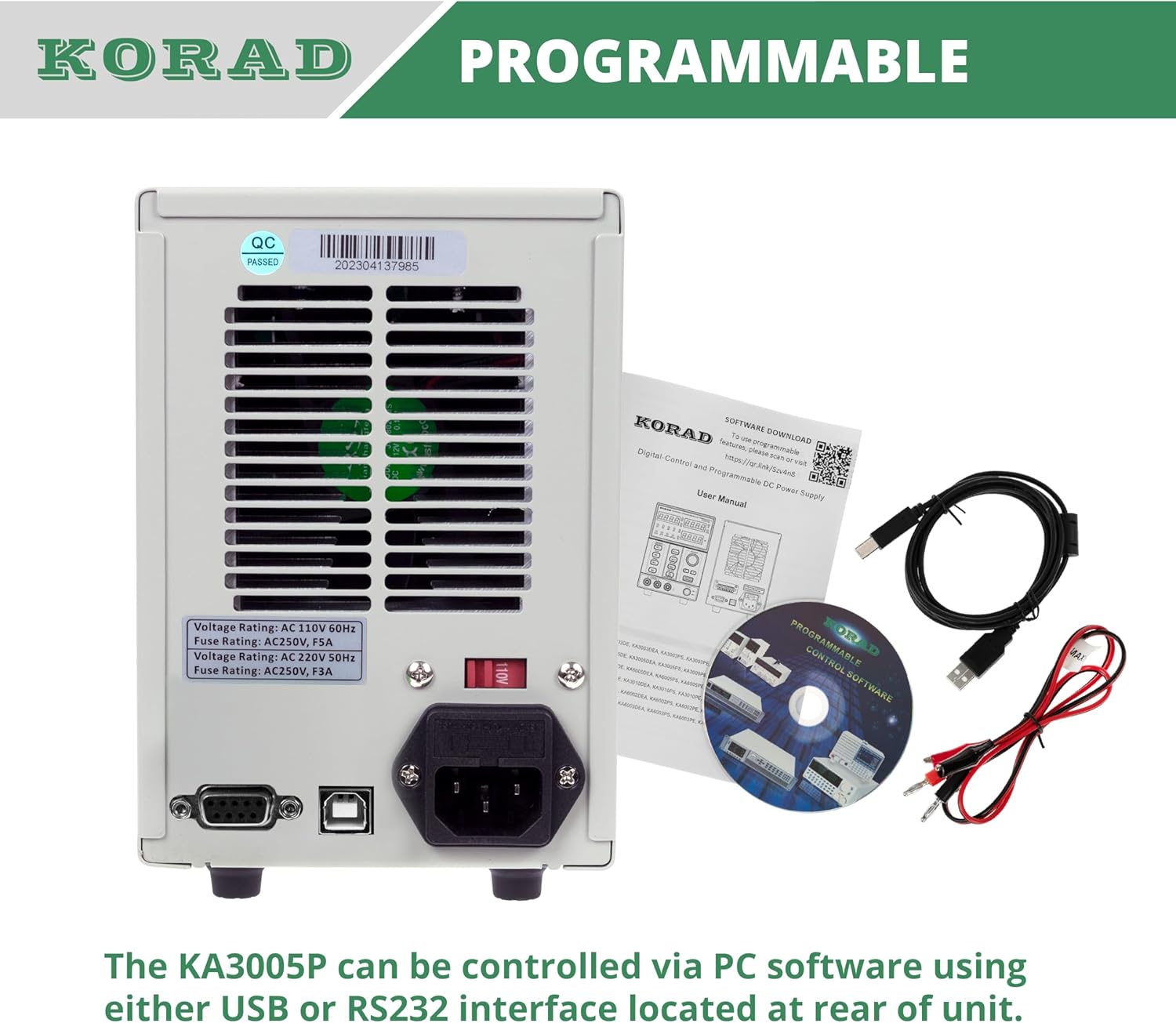
図5.2: Rear Panel Layout of the KORAD KA3005P. This image displays the rear panel, showing the AC input, voltage selector, cooling fan, and communication ports.
- AC入力ソケット: 付属のAC電源コードを接続します。
- 巻tage セレクタースイッチ (110V/220V): 適切な入力ボリュームを選択できるtagお住まいの地域のe。 電源に接続する前に、これが正しく設定されていることを確認してください。
- 冷却ファン: Automatically adjusts speed based on internal temperature to maintain optimal operating conditions.
- USBポート: For connecting to a computer for programmable control.
- RS232 ポート: For connecting to a computer or other devices for programmable control.
- ヒューズホルダー: メインAC入力ヒューズが含まれています。
6. セットアップ
6.1初期検査
Before connecting the power supply, inspect the unit for any signs of physical damage that may have occurred during shipping. If any damage is found, contact your supplier immediately.
6.2 Setting Input Voltage
巻を探すtage selector switch on the rear panel of the unit. Ensure it is set to match your local AC mains voltage(110Vまたは220V)。設定を誤ると、ユニットが損傷する可能性があります。

図6.1: Rear panel showing the 110V/220V voltage selector switch. This switch must be correctly set to match the local AC power supply before operation.
6.3電源接続
Connect the supplied AC power cord to the AC input socket on the rear panel and then plug it into a grounded wall outlet.
6.4出力接続
Connect your load to the output terminals on the front panel using the provided test leads or other suitable leads. Ensure correct polarity: Red for positive (+), Black for negative (-). The green terminal is for chassis ground.
7. 操作手順
7.1 電源のオン/オフ
- を押す 力 button on the front panel to turn the unit ON. The display will illuminate.
- を押す 力 button again to turn the unit OFF.
7.2 ボリュームの設定tageと現在
- を押す 巻TAG電子/電流 button to select whether you are adjusting voltage or current. The corresponding display will flash.
- 使用 左/右矢印 buttons to select the digit you wish to adjust. The selected digit will flash.
- 回転する Setting Adjustment Dial 選択した数字の値を変更します。
- 希望のボリュームになったらtage and current limit are set, press the オン/オフ 出力を有効にするには、 ON インジケーターが点灯します。

図7.1: Close-up of the bright 4-digit LED display. This display provides precise and clear readouts of voltage and current, essential for accurate power delivery.
7.3 メモリ機能(M1-M4)
The unit allows you to save and recall up to four sets of voltage と現在の設定。
- 保存する: 目的のボリュームを設定しますtage and current. Press and hold the desired memory button (M1、M2、M3、またはM4) until you hear a beep or the display indicates saving.
- 思い出すこと: 希望するメモリボタン(M1、M2、M3、またはM4). The saved settings will be loaded.

図7.2: Close-up of the memory save/recall buttons (M1-M4). These buttons allow users to quickly store and retrieve frequently used voltage と現在の設定。
7.4 出力オン/オフ制御
の オン/オフ button controls the output power to the terminals independently of the main power switch.
- プレス オン/オフ to enable output. The ON インジケーターが点灯します。
- プレス オン/オフ again to disable output. The ON インジケーターが消灯します。
- It is recommended to disable the output before connecting or disconnecting loads.
7.5 ロック機能
To prevent accidental changes to settings during operation, you can lock the front panel controls.
- を押し続けます 電流/mA ボタンを数秒間押し続けると、 ロック indicator illuminates. All front panel controls will be disabled.
- ロックを解除するには、 電流/mA もう一度ボタンを押して ロック インジケーターが消灯します。
7.6 Over-Current Protection (OCP) and Over-Voltage保護(OVP)
These features protect your connected load and the power supply from damage due to excessive current or voltage.
- OCP/OVPの設定: を押す OCP SET or OVP SET ボタンをクリックしてください。 Setting Adjustment Dial そして 左/右矢印 buttons to set the desired protection limit.
- Activating OCP/OVP: を押す OCCP or オーバーバイ button to enable the protection. The corresponding indicator will light up.
- When an OCP or OVP event occurs, the output will automatically shut off, and the respective indicator will flash. To reset, disable the protection or resolve the fault, then press the オン/オフ button to re-enable output.

図7.3: Close-up of the protection and control buttons. This image highlights the OCP, OVP, and Lock buttons, which are crucial for safe operation and preventing accidental changes.
8. Programmable Control
The KORAD KA3005P can be controlled remotely via a computer using the USB or RS232 ports located on the rear panel.
- ソフトウェアのインストール: Insert the provided CD into your computer and follow the on-screen instructions to install the remote control software. Drivers for the USB/RS232 interface may also be included.
- 繋がり: Connect the power supply to your computer using the supplied USB cable or an RS232 cable (not included for RS232).
- ソフトウェア操作: Launch the installed software. Select the correct COM port corresponding to your connected power supply. The software allows you to set voltage, current, enable/disable output, and configure protection limits from your computer. Some software versions may support programmable sequences or data logging.
- シリアルプロトコル: For advanced users, the user manual and CD typically contain documentation on the serial communication protocol, allowing for custom software development or integration with other programming environments (e.g., LabVIEW, Python).
図8.1: Rear panel showing USB and RS232 ports for programmable control. The image also displays the included user manual, USB cable, test leads, and software CD, which facilitate remote operation.
For software downloads or updates, please refer to the official KORAD website or the link provided in the manual (e.g., www.koradtechnology.com).
9. メンテナンス
The KORAD KA3005P is designed for reliable operation with minimal maintenance. Follow these guidelines:
- クリーニング: 清掃する前に、電源プラグをコンセントから抜いてください。表面は柔らかく乾いた布で拭いてください。研磨剤入りの洗剤や溶剤は使用しないでください。
- 換気: Ensure the ventilation openings on the sides and rear of the unit are free from dust and obstructions. Periodically clean the fan vents with compressed air if necessary.
- ヒューズの交換: If the unit does not power on, check the fuse located in the fuse holder on the rear panel. Replace only with a fuse of the same type and rating (e.g., 5A/250V for 110V input, 3A/250V for 220V input). Always disconnect the power cord before replacing the fuse.
- ストレージ: 長期間使用しない場合は、直射日光や極端な温度を避け、涼しく乾燥した場所に保管してください。
10。 トラブルシューティング
If you encounter issues with your KORAD KA3005P, refer to the following common problems and solutions:
| 問題 | 考えられる原因 | 解決 |
|---|---|---|
| ユニットの電源が入りません。 | AC電源なし、ヒューズ切れ、電圧不良tageセレクター設定。 | Check power cord connection and wall outlet. Replace fuse if blown. Verify voltage selector (110V/220V) on rear panel is correct. |
| 出力なしvoltage / current。 | Output is OFF; OCP/OVP triggered; Short circuit at output. | を押す オン/オフ button to enable output. Check if OCP/OVP indicators are flashing; resolve fault and reset. Check for short circuits in the load or test leads. |
| 出力ボリュームtage/current が不安定です。 | Poor load connection; Overheating; Faulty test leads. | Ensure secure connections to the load. Check ventilation and allow unit to cool. Inspect and replace test leads if damaged. |
| ディスプレイに誤った値が表示されます。 | Calibration issue; External interference. | If readings are consistently inaccurate, contact support for calibration. Minimize external electromagnetic interference. |
| Software communication issues. | Incorrect COM port; Driver issues; Software incompatibility. | Verify COM port selection in software. Reinstall USB/RS232 drivers. Ensure software version is compatible with your operating system. Refer to software documentation. |
If the problem persists after attempting these solutions, please contact KORAD customer support.
11. 仕様
Technical specifications for the KORAD KA3005P Programmable DC Power Supply:

図11.1: KORAD KA3005P Unit Specifications. This image provides a visual summary of the key technical parameters of the power supply.
| パラメータ | 価値 |
|---|---|
| 巻tage範囲 | 0-30V |
| 現在の範囲 | 0-5A |
| 負荷レギュレーション(Voltage) | ≤0.01%+ 2mV |
| 負荷レギュレーション(電流) | ≤0.1%+ 10mA |
| ラインレギュレーション(Voltage) | ≤0.01%+ 3mV |
| ラインレギュレーション(電流) | ≤0.1%+ 3mA |
| セットアップ解像度(Voltage) | 10mV |
| セットアップ解像度(現在) | 1mA |
| セットアップ精度 (25°C ± 5°C) (電圧tage) | ≤0.5%+ 20mV |
| セットアップ精度(25°C ± 5°C)(電流) | ≤0.5%+ 10mA |
| リップル(20-20M)(ボリュームtage) | ≤2mVrms |
| リップル(20-20M)(現在) | ≤2mArms |
| 温度係数(Voltage) | ≤150ppm |
| 温度係数(電流) | ≤150ppm |
| リードバック解像度(Voltage) | 10mV |
| リードバック解像度(現在) | 1mA |
| 反応時間(ボリュームtageライズ) | ≤100mS (Voltage ドロップ) |
| インタフェース | Programmable (USB, RS232) |
| 重さ | 9.52ポンド/4.32キログラム |
| 寸法(幅×高さ×奥行き) | 100mm(W)x 156mm(H)x 260mm(D) |
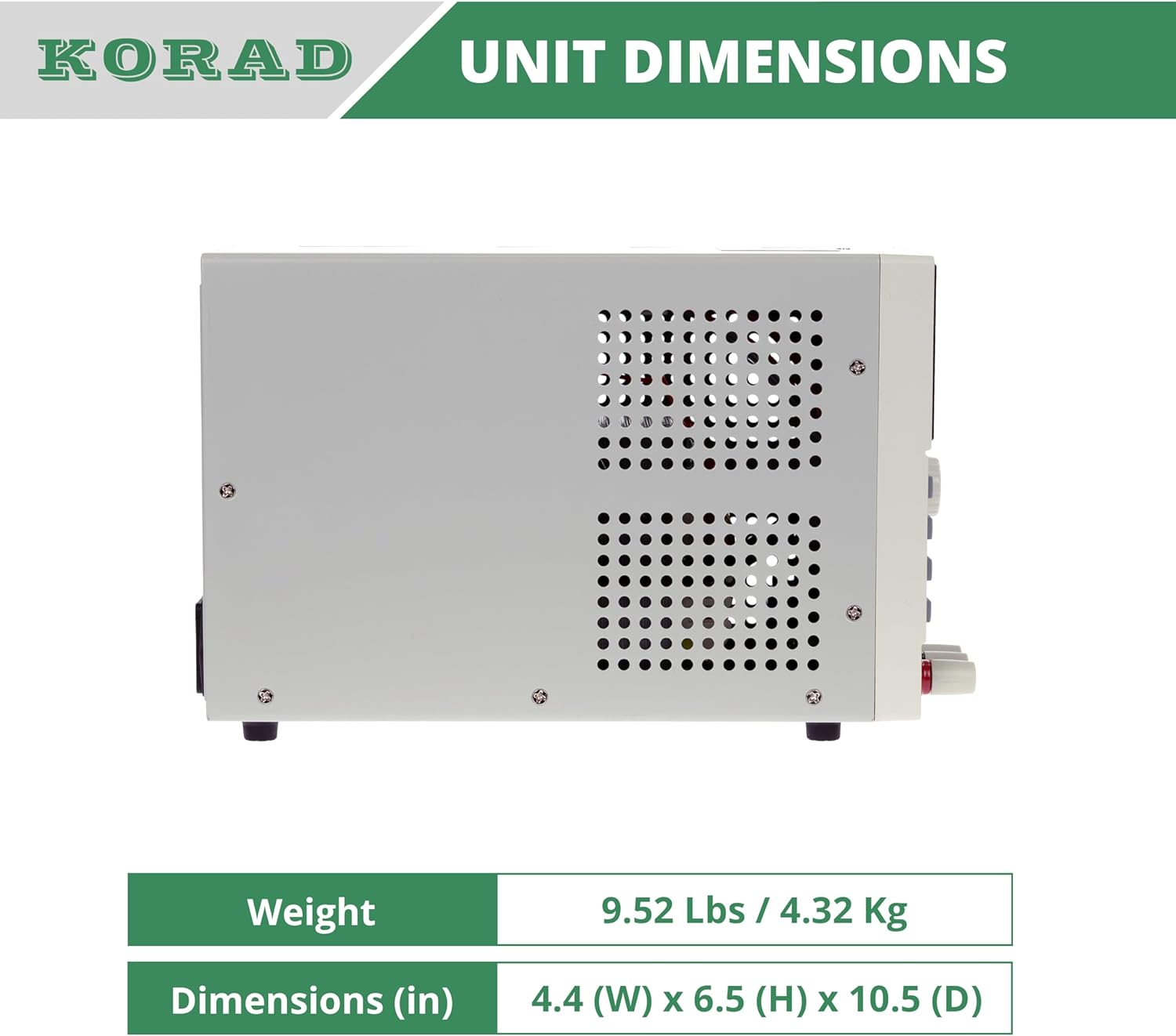
図11.2: 側 view of the KORAD KA3005P, illustrating its physical dimensions. The unit measures 4.4 inches (W) x 6.5 inches (H) x 10.5 inches (D).
12. 保証とサポート
KORAD products are manufactured to high quality standards. For warranty information and technical support, please refer to the documentation included with your purchase or visit the official KORAD webサイト。
- 保証: 保証請求のために購入証明書を保管してください。保証条件は地域によって異なる場合があります。
- テクニカルサポート: For technical assistance, troubleshooting beyond this manual, or service inquiries, please contact KORAD customer support through their official channels.
- オンラインリソース: Check the KORAD website for updated manuals, software, and FAQs.