1. はじめに
The Magellan RoadMate 2230T-LM is a portable GPS navigation device designed to provide reliable guidance for your journeys. It features lifetime map updates and lifetime traffic alerts, ensuring you have the most current road information and can avoid congestion. This manual provides essential information for setting up, operating, and maintaining your device.

図1.1: 前面 view of the Magellan RoadMate 2230T-LM GPS Navigator.
2. 安全情報
Please read and understand all safety information before using your Magellan RoadMate 2230T-LM. Failure to follow these instructions could result in injury or damage.
- 安全運転: Always prioritize safe driving. Do not operate the device or input data while driving. Pull over to a safe location before making any adjustments or entering information.
- 交通法規: Always obey all traffic laws and regulations. The GPS device is a navigational aid and should not supersede actual road signs or traffic conditions.
- 取り付け: デバイスがしっかりと取り付けられ、邪魔にならないことを確認してください。 view 道路を占拠したり、車両の制御を妨害したりしないでください。
- 電源: 付属の電源アダプターとケーブルのみを使用してください。非対応のアクセサリを使用すると、デバイスが損傷し、保証が無効になる可能性があります。
- 温度: デバイスを極端な温度、長時間の直射日光、過度の湿気にさらさないでください。
3. パッケージ内容
製品パッケージにすべてのアイテムが揃っていることを確認します。
- Magellan RoadMate 2230T-LM GPS Navigator
- フロントガラスマウント
- USBケーブル
- 車両用電源アダプター
- リチウムイオンバッテリー(プリインストール)
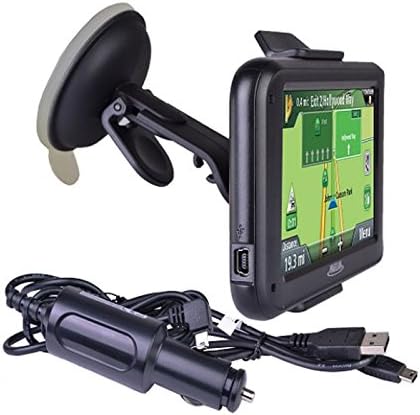
Figure 3.1: Included accessories: GPS unit, windshield mount, and charging cables.
4. セットアップ
4.1デバイスの充電
Before first use, fully charge your RoadMate 2230T-LM. Connect the USB cable to the device and then to the vehicle power adapter or a computer USB port. The battery indicator on the screen will show charging status. A full charge typically takes approximately 2 hours.
4.2デバイスの取り付け
The RoadMate 2230T-LM comes with a windshield mount for secure placement in your vehicle.
- Clean the desired area on your windshield with a non-abrasive cleaner.
- Attach the mounting bracket to the back of the GPS unit until it clicks into place.
- Press the suction cup firmly against the clean windshield surface and flip the lever to secure it.
- デバイスの角度を最適な位置に調整します view運転の妨げにならないように view.
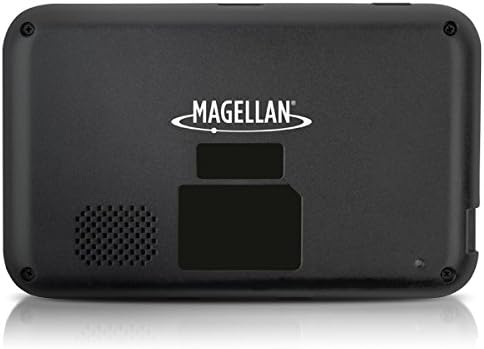
図4.1:背面 view of the GPS unit, showing the speaker and mounting area.
5. 操作手順
5.1 電源のオン/オフ
Press and hold the power button located on the device's top edge to turn it on or off. A short press will put the device into sleep mode.
5.2 基本的なナビゲーション
The RoadMate 2230T-LM features a touchscreen interface for all operations.
- 目的地を入力してください: From the main menu, tap 'Go To' or 'New Destination'. You can enter an address, point of interest (POI), or select from recent destinations.
- ルート計算: After entering your destination, the device will calculate the fastest or shortest route based on your preferences.
- 指示に従ってください: Follow the spoken turn-by-turn directions and on-screen map guidance. The device will display upcoming turns, speed limits, and estimated arrival times.
5.3 生涯にわたる地図更新
Your device includes lifetime map updates. To ensure you have the latest maps, connect your device to a computer with internet access and use the Magellan Content Manager software (available for download from the Magellan website). Follow the on-screen instructions to download and install map updates. Regular updates are recommended for optimal navigation accuracy.
5.4 Lifetime Traffic Alerts
The RoadMate 2230T-LM provides real-time traffic information to help you avoid delays. Traffic alerts are automatically received and displayed on the map. The device may suggest alternative routes to bypass heavy traffic or incidents.
5.5つの特別な機能
- Traffic Camera Alerts: Receive audible and visual warnings for upcoming traffic cameras.
- Best Parking: Find nearby parking options at your destination.
- 制限速度: The device displays the current speed limit for the road you are on.
6. メンテナンス
6.1デバイスのクリーニング
Use a soft, lint-free cloth to clean the screen and exterior of the device. Do not use abrasive cleaners or solvents, as they may damage the surfaces.
6.2 ソフトウェアと地図の更新
Regularly check for software and map updates via the Magellan website. Keeping your device updated ensures optimal performance and the most accurate navigation data.
6.3バッテリーケア
バッテリーの寿命を延ばすため、バッテリーを頻繁に完全に放電することは避けてください。長期間使用しない場合は、デバイスを涼しく乾燥した場所に保管してください。
7。 トラブルシューティング
If you encounter issues with your Magellan RoadMate 2230T-LM, refer to the following common problems and solutions:
- GPS信号なし: デバイスにクリアな view of the sky. Move away from tall buildings or dense foliage. Allow several minutes for the device to acquire satellites.
- Unit Freezes or Reboots: Try performing a soft reset by pressing and holding the power button for 10-15 seconds until the device restarts. If the issue persists, ensure the software is up to date.
- Inaccurate Routing/Voice Prompts: Verify that your maps are up to date. Check your navigation settings for route preferences (e.g., fastest, shortest, avoid tolls). Ensure the device's time and date settings are correct.
- 音質が悪い: Check the volume settings on the device. Ensure the speaker is not obstructed.
- バッテリーが充電されていません: Ensure the USB cable and power adapter are securely connected. Try a different USB port or power source.
For further assistance, visit the official Magellan support webサイトをご覧いただくか、カスタマーサービスにお問い合わせください。
8. 仕様
| モデル名 | RoadMate 2230T-LM |
| 商品型番 | RM2230SGLUC |
| 製品寸法 | 13 x 6.1 x 7.1インチ |
| アイテム重量 | 5オンス |
| 画面サイズ | 4.3インチ |
| ヒューマンインターフェイス入力 | タッチスクリーン |
| 接続技術 | USB |
| 電池のタイプ | リチウムイオン電池1個(付属) |
| バッテリー寿命 | 最大2時間 |
| マップタイプ | 北米 |
| 取り付けタイプ | フロントガラスマウント |
| 特集 | Traffic Camera Alerts, Best Parking, Touchscreen |
9. 保証とサポート
For information regarding your product's warranty, please refer to the warranty card included in your original packaging or visit the official Magellan web技術サポート、よくある質問、その他のリソースについては、 Magellan Support.