
導入
This manual provides essential information for the safe and effective use of your Neiko 1/2-Inch Drive Reversible Ratchet Handle. Please read these instructions carefully before operation and retain for future reference.

Figure 1: Neiko 1/2 Inch Ratchet Wrench, showing the main body and drive head.
製品の特徴
- 1/2 Ratchet: Precision machined and heat treated chrome vanadium steel for hardness and torque ability.
- TEAR DROP SOCKET WRENCH: Specialized tear drop, pear head design features 72-tooth mechanism for efficiency, strength and durability with a 5-degree swing.
- PRO-GRADE: Fast finger touch flip switch serves the forward and reverse function to maneuver direction of socket turn when working in tight spaces.
- VERSATILITY: One touch button at head of drive secures socket into place and quickly releases without hassle to loosen or tighten.
- 快適: Versatile drive body is 10-inches long with a contoured grip for comfort, suitable for home maintenance and vehicle repair.

図2:詳細 view highlighting the 1/2-inch drive ratchet head and the ergonomic handle.
設定
The Neiko 1/2-Inch Drive Ratchet Wrench is ready for use out of the packaging. No assembly is required. Ensure the drive head is clean and free of debris before attaching any sockets.
ソケットの取り付け:
- アプリケーションに適した 1/2 インチ ドライブ ソケットを選択します。
- Press the quick-release button located on the drive head.
- Align the square opening of the socket with the drive square on the ratchet head.
- Push the socket firmly onto the drive square until it clicks into place. Release the quick-release button to secure the socket.
ソケットの取り外し:
- Press the quick-release button on the drive head.
- Pull the socket off the drive square.

Figure 3: The quick-release button on the ratchet head for easy socket attachment and removal.
操作手順
The Neiko 1/2-Inch Drive Ratchet Wrench is designed for efficient tightening and loosening of fasteners.
方向転換:
- Locate the small lever (flip switch) on the drive head.
- To tighten (clockwise rotation), push the lever to one side.
- To loosen (counter-clockwise rotation), push the lever to the opposite side.
- Ensure the lever is fully engaged in the desired direction before applying torque.
トルクの適用:
- With the correct socket attached and the direction set, place the socket onto the fastener.
- Apply steady, even pressure to the handle to turn the fastener. The 72-tooth mechanism allows for small arcs of movement, ideal for confined spaces.
- Avoid using the ratchet wrench as a pry bar or striking it with a hammer, as this can damage the internal mechanism.
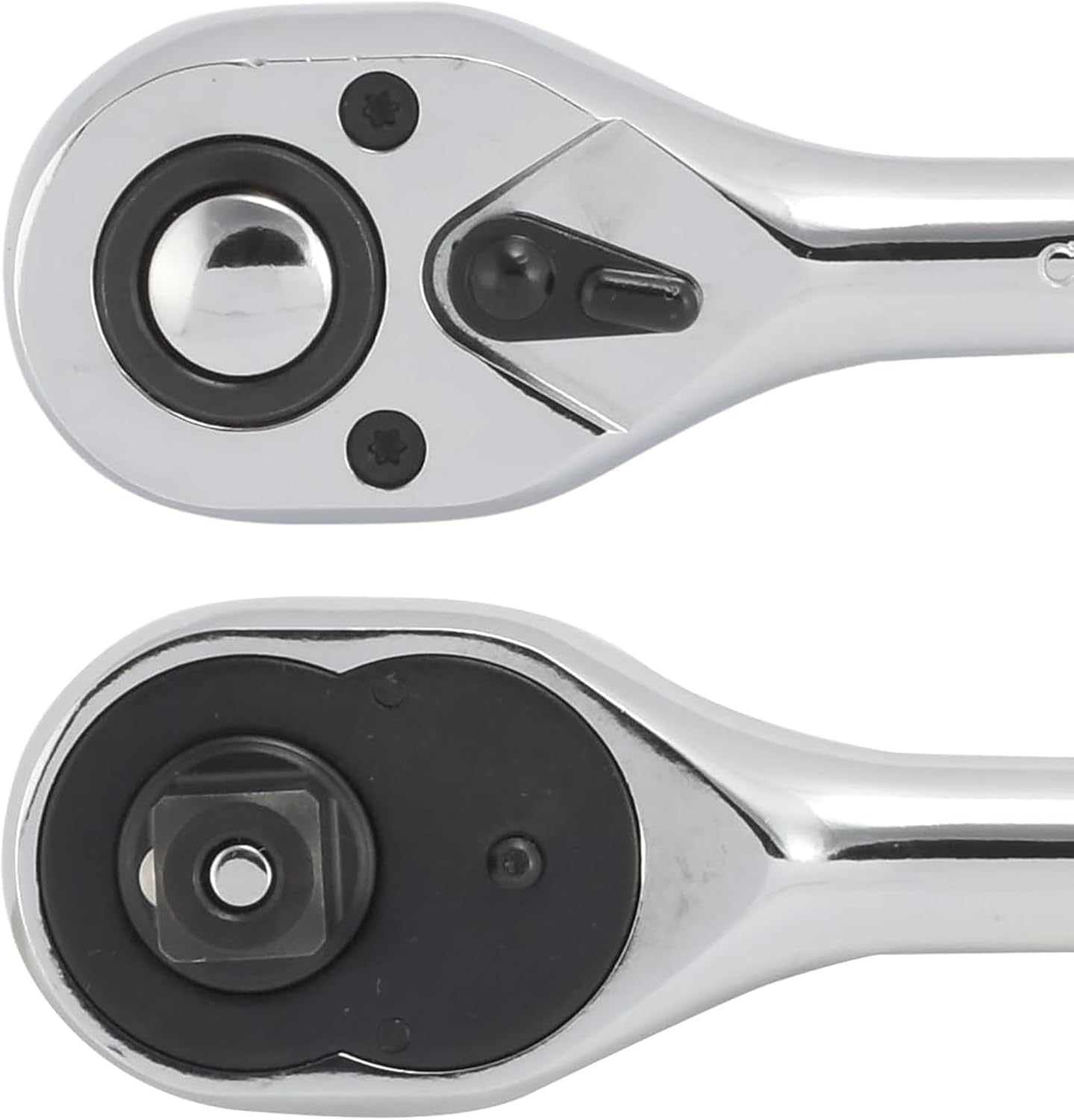
Figure 4: Demonstrating the application of the ratchet wrench to a fastener.
メンテナンス
Proper maintenance will extend the life and performance of your Neiko Ratchet Wrench.
- クリーニング: After each use, wipe the wrench clean with a dry cloth to remove dirt, grease, and debris. For stubborn grime, use a mild degreaser and then wipe dry.
- 潤滑: Periodically apply a small amount of light machine oil to the internal mechanism of the ratchet head. This can be done by applying a drop or two around the quick-release button and the direction lever, then working the mechanism to distribute the oil.
- ストレージ: Store the wrench in a clean, dry environment, away from excessive moisture or corrosive chemicals. A toolbox or tool roll is recommended to protect it from impacts and scratches.
- 検査: Regularly inspect the wrench for any signs of wear, damage, or loose components. Do not use a damaged wrench.

Figure 5: The chrome finish of the ratchet wrench, which should be kept clean and dry.
トラブルシューティング
If you encounter issues with your Neiko Ratchet Wrench, consider the following common solutions:
| 問題 | 考えられる原因 | 解決 |
|---|---|---|
| Ratchet mechanism slips or doesn't engage. | Internal mechanism is dirty or lacks lubrication. | Clean the ratchet head thoroughly and apply light machine oil. |
| Socket does not attach or release easily. | Quick-release button is stuck or debris is in the drive square. | Ensure the quick-release button moves freely. Clean any debris from the drive square. |
| Direction lever is stiff or difficult to move. | Lever mechanism is dirty or needs lubrication. | Clean the lever area and apply a small amount of light machine oil. |
If problems persist after attempting these solutions, contact Neiko customer support for further assistance.
仕様
| 属性 | 価値 |
|---|---|
| ブランド | ネイコ |
| モデル番号 | 03103A |
| ドライブサイズ | 1/2インチ |
| 長さ | 10インチ |
| 材料 | Alloy Steel (Chrome Vanadium) |
| 歯の数 | 72歯 |
| 仕上げる | クロム |
| アイテム重量 | 0.01オンス(約0.28グラム) |
| 欧州連合 | 837013031031 |
保証とサポート
For information regarding warranty coverage, product support, or to purchase replacement parts, please visit the official NEIKO website or contact their customer service department. Refer to the product packaging or the NEIKO web最新の連絡先情報については、サイトをご覧ください。
オンラインサポート: Visit the NEIKO Store on Amazon