
Olympus LS-100
オリンパス LS-100 ボイスレコーダー 取扱説明書
モデル:LS-100
導入
This manual provides detailed instructions for the proper use and maintenance of your Olympus LS-100 Voice Recorder. The LS-100 is designed for high-fidelity audio capture, offering features such as 24-bit/96kHz Linear PCM recording, multi-track capabilities, and versatile input options including XLR with phantom power. Please read this manual thoroughly before operating the device to ensure optimal performance and longevity.
安全情報
- バッテリーの安全性: Use only the specified Lithium Ion battery. Do not expose to extreme temperatures or attempt to disassemble.
- 水と湿気: 損傷を防ぐため、デバイスを水や高湿度から遠ざけてください。
- クリーニング: お手入れには柔らかく乾いた布をご使用ください。液体洗剤や溶剤は使用しないでください。
- 廃棄: Dispose of the device and batteries according to local regulations. Do not incinerate.
- 聴覚保護: 聴覚障害を防ぐため、長時間大音量で聞くことは避けてください。
パッケージ内容
パッケージにすべてのアイテムが揃っていることを確認します。
- Olympus LS-100 Digital Voice Recorder
- リチウムイオンバッテリー(プリインストールまたは別売)
- USBケーブル
- 取扱説明書(本書)
部品の識別
フロント View

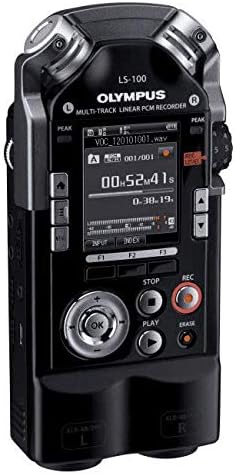
画像: 正面 view of the Olympus LS-100 Voice Recorder, showing the display, control buttons, and built-in microphones.
- 内蔵ステレオマイク: Left and Right 90-degree directional condenser microphones.
- LCDディスプレイ: Shows recording status, menu options, and file 情報。
- Peak Level Indicators: LED lights to indicate audio input levels.
- メニューボタン: Accesses the device's settings and options.
- 機能ボタン(F1、F2、F3): さまざまな操作に対応するコンテキスト依存のボタン。
- Navigation/OK Button: メニューのナビゲーションと選択に使用されます。
- 停止ボタン: 記録または再生を停止します。
- 再生ボタン: 再生を開始または一時停止します。
- 録音ボタン: 録音を開始します。
- 消去ボタン: 削除 files.
- REC Level Dial: 録音入力感度を調整します。
- XLR/Phantom Power Inputs: Connect external microphones requiring XLR or phantom power.
後方 View
画像: 背面 view of the Olympus LS-100 Voice Recorder, showing the battery compartment and external speaker.
- バッテリーコンパートメント: 充電可能なリチウムイオン電池を内蔵しています。
- 内蔵スピーカー: For basic audio playback.
- 三脚マウント: 三脚に取り付けるための標準ネジ。
設定
バッテリーの取り付けと充電
- デバイスの背面にあるバッテリー コンパートメントを見つけます。
- コンパートメントカバーを開きます。
- Insert the supplied Lithium Ion battery, ensuring correct polarity.
- 電池カバーをしっかりと閉じてください。
- Connect the device to a power source using the supplied USB cable to charge the battery. The charging indicator will illuminate.
SDカードの挿入
- デバイスの側面にある SD カード スロットを見つけます。
- Insert a compatible SD, SDHC, or SDXC card into the slot until it clicks into place.
- To remove, push the card gently until it ejects.
電源のオン/オフ
- 電源を入れるには: Press and hold the power button (usually located on the side) until the display illuminates.
- 電源を切るには: デバイスがシャットダウンするまで電源ボタンを押し続けます。
初期設定
Upon first power-on, you may be prompted to set the date, time, and language. Use the navigation buttons to select options and the OK button to confirm.
操作手順
Basic Recording (Internal Microphones)
- デバイスの電源がオンになっていることを確認します。
- Select your desired recording mode (e.g., PCM, MP3) and quality settings via the Menu.
- Adjust the REC Level dial to set the input sensitivity. Monitor the peak level indicators to avoid distortion.
- を押す 記録 ボタンを押して録音を開始します。録音インジケーターが点灯します。
- 録音を一時停止するには、 記録 もう一度ボタンを押してください。もう一度押すと再開します。
- 録音を停止するには、を押します 停止 ボタン。 file 自動的に保存されます。
Using External Microphones (XLR/Phantom Power)
The LS-100 features two XLR inputs with switchable phantom power for professional external microphones.
- Connect your XLR microphones to the corresponding L and R XLR inputs.
- If your microphones require phantom power, enable it through the device's menu settings.
- Adjust the individual input levels for each XLR channel using the REC Level dial or menu options.
- Proceed with recording as described in the Basic Recording section.
再生
- 目的の場所に移動します file ナビゲーション ボタンを使用します。
- を押す 遊ぶ ボタンをクリックして再生を開始します。
- Use the navigation buttons to fast-forward or rewind during playback.
- を押す 停止 再生を終了するボタン。
File 管理
- 転送中 Files: Connect the LS-100 to a computer using the USB cable. The device will appear as a removable storage device, allowing you to drag and drop files.
- 削除中 Files: 選択してください file 削除したいものを選択して 消去 ボタンをクリックします。プロンプトが表示されたら削除を確定します。
- 組織化 Files: Files are typically saved into folders (e.g., Folder A, Folder B). You can manage these folders and move files within the device's menu.
マルチトラック録音
The LS-100 supports up to eight tracks for multi-track recording. Refer to the on-screen menu for specific instructions on track layering, mixing, and editing functions.
特殊機能
- チューナー: An integrated tuner assists musicians with instrument tuning.
- メトロノーム: Provides a rhythmic click for practice or recording.
- Lissajous Function: A visual tool for analyzing stereo phase relationships.
メンテナンス
- クリーニング: デバイスの外側は、柔らかく乾いた布で拭いてください。研磨剤入りの洗剤や溶剤は使用しないでください。
- ストレージ: Store the recorder in a cool, dry place away from direct sunlight and extreme temperatures. Remove the battery if storing for extended periods.
- ファームウェアの更新: Periodically check the Olympus support web最適なパフォーマンスと新機能へのアクセスを確保するために、利用可能なファームウェア アップデートについては、サイトをご覧ください。
トラブルシューティング
| 問題 | 考えられる原因 | 解決 |
|---|---|---|
| デバイスの電源が入りません。 | 電池が消耗しているか、正しく挿入されていません。 | バッテリーを充電するか、正しく挿入し直してください。 |
| 再生中に音が出ない。 | Volume is too low; headphones not connected; file 破損しています。 | Increase volume; connect headphones; try playing another file. |
| Recording level is too low or distorted. | REC Level is set too low/high; microphone issue. | Adjust REC Level; check microphone connections and settings. |
| 保存できません filesをSDカードに。 | SD card is full or write-protected; card error. | 不要な削除 files; check write-protect switch; try a different SD card. |
| デバイスがフリーズしたり、応答しなくなったりします。 | 一時的なソフトウェアの不具合。 | ハードリセットを実行するには、バッテリーを取り外して再度挿入します。 |
仕様
| 特徴 | 詳細 |
|---|---|
| 製品寸法 | 6.3 x 2.8 x 1.3インチ |
| アイテム重量 | 9.9 オンス (0.28 キログラム) |
| 商品型番 | V313020BW000 |
| バッテリー | 1 個のリチウムイオン電池が必要 (付属) |
| メーカー | オリンパス |
| 対応デバイス | パソコン |
| ハードウェアインターフェイス | セキュアデジタルカード |
| マイクフォームファクター | 内蔵 |
| 記録フォーマット | WAV (up to 24 Bit/96 KHZ Linear PCM), MP3 |
| ヘッドフォンジャック | 3.5ミリメートル |
| メモリストレージ容量 | 4 GB(内部) |
| 画面サイズ | 3.5インチ |
| マイク | 90 degree directional, stereo condenser microphones |
| 入力 | XLR/Phantom Power Supply |
| トラック | Eight Tracks (multi-track recording) |
保証とサポート
For warranty information and customer support, please refer to the warranty card included with your product or visit the official Olympus support webサイトでご確認ください。保証請求に備えて購入証明書を保管してください。
オンラインリソース: 追加のサポート、FAQ、ファームウェアのアップデートについては、 Olympus Global Webサイト.
関連文書 - LS-100
 |
オリンパス LS-3 リニアPCMレコーダー - 高音質ポータブルオーディオ録音 コンパクトで高音質なリニアPCMレコーダー、オリンパス LS-3の機能と仕様をご紹介します。24bit/96kHzの高音質、4GBの内蔵メモリ、複数の録音フォーマット、そしてクリアなサウンドを収録できるプロフェッショナルな機能の数々をご覧ください。 |
 |
オリンパス LS-100 マルチトラック リニアPCMレコーダー ユーザーマニュアル オリンパス LS-100 マルチトラック リニア PCM レコーダーの包括的なユーザー マニュアルです。セットアップ、操作、録音モード、再生、安全上の注意事項に関する詳細な手順が記載されています。 |
 |
オリンパス VN-6200PC、VN-5200PC、VN-3200PC デジタルボイスレコーダー:取扱説明書 オリンパスVN-6200PC、VN-5200PC、VN-3200PCデジタルボイスレコーダーの包括的な取扱説明書。録音、再生、管理方法を学びます。 files を実行し、PC に接続してトラブルシューティングを行います。 |
 |
Olympus VN-541PC Digitális Hangrögzítő Használati Útmutató オリンパス VN-541PC のデジタル情報を簡単に確認できます。は嫌いです。 |
 |
Olympus WS-853 & WS-852 Digital Voice Recorder User Manual Comprehensive user manual for the Olympus WS-853 and WS-852 digital voice recorders. Learn about setup, recording, playback, PC connectivity, troubleshooting, and specifications. |
 |
オリンパス VP-10 デジタルボイスレコーダー ユーザーマニュアル オリンパス VP-10 デジタル音声レコーダーの包括的なユーザー マニュアル。セットアップ、録音、再生、PC 接続、メニュー機能、トラブルシューティングについて詳しく説明しています。 |