
導入
This manual provides essential information for the proper setup, operation, and maintenance of your Samson Auro D208 8-Inch Active Loudspeaker. Please read these instructions thoroughly before using the product to ensure optimal performance and safety.
安全情報
Always follow basic safety precautions when using this product to reduce the risk of fire, electric shock, or injury. Keep the loudspeaker away from water and moisture. Do not block ventilation openings. Refer all servicing to qualified personnel.
パッケージ内容
パッケージに次のアイテムが含まれていることを確認してください。
- Samson Auro D208 8-Inch Active Loudspeaker
- 電源ケーブル
- ユーザーマニュアル
設定
配置
The Auro D208 is designed for versatile placement. It can be used as a main PA speaker, a floor monitor, or mounted on a standard 1 3/8-inch (35mm) pole. Ensure the speaker is placed on a stable, level surface or securely mounted to prevent tipping.
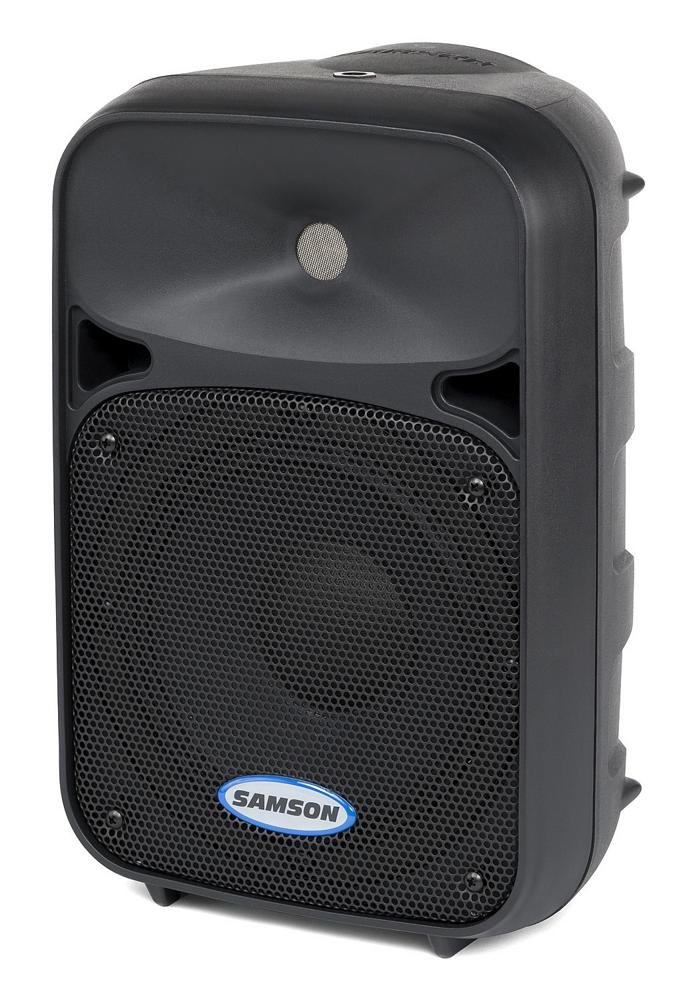
フロント view of the Samson Auro D208 Active Loudspeaker, showcasinコンパクトなデザインと保護グリルを備えています。
接続
The Auro D208 features a Mic/Line input and an additional Line output for linking multiple speakers.
- 電源接続: 付属の電源ケーブルを背面パネルの AC 入力に接続し、適切な電源コンセントに接続します。
- 入力接続: Use an XLR or 1/4-inch cable to connect your microphone or line-level audio source (e.g., mixer, instrument) to the Mic/Line input.
- Linking Speakers: To connect additional Auro D208 speakers, use an XLR cable from the Line output of the first speaker to the input of the next speaker.

Rear panel of the Samson Auro D208, illustrating the Mic/Line input, Line output, volume control, and Clip LED.
操作手順
電源のオン/オフ
After all connections are made, turn on the power switch located on the rear panel. It is recommended to turn on the Auro D208 last in your audio chain and turn it off first.
ボリュームコントロール
Adjust the main Volume control knob on the rear panel to set the overall output level of the loudspeaker. Start with the volume at its minimum setting and gradually increase it to the desired level.
Clip LED Indicator
The Clip LED illuminates when the input signal is too strong, indicating potential distortion. If the Clip LED lights up frequently, reduce the input level from your source or the volume on the Auro D208 to prevent signal clipping.
メンテナンス
クリーニング
Clean the exterior of the loudspeaker with a soft, dry cloth. Do not use abrasive cleaners, solvents, or waxes. Ensure the speaker is unplugged before cleaning.
ストレージ
When not in use, store the loudspeaker in a dry, cool environment, away from direct sunlight and extreme temperatures. If storing for extended periods, consider covering it to protect against dust.
トラブルシューティング
| 問題 | 考えられる原因 | 解決 |
|---|---|---|
| 音が出ない | No power; input cable disconnected; volume too low. | Check power connection and switch; ensure input cables are secure; increase volume. |
| 歪んだ音 | Input signal too high (clipping); faulty cable. | Reduce input level from source or speaker volume; replace cable. |
| ハムまたはバズ | グランドループ、不良ケーブル、干渉。 | Ensure all equipment is on the same electrical circuit; try different cables; move away from power sources. |
仕様
| 特徴 | 詳細 |
|---|---|
| ブランド | サムソン |
| モデル名 | オーロD208 |
| モデル番号 | SAROD208A |
| スピーカータイプ | 2-Way Active Loudspeaker |
| スピーカーサイズ | 8インチ |
| ウーファー直径 | 8インチ |
| ツイーター直径 | 1インチ |
| 最大出力 | 200ワット |
| 接続技術 | USB (for control, not audio streaming) |
| オーディオ出力モード | ステレオ |
| 取り付けタイプ | Clip On, Floor Mount, 1 3/8-inch (35mm) Pole Mount Receptacle |
| 追加機能 | Mic/Line input with Volume control and Clip LED, Additional Line output for linking multiple speakers |
| 商品の寸法(奥行き x 幅 x 高さ) | 奥行き17インチ x 幅12.25インチ x 高さ10.25インチ |
| アイテム重量 | 7.75グラム |
| 電源 | コード式電気 |
保証とサポート
保証情報
This product is covered by a 1-year parts and labor limited warranty. Please retain your proof of purchase for warranty claims.
カスタマーサポート
For technical assistance, service, or warranty inquiries, please visit the official Samson webメーカーのウェブサイトをご覧いただくか、カスタマーサポート部門にお問い合わせください。連絡先は通常、メーカーのウェブサイトに記載されています。 webサイトまたは製品のパッケージ内。