
導入
Welcome to the user manual for the Lindy 4x2 HDMI 1.4 Switching Splitter, Model 38054. This device allows you to connect up to four HDMI or DVI source devices to two HDMI display devices, distributing signals simultaneously or switching between sources. Please read this manual thoroughly to ensure proper installation and operation.
安全情報
Please observe the following safety guidelines to prevent damage to the unit and ensure user safety:
- Do not expose this unit to rain, moisture, or liquids.
- Do not attempt to open the unit casing. 内部にはユーザーが修理できる部品はありません。
- Use only the provided power adapter. Using an unauthorized adapter may damage the unit and void the warranty.
- ユニット周囲の適切な換気を確保してください。通気口を塞がないでください。
- Disconnect power before cleaning. Clean the unit with a soft, dry cloth only.
パッケージ内容
パッケージに次のアイテムが含まれていることを確認してください。
- Lindy 4x2 HDMI 1.4 Switching Splitter (Model 38054)
- 電源アダプター
- 赤外線リモートコントロール
- ユーザーマニュアル(このドキュメント)
製品の特徴
- Connects up to 4 HDMI/DVI source devices to 2 HDTV displays or projectors.
- Supports 1080p resolution and 3D video formats.
- Compatible with digital video formats in deep color mode (up to 36 bit).
- Supports lossless compressed digital audio formats, including Dolby TrueHD and DTS-HD Master Audio.
- Each selected input signal is simultaneously sent to both connected display devices.
- Includes an infrared remote control for convenient switching.
- Features signal re-timing, compensation, and regeneration for output signal transmission up to 10 meters.
製品終了view
The Lindy 4x2 HDMI 1.4 Switching Splitter is designed for efficient signal management in home theater or professional AV setups.
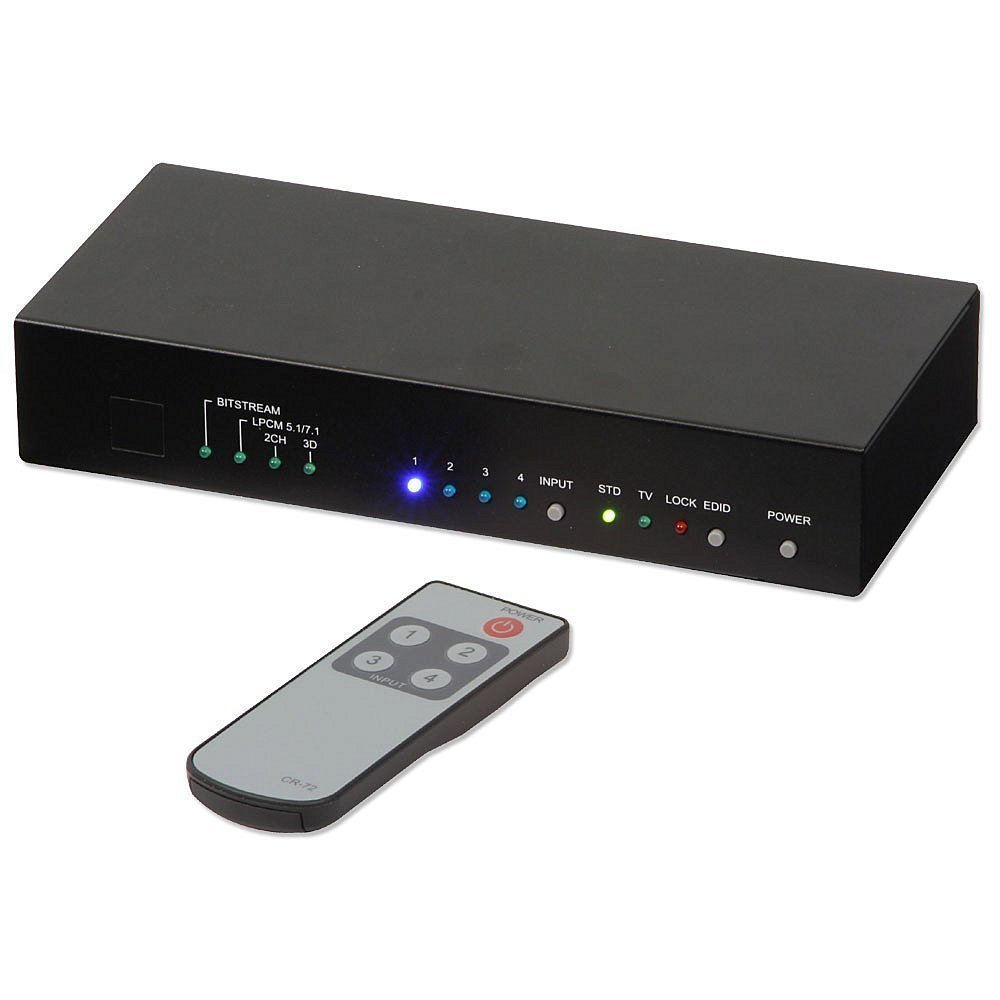
この画像は前面と上面を示しています view of the Lindy 4x2 HDMI 1.4 Switching Splitter. The front panel typically features LED indicators for active inputs and outputs, along with buttons for manual switching. The rear panel, not fully visible, would contain the HDMI input and output ports, and the power input.
フロントパネル
フロント パネルには通常、次のものが含まれます。
- 入力選択ボタン: For manually selecting the desired HDMI input source (e.g., Input 1, Input 2, etc.).
- LEDインジケーター: To show which input is currently active and which outputs are connected.
- IRレシーバー: 赤外線リモコンからの信号を受信します。
背面パネル
背面パネルには通常、次のものが含まれます。
- HDMI入力ポート(x4): Connect your source devices (e.g., Blu-ray player, game console, PC).
- HDMI Output Ports (x2): Connect to your display devices (e.g., HDTV, projector).
- DC 5V電源入力: 付属の電源アダプターを接続します。
セットアップとインストール
Follow these steps to set up your Lindy 4x2 HDMI 1.4 Switching Splitter:
- Ensure all devices (source, display, and splitter) are powered off and unplugged from their power outlets.
- Connect your HDMI source devices (e.g., DVD player, game console, PC) to the HDMI Input ports (HDMI IN 1-4) on the rear of the splitter using high-quality HDMI cables.
- Connect your HDMI display devices (e.g., HDTV, projector) to the HDMI Output ports (HDMI OUT 1-2) on the rear of the splitter using high-quality HDMI cables.
- Connect the provided power adapter to the DC 5V Power Input on the splitter, then plug the adapter into a suitable power outlet.
- Power on your display devices, then your source devices, and finally the Lindy 4x2 HDMI 1.4 Switching Splitter.
- Select the desired input source using the buttons on the front panel or the infrared remote control.
操作手順
手動切り替え
To switch between input sources manually, press the corresponding input selection button on the front panel of the splitter. The LED indicator for the active input will illuminate.
リモコン操作
Use the provided infrared remote control to select input sources. Point the remote control towards the IR receiver on the front panel of the splitter.
- Input 1-4 Buttons: Press the button corresponding to the desired HDMI input source (1, 2, 3, or 4).
- 電源ボタン: (If available on your remote) To power the unit on or off.
The selected input will be displayed on both connected output devices simultaneously.
メンテナンス
To ensure optimal performance and longevity of your Lindy 4x2 HDMI 1.4 Switching Splitter:
- Keep the unit in a cool, dry place, away from direct sunlight and heat sources.
- Clean the unit with a soft, dry cloth. Do not use liquid or aerosol cleaners, as they may damage the finish or internal components.
- Ensure proper ventilation and do not block any vents on the unit.
トラブルシューティング
If you encounter issues with your Lindy 4x2 HDMI 1.4 Switching Splitter, refer to the following common solutions:
| 問題 | 考えられる原因 | 解決 |
|---|---|---|
| No picture or sound on display. | Loose cable connections, incorrect input selection, power issue, incompatible resolution. |
|
| 断続的な信号またはちらつき。 | Poor quality HDMI cables, signal interference, long cable runs, HDCP issues. |
|
| リモコンが機能しない。 | Dead battery, obstructed IR path, remote too far. |
|
仕様
| 特徴 | 詳細 |
|---|---|
| モデル番号 | 38054 |
| ブランド | リンディ |
| 入力 | HDMI x 4 |
| 出力 | HDMI x 2 |
| HDMI規格 | HDMI 1.4 |
| サポートされている解像度 | 最大1080p |
| 3Dサポート | はい |
| 濃色 | 最大36ビット |
| オーディオサポート | ドルビーTrueHD、DTS-HDマスターオーディオ |
| Max Output Cable Length | 10m(32.8フィート) |
| アイテム重量 | 2.9ポンド(1.32kg) |
保証とサポート
This Lindy product comes with a 2年間保証 購入日より。
For technical support, troubleshooting assistance, or warranty claims, please contact your local Lindy customer service or visit the official Lindy website for further assistance. Please retain your proof of purchase for warranty validation.