
1. はじめに
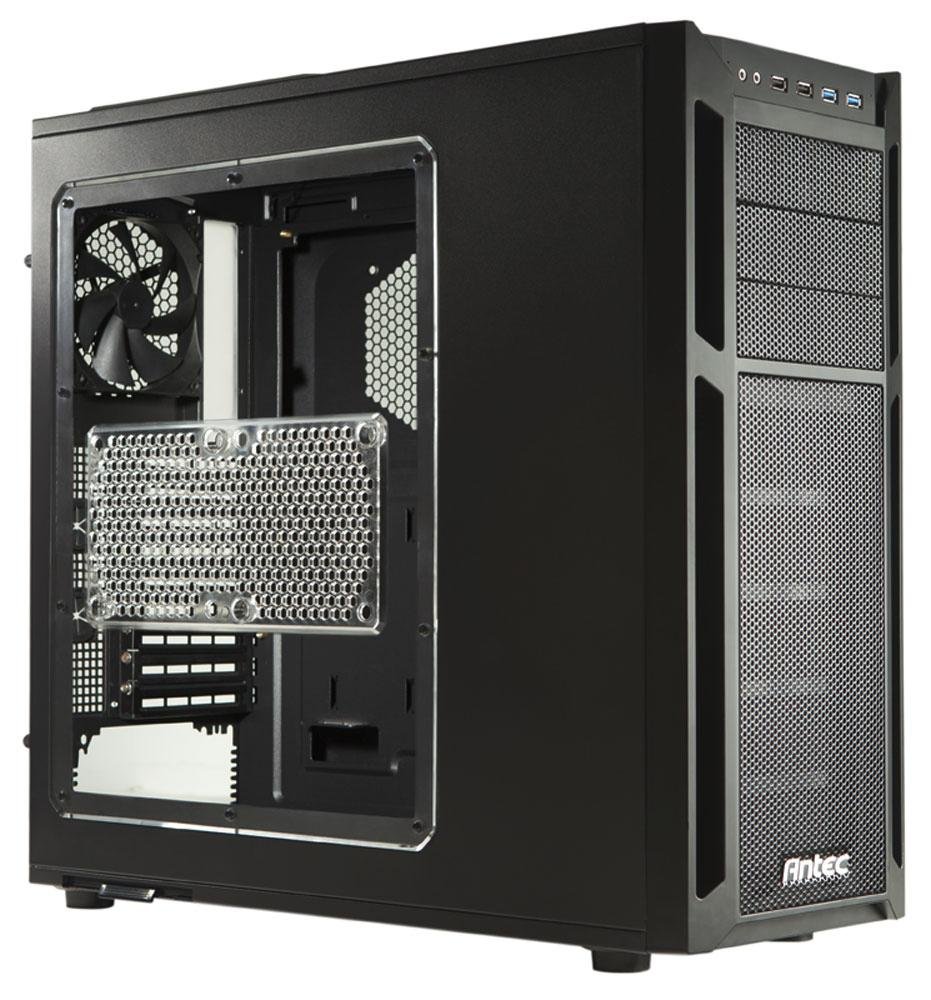
The Antec Eleven Hundred is a Super Mid Tower computer case designed to accommodate high-performance PC builds. It supports a wide range of components, including XL-ATX motherboards and multiple graphics card configurations. The case features an advanced cooling system with pre-installed fans and multiple additional fan mounts, along with efficient cable management solutions to ensure a clean and optimized internal layout.
2. セットアップとコンポーネントのインストール
This section provides instructions for installing various components into your Antec Eleven Hundred case.
2.1マザーボードの取り付け
The Eleven Hundred case supports XL-ATX motherboards (up to 10.3 x 13.6 inches).
- Prepare the motherboard tray by installing the necessary standoffs for your motherboard form factor.
- ネジ穴を合わせながら、マザーボードをスタンドオフの上に慎重に置きます。
- マザーボードをネジで固定します。
2.2 グラフィックカード(GPU)のインストール
The case features nine expansion slots and can accommodate graphics cards up to 13 inches (330 mm) in length, supporting multi-GPU configurations (e.g., three-way NVIDIA SLI or four-way AMD CrossFireX™).
- ケースの背面から必要な拡張スロット カバーを取り外します。
- Insert the graphics card into the appropriate PCIe slot on your motherboard.
- Secure the graphics card with the provided thumb screws.
2.3 ドライブのインストール
The Eleven Hundred offers eleven drive bays: three 5.25-inch bays and six 3.5-inch tool-less bays. Additionally, there are two 2.5-inch drive mounts.
- 5.25インチドライブ: Utilize the tool-less mechanisms for easy installation of optical drives or other 5.25-inch devices.
- 3.5インチドライブ: The six 3.5-inch bays feature tool-less trays. Slide your hard drive into a tray and then slide the tray into the bay until it clicks into place.
- 2.5インチドライブ(SSD): Dedicated mounts are available for 2.5-inch solid-state drives. Secure these drives with screws.
2.4 Cooling System and Fan Installation
The case includes a 200 mm blue LED top exhaust fan and a 120 mm rear exhaust fan. It also provides mounts for up to seven additional fans for enhanced cooling.
- Additional Fan Mounts: Strategic positions are available for optional fans, including an intake fan mount behind the motherboard tray for CPU cooling.
- Fan Power Hub: A convenient fan power hub allows connection of up to four 3-pin fans to a single Molex connector, simplifying cable management.
- Liquid Cooling Compatibility: The Eleven Hundred is compatible with Antec KÜHLER H2O liquid CPU coolers.
2.5 ケーブル管理
Effective cable management is crucial for airflow and aesthetics. The case provides 36 mm of space behind the motherboard tray and features grommet-lined cable routing holes.
- Route power supply cables and data cables through the grommeted holes to the rear of the motherboard tray.
- 活用する ample space behind the tray to organize and secure cables using cable ties.
- Connect front panel I/O cables (USB 3.0, USB 2.0, HD Audio) to the corresponding headers on your motherboard. The two front USB 3.0 ports connect via internal motherboard connectors.
3. 操作
Once all components are installed and connected, close the side panels. Power on your system. The pre-installed fans will begin operating to provide cooling.
3.1 フロントパネル I/O
フロントパネルから以下の機能に簡単にアクセスできます。
- USB 2 ポート x 3.0
- USB 2 ポート x 2.0
- HDオーディオジャック(ヘッドフォンとマイク)
- 電源ボタン
- リセットボタン
4. メンテナンス
Regular maintenance helps ensure optimal airflow and component longevity.
4.1 エアフィルターの清掃
The Eleven Hundred case is equipped with removable and washable air filters to prevent dust buildup.
- PSU Air Intake Filter: Located at the bottom of the case, beneath the power supply.
- Front Air Intake Filter: Located behind the quick-release front bezel.
清掃するには:
- フィルターを慎重に取り外します。
- Wash them with water and mild soap, or use a vacuum cleaner to remove dust.
- フィルターを再度取り付ける前に、フィルターが完全に乾いていることを確認してください。
4.2一般的なクリーニング
Use a soft, dry cloth to wipe down the exterior of the case. For internal cleaning, use compressed air to remove dust from fans and components. Ensure the system is powered off and unplugged before performing any internal cleaning.
5。 トラブルシューティング
このセクションでは、発生する可能性のある一般的な問題について説明します。
5.1 ファンの騒音が大きすぎる
If you experience unusual or excessive noise from the fans, particularly the top 200mm fan:
- 障害物の確認: Ensure no cables or debris are interfering with the fan blades.
- ファンの取り付け: Verify that all fans are securely mounted and screws are tightened.
- 電源接続: The included fans connect via Molex. If connected to a motherboard fan header, ensure fan speed settings in the BIOS/UEFI or operating system are appropriate.
- 部品の摩耗: Over time, fan bearings can wear out, leading to increased noise. Consider replacing the fan if it remains noisy after checking the above.
5.2 空気の流れが悪い、または過熱している
コンポーネントが予想以上に高温になっている場合:
- フィルターのクリーニング: Ensure all air intake filters are clean and free of dust.
- ケーブル管理 Verify that internal cables are neatly routed and not obstructing airflow.
- ファン構成: Ensure fans are oriented correctly for optimal airflow (intake at front/bottom, exhaust at rear/top). Consider adding optional fans to improve cooling.
- コンポーネント座席: Check that CPU coolers and GPU heatsinks are properly seated and making good contact.
6. 仕様
| ブランド | アンテック |
| モデル | Eleven Hundred |
| ケースタイプ | Super Mid Tower |
| 色 | 黒 |
| 材料 | 合金鋼 |
| マザーボードの互換性 | XL-ATX, ATX, Micro-ATX, Mini-ITX |
| 拡張スロット | 9 |
| ドライブベイ | 3 x 5.25" (external), 6 x 3.5" (internal, tool-less), 2 x 2.5" (internal) |
| フロントI / Oポート | 2 x USB 3.0, 2 x USB 2.0, HD Audio In/Out |
| 付属ファン | 1 x 200mm Top Exhaust (Blue LED), 1 x 120mm Rear Exhaust |
| Optional Fan Mounts | Up to 7 additional fans |
| 最大GPU長 | 13インチ(330 mm) |
| ケーブル管理スペース | 36 mm behind motherboard tray |
| 寸法(高さ×幅×奥行き) | 20.7 x 9.3 x 21.5 インチ (52.6 x 23.6 x 54.6 cm) |
| 重さ | 20ポンド(9kg) |
| 欧州連合 | 761345159500 |
| ASIN | B005X3E4YC |
7. 保証とサポート
7.1 製造元の保証
The Antec Eleven Hundred computer case is backed by a manufacturer's 3年間の限定保証, covering both parts and labor. Please retain your proof of purchase for warranty claims.
7.2 カスタマーサポート
For technical assistance, warranty inquiries, or to report any issues, please contact Antec customer support. Refer to the official Antec web最新の連絡先情報とサポート リソースについては、こちらのサイトをご覧ください。