
ZIPRO 5941329 L
ZIPRO Treadmill User Manual
モデル: 5941329L
1. はじめに
The ZIPRO Treadmill (Model 5941329 L) is a versatile and compact fitness machine designed for home use, offering a comprehensive range of features for effective cardiovascular training, jogging, and walking. Its foldable design makes it ideal for small spaces, allowing for easy storage when not in use.
This treadmill is equipped with a powerful 1.96 HP motor, providing a speed range of 1 to 16 km/h. It features 12 adjustable incline levels to increase workout intensity and engage different muscle groups. The integrated LED display and heart rate sensors provide real-time data on time, speed, distance, calories burned, and heart rate, helping you monitor your progress effectively.
For an enhanced training experience, the treadmill supports connectivity with compatible fitness applications like Kinomap and FitShow, allowing for interactive workouts and data tracking. It also includes a smartphone holder, MP3 function, and built-in speakers for entertainment during your exercise sessions. Designed with user comfort in mind, it features a spacious running surface (45 x 125 cm) and a joint-friendly cushioning system to minimize impact.

Image: The ZIPRO Treadmill in an unfolded state, with a user actively running on it. A smartphone with fitness app icons is shown in the background, highlighting the app connectivity feature.
2. 安全情報
トレッドミルをご使用になる前に、すべての説明書をよくお読みください。このマニュアルは保管し、今後の参考としてお役立てください。
- 最大積載量: Do not exceed the maximum user weight of 130 kg (286 lbs). Exceeding this limit can cause damage to the treadmill and lead to injury.
- 配置: トレッドミルは平らで安定した場所に設置してください。トレッドミルの背後に少なくとも2メートル(6.5フィート)、両側に0.6メートル(2フィート)のスペースを確保してください。
- 電源接続: トレッドミルはアース付きのコンセントに接続してください。延長コードやアダプターは使用しないでください。
- 安全キー: Always attach the safety key clip to your clothing before starting the treadmill. In case of an emergency or if you fall, the safety key will detach, immediately stopping the machine.
- 子供とペット: Keep children and pets away from the treadmill, especially when it is in operation. This equipment is not a toy.
- 健康状態: 特に既往症がある場合は、運動プログラムを開始する前に必ず医師に相談してください。
- 適切な服装: Wear appropriate athletic footwear and clothing that will not get caught in the moving parts of the treadmill.
- メンテナンス: Perform regular maintenance as described in this manual to ensure safe and optimal operation.

Image: A user exercising on the ZIPRO treadmill, illustrating the safe and versatile training environment provided by the machine, including its adjustable speed range.
3. パッケージ内容
開梱したら、パッケージに次のすべてのコンポーネントが含まれていることを確認してください。
- ZIPRO Treadmill (Main Unit)
- ユーザーマニュアル(このドキュメント)
- Tool Kit for assembly and maintenance
- Lubricant for treadmill belt maintenance
- 安全キー
- 電源コード
部品が不足または破損している場合は、すぐにカスタマー サポートにご連絡ください。
4. セットアップと組み立て
The ZIPRO Treadmill is designed for minimal assembly. Follow these steps for initial setup:
4.1 トレッドミルの展開
- トレッドミルをパッケージから慎重に取り出します。
- トレッドミルを平らで水平な場所に設置します。
- Lift the console/handlebar assembly until it locks into the upright position. Ensure it is securely locked before proceeding.
- Lower the running deck gently until it rests flat on the floor.
4.2電源への接続
Plug the power cord into the treadmill's power input, then into a grounded electrical outlet. Ensure the power switch (usually located near the power cord input) is in the 'ON' position.
4.3 収納時の折りたたみ
トレッドミルを折りたたんで保管するには:
- トレッドミルの電源がオフになっていて、プラグが抜かれていることを確認します。
- Carefully lift the running deck until it clicks into the vertical locked position.
- The treadmill can then be moved using the transport wheels and stored vertically, requiring minimal space (approx. 31.5 cm high when folded flat, or 150 cm high when stored vertically).

Image: A user demonstrating the folding mechanism of the ZIPRO treadmill, highlighting its compact design and ease of vertical storage to save space.
5. 操作手順
5.1コントロールパネルオーバーview
The treadmill features an intuitive LED display and control buttons on the console and handlebars. The display shows key metrics such as time, speed, distance, calories, and heart rate.
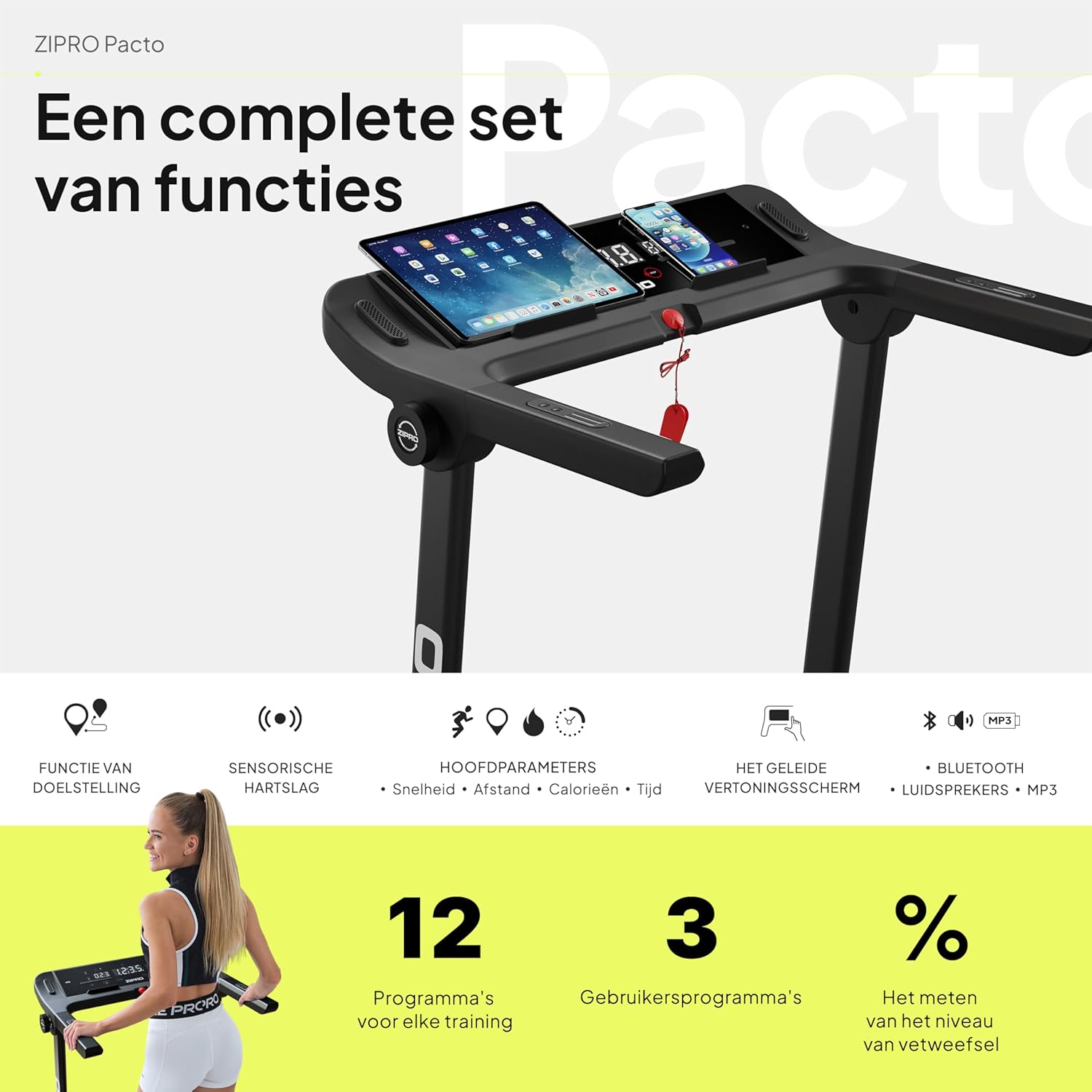
画像: 詳細な view of the ZIPRO treadmill's control panel, featuring a tablet and smartphone in their respective holders, illustrating the comprehensive set of functions available.
5.2 ワークアウトの開始
- 安全キーがコンソールと衣服に正しく取り付けられていることを確認してください。
- Press the 'START' button. The treadmill will typically begin with a short countdown before the belt starts moving at a low speed.
5.3 速度と傾斜の調整
- スピード: Use the '+' and '-' buttons on the console or handlebars to adjust the speed from 1 km/h to 16 km/h. Quick speed buttons (e.g., 3, 6, 9, 12 km/h) may also be available for rapid adjustments.
- 傾斜: Use the 'INCLINE +' and '-' buttons to adjust the incline level. The treadmill offers 12 adjustable incline levels to simulate uphill walking or running.
5.4 プリセットプログラムの使用
The treadmill comes with 12 pre-set workout programs and 3 customizable user programs. Refer to the specific program section in your detailed manual for instructions on selecting and using these programs.
5.5心拍数のモニタリング
Grasp the heart rate sensors on the handlebars to display your current heart rate on the LED screen. For accurate readings, ensure your hands are clean and firmly placed on the sensors.
5.6 App Connectivity (Kinomap & FitShow)
Enhance your workout experience by connecting your smartphone or tablet to the treadmill via Bluetooth and using compatible fitness apps like Kinomap and FitShow. These apps offer interactive training, virtual routes, and detailed workout tracking.
- Download the Kinomap or FitShow app from your device's app store.
- デバイスで Bluetooth を有効にします。
- Open the app and follow the on-screen instructions to connect to your ZIPRO treadmill.

Image: A smartphone displaying the logos for Kinomap and FitShow applications, illustrating the treadmill's compatibility with these popular fitness apps for interactive training.
5.7 MP3 Function and Speakers
Connect your audio device to the treadmill's MP3 input to play music through the built-in speakers, making your workouts more enjoyable.
5.8 ワークアウトの停止
Press the 'STOP' button to gradually slow down and stop the treadmill belt. Alternatively, pulling the safety key will immediately stop the treadmill.
6. メンテナンス
Regular maintenance is crucial for the longevity and optimal performance of your ZIPRO treadmill.
6.1 クリーニング
- コンソールやその他の表面を柔らかくて乾いた布で拭いてください。amp 使用後は毎回布で汗やほこりを拭き取ってください。
- 仕上げを損傷する可能性があるため、研磨剤入りのクリーナーや溶剤は使用しないでください。
- Vacuum underneath the treadmill regularly to prevent dust and debris from accumulating.
6.2 ベルトの潤滑
The running belt requires periodic lubrication to reduce friction and extend its lifespan. Use the provided lubricant or a silicone-based treadmill lubricant.
- トレッドミルの電源を切り、プラグを抜きます。
- 後部のローラーボルトを少し緩めてベルトを持ち上げます。
- Apply a thin line of lubricant evenly under the center of the belt.
- 後部のローラーボルトを締めます。
- トレッドミルを低速(例:3 km/h)で数分間動かし、潤滑剤を行き渡らせます。
Frequency of lubrication depends on usage: every 3-6 months for moderate use, or more frequently for heavy use.
6.3 ベルトの張力とアライメント
Check the belt tension and alignment periodically. If the belt slips or drifts to one side, adjust the rear roller bolts using the tool kit provided. Refer to the detailed manual for precise adjustment instructions.
7。 トラブルシューティング
This section addresses common issues you might encounter with your treadmill. If the problem persists, please contact customer support.
| 問題 | 考えられる原因 | 解決 |
|---|---|---|
| トレッドミルの電源が入りません。 | 電源コードが差し込まれていない、電源スイッチがオフ、回路ブレーカーが落ちている。 | Ensure power cord is securely plugged in. Check if the power switch is ON. Reset the circuit breaker if necessary. |
| ベルトが動きません。 | Safety key not in place; motor overload; loose belt. | Ensure the safety key is correctly inserted. Reduce user weight if exceeding capacity. Check belt tension and adjust if loose. |
| ディスプレイが正しく動作しない。 | Loose cable connection; software glitch. | Check all cable connections to the console. Try turning the treadmill off and on again. |
| 動作中に異常な音がする。 | Lack of lubrication; loose parts; foreign object. | Lubricate the running belt. Inspect for any loose screws or foreign objects under the belt. |
| ベルトが滑ったり、動きが遅くなったりします。 | Belt too loose; lack of lubrication. | Adjust belt tension. Lubricate the running belt. |
8. 仕様
| 特徴 | 詳細 |
|---|---|
| ブランド | ジプロ |
| モデル番号 | 5941329 |
| 色 | Pacto |
| サイズ | L |
| 表示タイプ | 導かれた |
| 表示サイズ | 2.4インチ |
| モーター馬力 | 1.96馬力 |
| 最高速度 | 16 km/h |
| 最大重量容量 | 130キロ |
| 走行面寸法 | 45 x 125 cm |
| 展開時の寸法(長さ x 幅 x 高さ) | 154 x 77.4 x 114 cm |
| 折りたたみ時の高さ | 31.5 cm (when folded flat) |
| アイテム重量 | 41.9キロ |
| プリセットプログラム | 12 |
| カスタマイズ可能なプログラム | 3 |
| Adjustable Incline Levels | 12 |
| 電源 | コード式電気 |
| 主な特徴 | Touchscreen, Adjustable Height, Bottle Holder, Timer, Heart Rate Monitor |
| 材質タイプ | 合金鋼、プラスチック、アルミニウム |
| 含まれるコンポーネント | User Manual, Tool Kit, Lubricant, Safety Key, Power Cord |
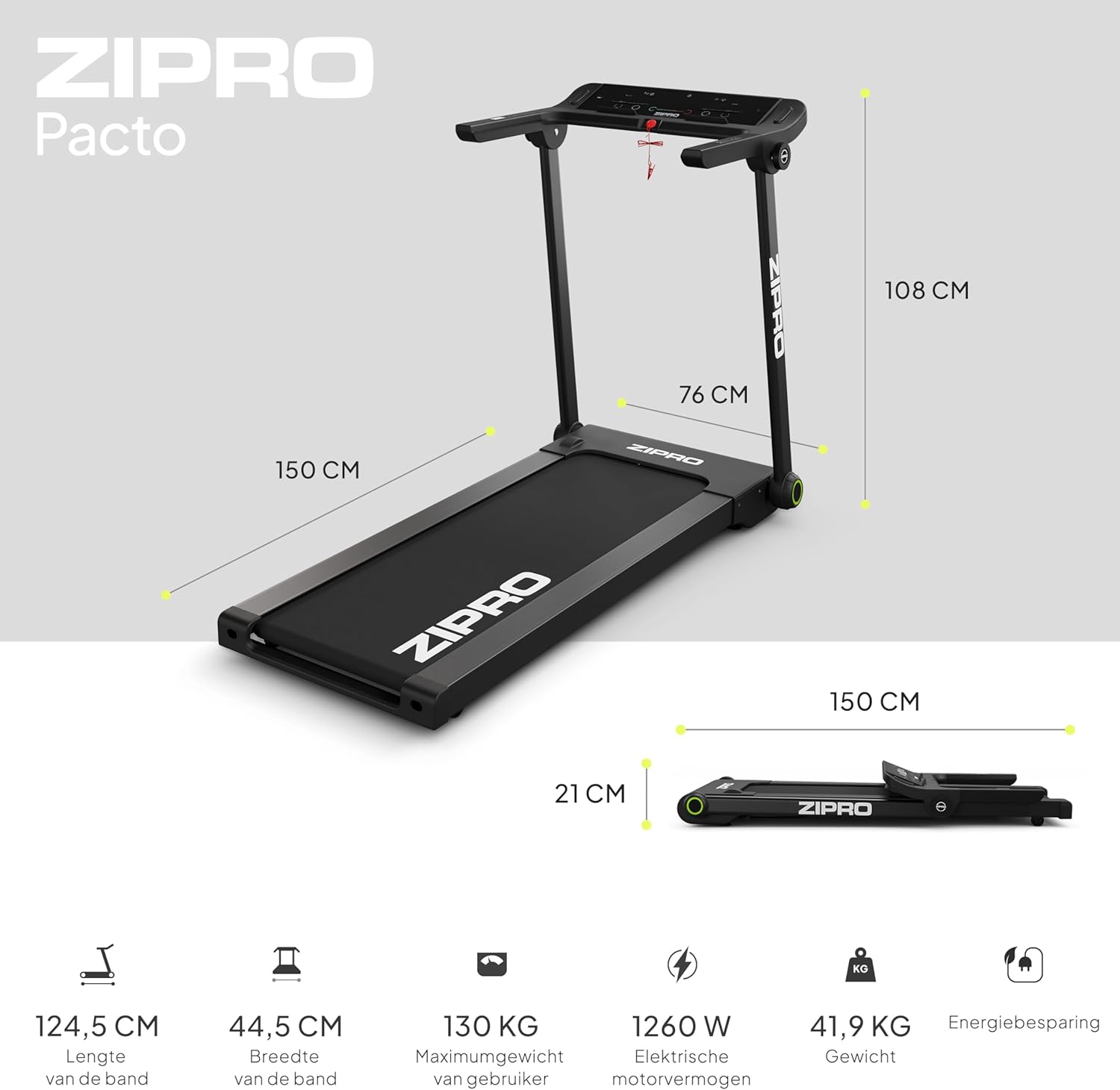
Image: A visual representation of the ZIPRO treadmill's dimensions when unfolded and folded, accompanied by key specifications such as belt length, width, maximum user weight, motor power, and item weight.

画像: 詳細な view of the ZIPRO treadmill's cushioning system, highlighting the shock absorbers designed to provide a comfortable and joint-friendly workout experience.
9. 保証とサポート
Your ZIPRO Treadmill is covered by a manufacturer's warranty against defects in materials and workmanship. Please refer to the warranty card included in your package for specific terms and conditions, including the warranty period and coverage details.
For technical assistance, troubleshooting beyond this manual, or to inquire about warranty claims, please contact ZIPRO customer support. Contact information can typically be found on the product packaging, the warranty card, or the official ZIPRO webサイト。
When contacting support, please have your model number (5941329 L) and proof of purchase readily available to expedite the service process.
Ask a question about this manual
Ask about setup, troubleshooting, compatibility, parts, safety, or missing instructions. Manuals+ will review the question and use this page’s manual context to help answer it.