
導入
This manual provides essential instructions for setting up, operating, and maintaining your Canon PowerShot ELPH 310 HS digital camera. Please read this manual thoroughly to ensure proper use and to maximize your camera's performance.
箱の中身
開梱したら、以下の品目がすべて含まれていることを確認してください。
- Canon PowerShot ELPH 310 HS Camera
- バッテリーパックNB-4L
- バッテリーチャージャー CB-2LV
- リストストラップ
- USBケーブル
- CD-ROM(ソフトウェア/ドライバー)
設定
1. バッテリーの充電
Insert the Battery Pack NB-4L into the Battery Charger CB-2LV. Plug the charger into a power outlet. The charging indicator light will show the charging status. Once fully charged, remove the battery.
2. バッテリーとメモリーカードの挿入
Open the battery/card compartment cover on the camera. Insert the charged battery pack, ensuring correct orientation. Insert a compatible SD/SDHC/SDXC memory card into the card slot until it clicks into place. Close the compartment cover securely.

画像: 正面 view of the Canon PowerShot ELPH 310 HS digital camera, showcasing its silver finish and lens.
カメラの操作
1. 電源のオン/オフ
を押す オン/オフ button located on the top or side of the camera to power it on or off. The lens will extend when powered on.
2. 基本的な写真撮影
- フォーカス: Gently press the shutter button halfway down to focus. The camera will emit a beep and display a green frame when focus is achieved.
- 写真を撮る: シャッターボタンを全押しして画像を撮影します。
- ズーム: Use the zoom lever around the shutter button to adjust the optical zoom (8x).
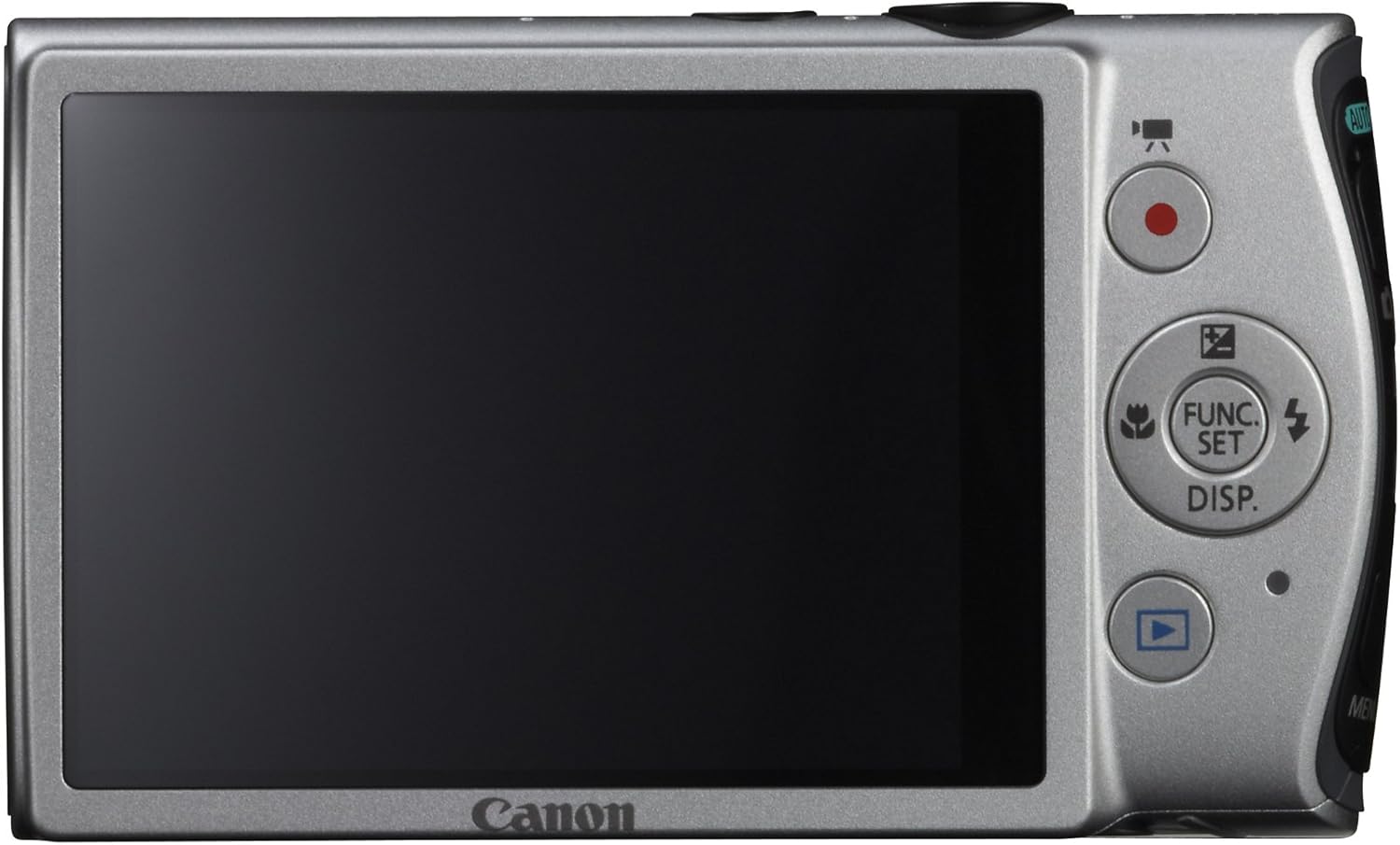
画像: 背面 view of the Canon PowerShot ELPH 310 HS, displaying the 3.0-inch LCD screen and various control buttons for navigation and function selection.
3.撮影モード
The PowerShot ELPH 310 HS offers various shooting modes to suit different situations. Use the mode dial or menu to select:
- スマートオート: Automatically detects scenes and applies optimal settings for point-and-shoot simplicity.
- プログラム(P): Allows for automatic aperture/shutter speed selection based on conditions, with some user control.
- 映画ダイジェスト: Records a short video clip before each still image, combining them into a daily video.
- 高速バースト: Captures rapid action at approximately 8.7 frames per second.
- スーパースローモーションムービー: Records video at high frame rates (up to 240 fps) for slow-motion playback.
- 特別なシーンモード: Includes options like Handheld Night Scene, Portrait, Beach, Snow, Fireworks, Fisheye Effect, Miniature Effect, Toy Camera Effect, and more for specific photographic effects.
4.ビデオ録画
To record videos, press the dedicated movie button. The camera supports Full HD 1080p video at 24 fps and 720p HD video at 30 fps. The iFrame movie format is also supported for easier editing.
5. Image Stabilization (Intelligent IS)
The camera features Intelligent IS, which automatically selects the best shake correction method for your shooting situation. This includes modes for stills (Normal, Panning, Macro, Tripod) and videos (Dynamic, Powered, Macro, Tripod) to ensure steady images and footage.
メンテナンス
1. カメラのクリーニング
- レンズ: Use a soft, lint-free cloth specifically designed for camera lenses. Avoid touching the lens directly with fingers.
- LCDスクリーン: Wipe gently with a soft, dry cloth. Do not use abrasive cleaners.
- カメラ本体: Use a soft, dry cloth to wipe away dust and smudges.
2. バッテリーのお手入れ
- バッテリーを使用しないときは、涼しく乾燥した場所に保管してください。
- バッテリーの寿命を延ばすために、バッテリーを頻繁に完全に放電することは避けてください。
- バッテリーを極端な温度にさらさないでください。
3. ストレージ
カメラを長期間保管する場合は、バッテリーとメモリーカードを取り外してください。カメラは乾燥したほこりのない環境で保管し、できればカメラバッグやケースに入れてください。
トラブルシューティング
| 問題 | 考えられる原因 / 解決策 |
|---|---|
| カメラの電源が入りません。 | 電池が消耗しているか、正しく挿入されていない可能性があります。電池が充電され、正しく挿入されていることを確認してください。 |
| 画像がぼやけてしまいます。 | Camera shake, subject movement, or incorrect focus. Ensure proper grip, use Intelligent IS, or check focus settings. |
| メモリカードエラー。 | メモリカードがいっぱい、破損、または互換性がない可能性があります。カードをフォーマットするか(すべてのデータが消去されます)、別のカードをお試しください。 |
| フラッシュは発光しません。 | Flash may be set to OFF or Red-Eye Reduction mode. Check flash settings in the menu. |
| ビデオを録画できません。 | Memory card may be full or too slow. Ensure sufficient space and use a high-speed memory card. |
仕様
| 特徴 | 詳細 |
|---|---|
| モデル名 | Canon PowerShot ELPH 310 HS |
| イメージセンサー | 12.1メガピクセルCMOS |
| 画像プロセッサ | デジック4 |
| 光学ズーム | 8x |
| レンズ | 28mm Wide-Angle (35mm equivalent: 28-224mm) |
| 画像安定化 | 光学式(インテリジェントIS) |
| ビデオ録画 | Full HD 1080p (24 fps), HD 720p (30 fps) |
| 液晶画面 | 3.0-inch PureColor LCD (461,000 dots) |
| ストレージメディア | SD、SDHC、SDXCメモリーカード |
| 接続性 | HDMI、USB |
| バッテリー | NB-4L リチウムイオンバッテリーパック |
| 重さ | Approx. 0.31 Pounds (including battery and memory card) |
保証とサポート
保証情報およびテクニカルサポートについては、製品に付属のマニュアルを参照するか、キヤノンの公式ウェブサイトをご覧ください。 webサイトでご確認ください。保証請求の際は購入証明として領収書を保管してください。
キヤノンサポート Webサイト: www.usa.canon.com/support