
1. はじめに
ご購入ありがとうございますasing the Caliber RMD 068-2 Car Radio USB/SD Player. This manual provides detailed instructions for the installation, operation, and maintenance of your new car radio. Please read this manual thoroughly before using the product to ensure proper functionality and safety. Keep this manual for future reference.
2. 安全情報
- インストール: Ensure the unit is installed by a qualified technician to prevent damage to the vehicle's electrical system. Incorrect wiring can cause fire or electrical shock.
- 電源: ユニットは、マイナス接地の 12V DC 自動車バッテリーにのみ接続してください。
- ヒューズ: Always replace fuses with new ones of the specified rating. Using an incorrect fuse can cause damage to the unit or vehicle.
- 音量レベル: Do not operate the unit at excessively high volume levels, as this may impair your ability to hear external traffic sounds and could be dangerous.
- クリーニング: 清掃には柔らかく乾いた布を使用してください。研磨剤や溶剤は使用しないでください。
- 水分: ユニットを湿気や水にさらさないでください。
3. パッケージ内容
すべての項目が揃っていることを確認してください:
- Caliber RMD 068-2 Car Radio Unit
- 取り外し可能なフロントパネル
- ISOワイヤーハーネス
- 取り付けフレーム
- Disassembly Keys (2 pcs)
- ユーザーマニュアル(このドキュメント)
4.製品オーバーview
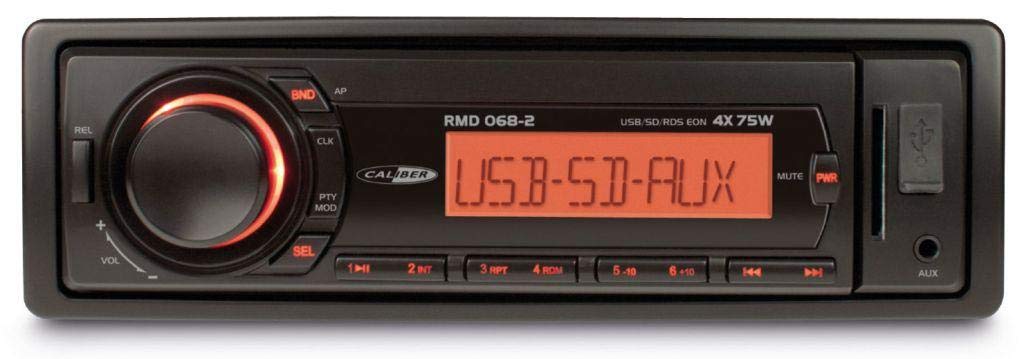
図1: 前面 view of the Caliber RMD 068-2 Car Radio. This image shows the main unit with its detachable front panel, including the display, control buttons, USB port, and SD card slot.
4.1 フロントパネルコントロール
- 電源/モードボタン: Press to turn on/off. Short press to switch between Radio, USB, SD, AUX modes.
- ボリュームノブ: Rotate to adjust volume. Press to access audio settings (Bass, Treble, Balance, Fader).
- 表示: Shows current time, radio frequency, track information, etc.
- USBポート: メディアを再生するには、USB フラッシュ ドライブを接続します。
- SDカードスロット: メディアを再生するには SD カードを挿入します。
- AUX入力(3.5mmジャック): 外部オーディオデバイスを接続します。
- BAND/AMSボタン: In radio mode, press to select radio band (FM1, FM2, FM3). Long press for Automatic Memory Store.
- プリセットボタン(1~6): Store and recall radio stations. In USB/SD mode, use for direct track selection.
- 再生/一時停止ボタン: メディアの再生を再生または一時停止します。
- FORWARD/BACKWARD Buttons: Skip tracks or tune radio frequency.
- イジェクトボタン: Release the detachable front panel.
4.2 背面接続
The rear of the unit features standard ISO connectors for power and speakers, along with an antenna input.
- ISO Power Connector: For connecting to the vehicle's power supply (constant 12V, ignition 12V, ground).
- ISO Speaker Connector: For connecting to the vehicle's speakers (Front Left, Front Right, Rear Left, Rear Right).
- アンテナ入力: 車のラジオアンテナを接続します。
5. セットアップ
5.1 インストール
- バッテリーを外します: Before starting, disconnect the negative terminal of your car battery to prevent short circuits.
- 古いユニットを削除します: 既存のカーラジオをダッシュボードから慎重に取り外します。
- 取り付けフレームの取り付け: Insert the supplied mounting frame into the dashboard opening and bend the tabs to secure it.
- 配線を接続: Refer to the wiring diagram in section 5.2. Connect the ISO wiring harness to the car's wiring and then to the Caliber RMD 068-2 unit. Connect the antenna cable.
- Slide Unit In: Carefully slide the Caliber RMD 068-2 unit into the mounting frame until it clicks into place.
- バッテリーを再接続します: Reconnect the negative terminal of your car battery.
- フロントパネルを取り付ける: Attach the detachable front panel to the main unit.
5.2 配線図
The Caliber RMD 068-2 uses standard ISO connectors. Ensure correct connections as shown below. If your vehicle does not have ISO connectors, an adapter may be required.
| ピン番号 | 配線色(標準) | 関数 |
|---|---|---|
| 4 | 黄色 | 定電圧12V(バッテリー) |
| 7 | 赤 | 12V 切り替え (点火) |
| 8 | 黒 | 地面 |
| 5 | 青 | Antenna Remote Out |
| ピン番号 | 配線色(標準) | 関数 |
|---|---|---|
| 1 | 紫 | リア右 (+) |
| 2 | パープル/ブラック | 右後 (-) |
| 3 | 緑 | リア左 (+) |
| 4 | 緑/黒 | 左奥 (-) |
| 5 | グレー | フロント右 (+) |
| 6 | グレー/ブラック | フロント右 (-) |
| 7 | 白 | フロント左 (+) |
| 8 | ホワイト/ブラック | 前方左側 (-) |
Note: Wire colors may vary depending on vehicle manufacturer. Always consult your vehicle's wiring diagram.
6. 操作手順
6.1 基本機能
- 電源オン/オフ: を押す パワー/モード ユニットの電源をオンまたはオフにするボタン。
- 音量コントロール: 回転する 音量 ノブを時計回りに回すと音量が上がり、反時計回りに回すと音量が下がります。
- モード選択: を短く押す パワー/モード button to cycle through available modes: Radio (FM), USB, SD, AUX.
- オーディオ設定: を押す 音量 knob to enter audio settings. Rotate the knob to select settings like BASS, TREBLE, BALANCE, FADER. Press the knob again to confirm or move to the next setting.
6.2無線操作
- バンドの選択: ラジオモードでは、 バンド/ AMS FM1、FM2、FM3 バンドを切り替えるボタン。
- 手動チューニング: を短く押す 前方後方 周波数を微調整するためのボタン。
- 自動検索: 長押し 前方後方 ボタンを押すと、次の電波の強い放送局が自動的に検索されます。
- プリセットを保存: Tune to your desired station. Long press one of the プリセット(1~6) buttons until you hear a beep. The station is now stored.
- プリセットの呼び出し: いずれかを短く押す プリセット(1~6) buttons to recall a stored station.
- 自動メモリストア(AMS): 長押し バンド/ AMS ボタンを押すと、最も強い放送局が自動的にスキャンされ、現在のバンドのプリセットに保存されます。
6.3 USB/SD再生
- メディアを挿入: USBフラッシュドライブをUSBポートに、またはSDカードをSDカードスロットに挿入します。自動的にUSB/SDモードに切り替わり、再生を開始します。
- 再生/一時停止: を押す 再生/一時停止 再生を一時停止または再開するボタン。
- トラックをスキップ: を短く押す 前方後方 次のトラックまたは前のトラックにスキップするためのボタン。
- 早送り/巻き戻し: 長押し 前方後方 トラック内で早送りまたは巻き戻しを行うボタン。
- フォルダーナビゲーション: 使用 プリセット5 そして プリセット6 buttons to navigate between folders on your USB/SD media.
6.4 AUX入力
- デバイスの接続: オーディオ ケーブルを使用して、外部オーディオ デバイス (例: スマートフォン、MP3 プレーヤー) をフロント パネルの 3.5 mm AUX 入力ジャックに接続します。
- AUXモードを選択: を押す パワー/モード button repeatedly until "AUX" is displayed.
- 再生を制御する: Control playback (play, pause, skip) directly from your connected external device. The car radio will control the volume.
7. メンテナンス
- ユニットのクリーニング: Use a soft, dry cloth to wipe the front panel and display. Do not use harsh chemicals, cleaning sprays, or abrasive cloths, as these can damage the surface.
- 取り外し可能なフロントパネル: When detaching the front panel, handle it carefully. Store it in a protective case (if supplied) to prevent scratches or damage.
- USB/SD ポート: Keep the USB port and SD card slot free from dust and debris.
8。 トラブルシューティング
| 問題 | 考えられる原因 | 解決 |
|---|---|---|
| 電源なし | ヒューズ切れ、配線ミス、接続不良 | Check and replace fuse; Verify wiring connections (Yellow to constant 12V, Red to ignition 12V, Black to ground); Ensure front panel is securely attached. |
| 音が出ない | Volume too low; Mute activated; Incorrect speaker wiring; Damaged speakers | Increase volume; Check if mute is active; Verify speaker connections; Test with known good speakers. |
| ラジオの受信状態が悪い | Antenna not connected; Damaged antenna; Weak signal area | Ensure antenna is securely connected; Check antenna for damage; Try tuning to a stronger station or move to a different location. |
| USB/SDが再生されない | サポートされていません file format; Corrupted media; Incorrectly inserted media; Max capacity exceeded | 確保する files are MP3/WMA format; Try a different USB/SD card; Reinsert media correctly; Check media capacity (max 32GB recommended). |
| Front panel cannot be detached | Eject button not fully pressed; Mechanism jammed | Press the EJECT button firmly; Do not force the panel. |
If the problem persists after trying these solutions, please contact your dealer or a qualified service center.
9. 仕様
- モデル: Caliber RMD 068-2
- 出力: 4 x 75 Watts Max
- 電源: 12V DC (10.8V-15.6V), Negative Ground
- ヒューズ: 10A
- サポートされているオーディオ形式: MP3、WMA(USB/SD経由)
- USB/SD Compatibility: 最大32GB(FAT32形式)
- FMチューナー: RDS, 18 Presets
- AUX入力: 3.5mmステレオジャック
- 取り外し可能なフロントパネル: はい
- 重さ: 約0.95kg(2.09ポンド)
10. 保証とサポート
This Caliber product is covered by a warranty in accordance with applicable European laws. For detailed warranty terms and conditions, please refer to the warranty card included with your product or visit the official Caliber website. For technical support, troubleshooting assistance, or service inquiries, please contact your authorized Caliber dealer or the customer service department in your region. Please have your product model number (RMD 068-2) and proof of purchase ready when contacting support.
Note: Specifications and design are subject to change without notice for improvement.