
Johnson Controls TEC2203-3
ジョンソンコントロールズ TEC2203-3 非プログラム式サーモスタット ユーザーマニュアル
Model: TEC2203-3
1. はじめに
This manual provides essential information for the installation, operation, and maintenance of the Johnson Controls TEC2203-3 Non-Programmable Thermostat. This device is designed for controlling heating and cooling systems with 2 Heat and 2 Cool stages, and features a 1SPDFAN (Single Pole Double Throw Fan) control. It serves as a reliable replacement thermostat for compatible HVAC systems.
2.製品オーバーview
2.1 主な特徴
- Non-Programmable operation for straightforward temperature control.
- Supports 2 Heat and 2 Cool stages for versatile HVAC system compatibility.
- Integrated 1SPDFAN control.
- Clear digital display for room temperature.
2.2 コンポーネントとディスプレイ
The TEC2203-3 thermostat features a user-friendly interface with a digital display and intuitive buttons for control. Refer to the image below for a visual guide to the thermostat's components.
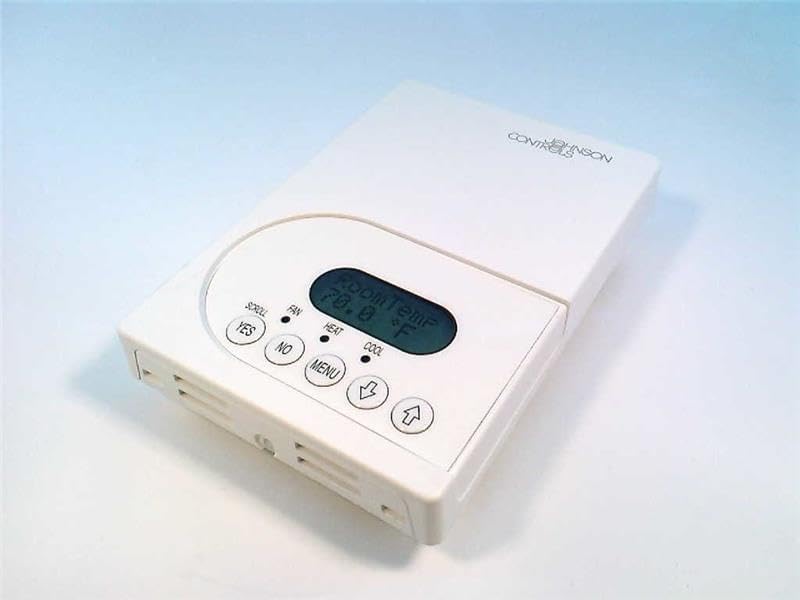
図1: フロント view of the Johnson Controls TEC2203-3 Thermostat. The image shows the white rectangular thermostat unit with a central digital display indicating "Room Temp 70.0 °F". Below the display are control buttons: "YES", "NO", "MENU", a down arrow, and an up arrow. Indicators for "SCROLL", "FAN", "HEAT", and "COOL" are also visible.
The display shows the current room temperature. Indicators for HEAT and COOL illuminate when the respective modes are active. The FAN indicator shows fan operation. Buttons include:
- YES / NO: Used for confirming or canceling selections in menu options.
- メニュー: Accesses system settings and operational modes.
- Up Arrow / Down Arrow: Adjusts temperature setpoints and navigates menu options.
3. インストール
Installation of the Johnson Controls TEC2203-3 Thermostat should be performed by a qualified HVAC technician. Incorrect installation can lead to system malfunction, property damage, or personal injury. Always ensure power to the HVAC system is turned off at the circuit breaker before beginning any installation work.
3.1 安全上の注意
- Disconnect all power to the heating and cooling system before installation.
- 地域の電気に関する規則および条例をすべて遵守してください。
- Ensure wiring connections are secure and correct according to the wiring diagram provided with the product packaging (not included in this manual).
4. 操作手順
The TEC2203-3 is a non-programmable thermostat, meaning it maintains a set temperature until manually changed.
4.1温度の設定
- ディスプレイには現在の室温が表示されます。
- を押す 上矢印 or 下矢印 button to adjust the desired temperature setpoint.
- The new setpoint will flash briefly and then be saved. The system will then work to reach and maintain this temperature.
4.2 Changing System Mode (Heat/Cool/Off)
- を押す メニュー ボタン。
- 使用 上矢印 or 下矢印 to navigate through the available system modes (e.g., HEAT, COOL, OFF).
- プレス はい 希望のモードを選択します。
- The corresponding indicator (HEAT or COOL) will illuminate when active.
4.3 ファン操作
The fan can typically be set to AUTO (runs only when heating or cooling) or ON (runs continuously).
- を押す メニュー ボタン。
- Navigate to the fan settings using the 上矢印 or 下矢印.
- プレス はい 目的のファンモードを選択します。
5. メンテナンス
The Johnson Controls TEC2203-3 Thermostat requires minimal maintenance to ensure optimal performance.
- クリーニング: 定期的にサーモスタットの外側を柔らかくて乾いた布で拭いてください。amp 布で拭いてください。研磨剤や溶剤は使用しないでください。
- 気流: 温度感知の精度に影響する可能性があるため、サーモスタットの通気口がほこりやごみで塞がれていないことを確認してください。
- 専門家による検査: It is recommended to have your entire HVAC system, including the thermostat, inspected by a professional technician annually.
6。 トラブルシューティング
If you experience issues with your TEC2203-3 thermostat, consider the following common troubleshooting steps:
- ディスプレイ/電源なし: HVACシステムの回路ブレーカーを確認してください。サーモスタットがベースに正しく固定されていることを確認してください。
- 温度の読み取りが不正確: Ensure the thermostat's vents are clear of obstructions. Avoid placing the thermostat near heat sources (lamps, direct sunlight) or drafts.
- システムが応答しません: Verify the system mode (HEAT/COOL/OFF) is correctly selected. Check if the temperature setpoint is above (for heat) or below (for cool) the current room temperature.
- ファンが動作していない: Check the fan mode setting (AUTO/ON). If set to AUTO, the fan will only run when heating or cooling is active.
これらの手順を試しても問題が解決しない場合は、資格のある HVAC 技術者に連絡してサポートを受けてください。
7. 仕様
| 特徴 | 詳細 |
|---|---|
| モデル | TEC2203-3 |
| ブランド | ジョンソンコントロールズ |
| コントロールタイプ | プログラム不可能なサーモスタット |
| Stages | 2ヒート/ 2クール |
| ファンコントロール | 1SPDFAN |
| アイテム重量 | 1ポンド |
| ASIN | B004H2XCMU |
8. 保証とサポート
For specific warranty information and technical support regarding your Johnson Controls TEC2203-3 Thermostat, please refer to the documentation included with your purchase or contact Johnson Controls directly. Warranty terms and support options may vary based on region and purchase location.
関連文書 - TEC2203-3
 |
Johnson Controls FCP Largo サーモスタット ユーザー ガイド: FCP-NA-701-L および FCP-PA-701-L ジョンソンコントロールズFCP-NA-701-LおよびFCP-PA-701-L Largoサーモスタットの包括的なユーザーガイド。ファンコイルおよびPTACシステムの機能、設置、構成、操作、詳細設定、トラブルシューティング、技術仕様を網羅しています。 |
 |
PCA Advanced Application Programmable Controller Catalog Technical specifications, features, and ordering information for Johnson Controls PCA Series Advanced Application Programmable Controllers, including models PCA2513, PCA2611, PCA2612, PCA3613, and PCA4911. |
 |
スマート機器制御クイックスタートガイド - Johnson Controls UCB ファームウェア 3.3.1.186 このクイックスタートガイドでは、ジョンソンコントロールズ スマート機器™ ユニットコントロールボード(UCB)のファームウェアバージョン3.3.1.186の設定とアップデートに必要な手順を説明します。ローカルLCDの操作方法、システム設定のバックアップ方法、ファームウェアのアップデート方法、そして様々なHVACアプリケーションの主要なメニューオプションについて解説します。 |
 |
UCB HVAC システム向けスマート機器制御クイックスタートガイド ジョンソンコントロールズ製スマート機器ユニット制御ボード(UCB)HVACシステムの包括的なクイックスタートガイドです。定容量制御、VAV、エコノマイザ、ヒートポンプの各アプリケーションの設定、操作方法、ファームウェアアップデート、設定のバックアップ、試運転、トラブルシューティングについて解説します。詳細なメニュー構成と動作パラメータも含まれています。 |
 |
ジョンソンコントロールズ AD-XXX シリーズ PureFlow デュプレックスエアコンプレッサー | 製品速報 ジョンソンコントロールズAD-XXXシリーズPureFlowデュプレックスエアコンプレッサー(1/2馬力から20馬力まで)の詳細な製品情報を掲載した包括的な製品速報です。機能、技術仕様、性能データ、注文情報、寸法、配線図、修理部品の全リストを掲載しています。 |
 |
Hx 3 タッチスクリーンサーモスタット ユーザー情報マニュアル このユーザー情報マニュアルには、Johnson Controls Hx 3 タッチ スクリーン サーモスタット (モデル: S1-THXU430W) のインストール、機能、操作、アプリの接続、設定など、詳細な手順とガイダンスが記載されています。 |
Ask a question about this manual
Ask about setup, troubleshooting, compatibility, parts, safety, or missing instructions. Manuals+ will review the question and use this page’s manual context to help answer it.