
1. はじめに
This manual provides instructions for the installation, operation, and maintenance of your Orbit 27954 Pocket Star 4-Station Plus Indoor Sprinkler Controller. This controller is designed to manage residential 24-volt sprinkler systems, offering dual programming capabilities and a rain delay feature.
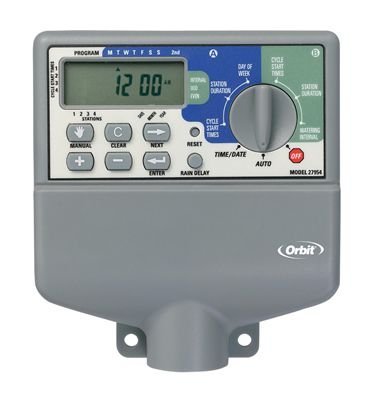
Image 1.1: The Orbit 27954 Pocket Star 4-Station Plus Indoor Sprinkler Controller. This image displays the front panel of the controller, featuring its digital display and control buttons.
2. 安全情報
設置および操作の前に、すべての指示をよくお読みください。指示に従わない場合、物的損害または人身傷害が発生する可能性があります。
- This controller is designed for indoor use only. Do not install outdoors or in areas exposed to water.
- 配線やメンテナンスを行う前に、必ず電源を切ってください。
- All electrical wiring should comply with local codes and regulations. If you are unsure, consult a qualified electrician.
- ユニットをご自身で修理しようとしないでください。すべての修理は資格のある専門家にご依頼ください。
3. セットアップ
3.1 開梱
Carefully remove the controller from its packaging. Verify that all components are present. Retain packaging for future use or disposal.
3.2コントローラーの取り付け
- Choose a suitable indoor location near a standard 120V AC outlet and away from direct sunlight or extreme temperatures.
- Use the provided mounting template (if applicable) or mark the desired screw locations on the wall.
- Install mounting screws into the wall, leaving the screw heads slightly extended.
- Hang the controller onto the screws using the keyhole slots on the back of the unit.
- Secure the controller by tightening the screws.
3.3配線
重要: 配線する前に電源を切ってください。
- 電源接続: Plug the controller's power cord into a standard 120V AC outlet.
- バルブ配線: Connect one wire from each sprinkler valve to a numbered terminal (1, 2, 3, 4) on the controller. Connect the common wire from all valves to the terminal labeled 'C' (Common).
- Sensor Wiring (Optional): If using a rain sensor, connect its wires to the designated sensor terminals. Refer to your sensor's manual for specific wiring instructions.
3.4 初期電源投入
Once all wiring is complete and secure, connect the power cord to the electrical outlet. The controller display should illuminate, indicating it is powered on.
4. 操作手順
4.1 ディスプレイとボタンの理解
The controller features a digital display and several buttons for navigation and programming. Familiarize yourself with the 'Program', 'Set', 'Arrow' (up/down), and 'Rain Delay' buttons.
4.2 現在の時刻と日付の設定
- Press the 'Set' button repeatedly until 'Set Time' appears on the display.
- Use the 'Arrow' buttons to adjust the hour, then press 'Set' to move to minutes.
- Repeat for minutes, AM/PM, year, month, and day.
4.3 散水スケジュールのプログラミング
The controller supports dual programs (A and B) for flexible scheduling.
- プログラムを選択してください: Press the 'Program' button to select Program A or B.
- 開始時間の設定: Press 'Set' until 'Start Time' appears. Use 'Arrow' buttons to set the desired start time for the first cycle. The controller supports multiple start times per program.
- 実行時間の設定: Press 'Set' until 'Run Time' appears. Use 'Arrow' buttons to set the duration (in minutes) for each station (1-4).
- 水やり日を設定する: Press 'Set' until 'Watering Days' appears. Use 'Arrow' buttons to select specific days of the week, odd/even days, or interval watering.
4.4手動操作
To manually water a station or all stations:
- Press the 'Manual' button (if available, or follow specific manual run instructions in the display menu).
- Select the desired station or 'All Stations'.
- Set the run time using the 'Arrow' buttons.
- The selected station(s) will begin watering immediately.
4.5 降雨遅延機能
The rain delay feature allows you to pause watering for a set period without losing your programmed schedule.
- Press the 'Rain Delay' button.
- Use the 'Arrow' buttons to select the delay duration (e.g., 24, 48, or 72 hours).
- The controller will pause watering for the selected period and resume the schedule automatically afterward.
5. メンテナンス
5.1 クリーニング
Wipe the controller's exterior with a soft, damp 布で拭いてください。研磨剤入りの洗剤や溶剤はディスプレイやコンピューターを損傷する恐れがあるため使用しないでください。asing.
5.2 季節的な考慮
As an indoor controller, the unit is not directly exposed to outdoor elements. However, ensure the indoor environment remains within recommended operating temperatures to prolong its lifespan.
6。 トラブルシューティング
| 問題 | 考えられる原因 | 解決 |
|---|---|---|
| コントローラーのディスプレイが空白です。 | 電源がありません。 | Check power outlet, ensure power cord is securely plugged in. Verify circuit breaker. |
| スプリンクラーは作動しません。 | Incorrect programming, wiring issue, or rain sensor activated. | Verify watering schedule. Check valve wiring connections. Ensure rain sensor is not active or bypassed. |
| Only some sprinklers turn on. | Faulty valve, wiring issue to specific station. | Check wiring for the non-working station. Test the valve manually. |
| 水やりの時間が適切ではありません。 | Incorrect time/date setting or program schedule. | 現在の時刻と日付を確認してください。view and adjust program start times and watering days. |
7. 仕様
- モデル: Orbit 27954 Pocket Star 4-Station Plus Indoor Controller
- ブランド: 軌道
- 部品番号: 27954
- 駅数: 4
- 巻tage: 24ボルト(AC)
- ヒューマン インターフェイス入力: ボタン
- 必要な電池: いいえ
- インストール: 屋内
- 特徴: Dual program, Rain delay
- パッケージ寸法: 21.84 x 13.46 x 6.6 cm
- 重さ: 226.8グラム
8. 保証とサポート
保証情報やテクニカルサポートについては、Orbitの公式ウェブサイトをご覧ください。 web購入サイトをご覧いただくか、カスタマーサービス部門にお問い合わせください。購入証明書としてレシートを保管してください。


