
1. はじめに
The Motorola ARRIS SURFboard SBG6580 is an integrated home networking solution combining a DOCSIS 3.0 cable modem, a four-port 10/100/1000 Ethernet switch with advanced firewall capabilities, and an 802.11n Wi-Fi access point. This device is designed to provide ultra-broadband data and multimedia services, as well as high-bandwidth home networking, allowing users to share a single internet connection, files, and networked peripherals via wired or Wi-Fi connectivity.
2. パッケージ内容
Upon opening the retail packaging, ensure the following items are included:
- ARRIS SURFboard SBG6580 Cable Modem/Wi-Fi Router
- 電源コード
- イーサネットケーブル
- 取扱説明書(本書)
3.デバイスオーバーview
3.1フロントパネルインジケータ
The front panel of the SBG6580 features several LED indicators that provide status information about the device's operation. These lights help in monitoring the connection status and identifying potential issues.
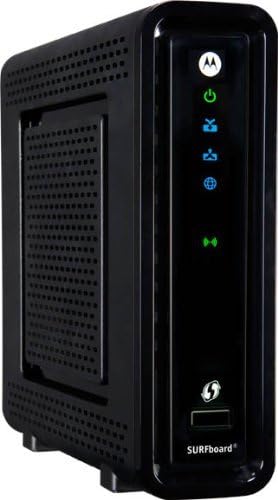
図1: 前面 view of the ARRIS SURFboard SBG6580 showing indicator lights.
- 電源(緑): デバイスの電源が入っていることを示します。
- 受信(青/緑): Indicates downstream channel bonding (blue) or single channel connection (green).
- 送信(青/緑): Indicates upstream channel bonding (blue) or single channel connection (green).
- オンライン(緑): インターネット接続が成功したことを示します。
- Wi-Fi (Green): Wi-Fi 機能がアクティブであることを示します。
3.2 背面パネルのポート
The rear panel provides all the necessary connection ports for the cable modem and router functionalities.

図2:背面 view of the ARRIS SURFboard SBG6580 with various ports.
- COAX (Blue): ケーブル サービス プロバイダーからの同軸ケーブルに接続します。
- Ethernet Ports (Yellow, 1-4): コンピューター、ゲーム コンソール、またはその他のネットワーク デバイスへの有線接続用の 4 つのギガビット イーサネット ポート。
- 電源(緑): 電源アダプタに接続します。
- リセットボタン: Used to reset the device to factory default settings (recessed button).
4. セットアップ
4.1 インストール前のチェック
- Verify compatibility with your Internet Service Provider (ISP). The SBG6580 is compatible with major U.S. cable operators like Comcast Xfinity, Time Warner Cable, Charter, Cox, and Cablevision. Contact your ISP if not listed.
- 有効なケーブル インターネット サービスのサブスクリプションがあることを確認してください。
- Gather your ISP account information, including account number and contact details.
4.2 Connecting the Modem/Router
- Connect one end of the coaxial cable to the COAX port on the SBG6580 and the other end to a cable wall outlet. Ensure the connection is finger-tight.
- Connect the Ethernet cable from one of the Ethernet ports (1-4) on the SBG6580 to the Ethernet port on your computer (optional for initial setup, Wi-Fi can also be used).
- Connect the power cord to the Power port on the SBG6580 and then plug the other end into an electrical outlet.
- Allow the device several minutes to power on and establish a connection. The front panel lights will cycle through various states before settling.
4.3 Activating with ISP
After connecting the hardware, you will need to activate the SBG6580 with your ISP. This typically involves:
- Calling your ISP's customer service.
- Providing them with the MAC address (CM MAC) and Serial Number (SN) located on the label on the bottom or back of your SBG6580.
- Following their instructions to complete the activation process.
5. 操作
5.1 表示灯の理解
Once fully operational, the front panel LEDs should display the following status:
- 力: 緑色
- 受け取る: Solid Blue (for bonded channels) or Solid Green (for single channel)
- 送信: Solid Blue (for bonded channels) or Solid Green (for single channel)
- オンライン: 緑色
- Wi-Fi: 緑色
If any lights are blinking or off when they should be solid, refer to the Troubleshooting section.
5.2へのアクセス Web インタフェース
To configure advanced settings, including Wi-Fi network name and password, you can access the SBG6580's web インタフェース:
- 開く web ブラウザ(例:Chrome、Firefox、Edge)。
- アドレスバーに次のように入力します
192.168.0.1or192.168.100.1Enter キーを押します。 - プロンプトが表示されたら、デフォルトのユーザー名を入力します。
adminパスワードmotorola(or the password printed on the device label if different). - You will now have access to the modem/router's configuration pages.
5.3 基本的なWi-Fi設定
から web interface, navigate to the Wireless section to configure your Wi-Fi network:
- SSID(ネットワーク名): デフォルトの SSID をネットワークの一意の名前に変更します。
- Security Key (Password): Set a strong, unique password for your Wi-Fi network. WPA2-PSK (AES) is recommended for optimal security.
- デュアルバンド: The SBG6580 supports dual-band Wi-Fi (2.4GHz and 5GHz). You can configure separate SSIDs and passwords for each band or use a single SSID for both if supported by your devices.
- Disabling SSID Broadcasting: To hide your network name, navigate to the 'Wireless' section, then 'Primary Network'. Under 'Automatic Security Configuration', click 'Disabled'. In the 'Closed Network' section, set it to 'Enabled'. Save and exit.
5.4 有線接続
Use the four Gigabit Ethernet ports on the rear panel to connect devices that require a stable, high-speed wired connection, such as desktop computers, smart TVs, or gaming consoles. Simply plug an Ethernet cable from the device into any of the numbered Ethernet ports on the SBG6580.
6. メンテナンス
6.1ファームウェアアップデート
Firmware updates for the SBG6580 are typically managed and pushed by your Internet Service Provider (ISP). It is generally not recommended to attempt manual firmware updates unless instructed by your ISP, as incorrect updates can cause device malfunction.
6.2 デバイスのリセット
If you experience persistent issues or wish to restore the device to its factory default settings, you can perform a factory reset:
- With the SBG6580 powered on, use a paperclip or a similar pointed object to press and hold the recessed Reset button on the rear panel for at least 10-15 seconds.
- Release the button. The device will restart and revert to its original factory settings. You will need to reconfigure your Wi-Fi settings and potentially reactivate with your ISP.
6.3 身体的ケア
- Place the device in a well-ventilated area to prevent overheating. Avoid enclosed spaces.
- デバイスを湿気、直射日光、極端な温度から遠ざけてください。
- 外装は柔らかく乾いた布で拭いてください。液体クリーナーやエアゾールは使用しないでください。
7。 トラブルシューティング
このセクションでは、一般的な問題とその潜在的な解決策について説明します。
7.1 Intermittent Disconnections or Slow Speed
One common cause for intermittent disconnections or slow internet speeds is improper signal power levels. You can check these levels via the modem's web インタフェース:
- Access the SBG6580 web インターフェース(セクション5.2を参照)。
- Navigate to the 'Connection' or 'Status' page. Look for tables displaying 'Downstream Bonded Channels' and 'Upstream Channels'.
- Downstream Power Levels: Check the 'Power' column. Optimal range is typically between -8 dBmV and +8 dBmV. Values outside this range (e.g., -9 dBmV or +9 dBmV) may indicate a problem.
- Upstream Power Levels: Check the 'Power' column. Optimal range is typically up to 52 dBmV. Values higher than this (e.g., 55 dBmV or 57 dBmV) may indicate a problem.
- Also, ensure all channels (typically 8 downstream and 4 upstream) are locked. If only one upstream channel is locked, it can indicate an issue.
If power levels are outside the optimal range or channels are not locked, contact your ISP. They may need to send a technician to inspect your cable lines or adjust signal strength from their end. Remote fixes may offer temporary relief, but a physical inspection is often required for a lasting solution.
7.2 インターネット接続なし
- すべてのケーブル接続 (同軸、イーサネット、電源) が安全であることを確認します。
- Restart the modem by unplugging the power cord for 10 seconds and then plugging it back in.
- Verify that the 'Online' LED on the front panel is solid green. If it's blinking or off, the modem is not establishing an internet connection.
- サービスの状態とモデムのアクティベーションを確認するには、ISP にお問い合わせください。
7.3 Wi-Fiが機能しない
- Ensure the 'Wi-Fi' LED on the front panel is solid green.
- Check your device's Wi-Fi settings to ensure it's connected to the correct SSID and using the correct password.
- Try restarting the modem/router.
- アクセス web interface (Section 5.2) to verify Wi-Fi settings are correctly configured and not disabled.
7.4 サポートへの連絡
If troubleshooting steps do not resolve your issue, contact your Internet Service Provider for assistance. For hardware-related inquiries, you may contact Motorola/ARRIS support.
8. 仕様
| 特徴 | 仕様 |
|---|---|
| モデル | SBG6580 |
| DOCSIS規格 | DOCSIS 3.0 |
| Wi-Fi規格 | 802.11n (N300 Dual Band) |
| イーサネットポート | ギガビットイーサネット x 4 (10/100/1000 Mbps) |
| Max Downstream Data Rate | 343 Mbps (8 bonded channels) |
| Max Upstream Data Rate | 131 Mbps (4 bonded channels) |
| 周波数範囲 | DOCSIS and EuroDOCSIS 108 to 1002 MHz |
| 寸法(長さ×幅×高さ) | 5.9インチ x 1.77インチ x 6.69インチ |
| 重さ | 15.04オンス |
| 色 | 黒 |
9.製品オーバーview ビデオ
全体像についてはこのビデオをご覧くださいview of the ARRIS SURFboard SBG6580 Cable Modem & Wi-Fi Router features and benefits.
Video: ARRIS SURFboard SBG6580 DOCSIS 3.0 Cable Modem/ Wi-Fi N300 2.4Ghz + N300 5GHz Dual Band Router Overview. This video highlights the device's capabilities and integrated features.
10. 保証とサポート
The Motorola ARRIS SURFboard SBG6580 comes with a 1-Year Full Coverage Warranty. For warranty claims or technical support, please refer to the contact information provided by your retailer or Internet Service Provider. You may also visit the official Motorola support web追加リソースのサイト。