
1. はじめに
The BUFFALO Giga Switching Hub LSW3-GT-24NSR is a 24-port Gigabit Ethernet switch designed for high-speed network environments. It is ideal for small to medium-sized offices and workplaces requiring robust and reliable network connectivity. This device supports full Gigabit speeds across all ports, ensuring efficient data transfer.
Key features include a fanless design for silent operation and enhanced reliability, as well as a loop detection function to prevent network disruptions caused by accidental network loops.
2. 安全情報
怪我や損傷を防ぐために、デバイスを使用する前に以下の安全上の注意事項を読んで理解してください。
- 電源: Use only the provided power adapter. Ensure the power outlet meets the specified voltag要件。
- 換気: 通気口を塞がないでください。過熱を防ぐため、デバイス周囲に十分な空気の流れを確保してください。
- 環境: Avoid exposing the device to water, high humidity, extreme temperatures, or direct sunlight.
- 取り扱い: Do not drop or subject the device to strong impacts. Do not attempt to open or repair the device yourself. Refer all servicing to qualified personnel.
- ケーブル: Ensure all network cables are properly connected and secured.
3. パッケージ内容
パッケージにすべてのアイテムが揃っていることを確認します。
- BUFFALO Giga Switching Hub LSW3-GT-24NSR Unit
- 電源ケーブル
- Rack Mount Brackets (if included with your model)
- ゴム足(デスクトップ設置用)
4. セットアップ
4.1物理的な設置
The LSW3-GT-24NSR can be installed on a desktop or mounted in a 19-inch equipment rack.
デスクトップの配置:
- Attach the included rubber feet to the bottom of the unit to prevent slipping and provide stability.
- 十分な換気のある平らで安定した場所にユニットを設置してください。
ラックマウント:
- Attach the rack mount brackets to the sides of the unit using the provided screws.
- Secure the unit into a standard 19-inch equipment rack using appropriate rack screws (not included).
4.2 ネットワークケーブルの接続
Connect your network devices (computers, servers, other switches) to any of the 24 RJ-45 ports on the front panel using standard Ethernet cables (Category 5e or higher recommended for Gigabit speeds).

図1: フロントパネルview with 24 Ethernet Ports and Status LEDs.
4.3 電源の接続
- Connect the power cable to the AC IN port on the rear of the device.
- 電源ケーブルのもう一方の端を適切な電源コンセントに差し込みます。
- The device will power on automatically. The POWER LED on the front panel should illuminate.

図2: 背面パネルview with AC IN Power Port.
5. 操作手順
5.1 LEDインジケーター
The front panel features several LED indicators to monitor the status of the switch and its ports.
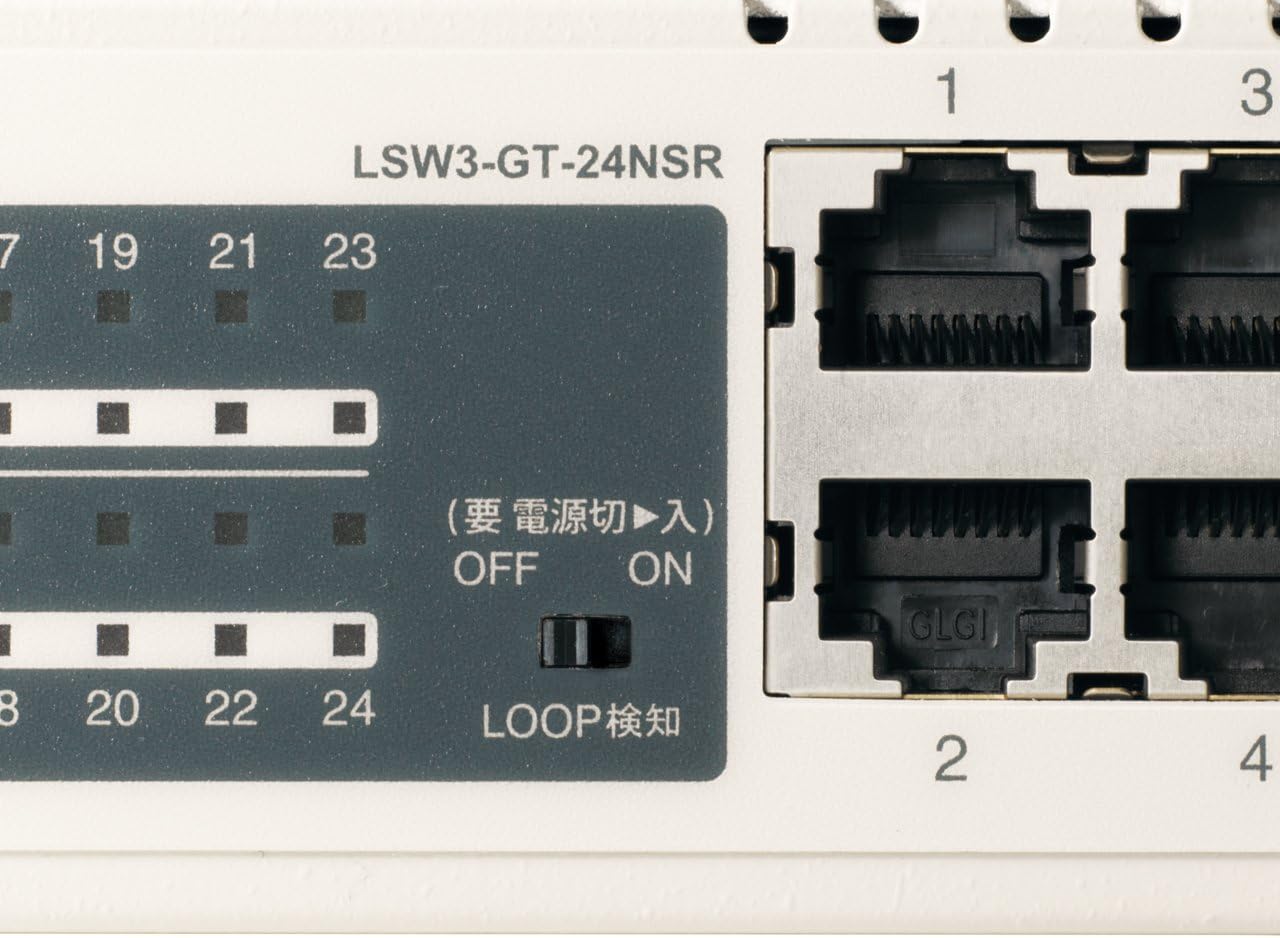
図3:詳細 view of LED Indicators and Loop Detection Switch.
| LED名 | 状態 | 説明 |
|---|---|---|
| 力 | On | デバイスの電源がオンになっています。 |
| リンク/行為 (ポートごと) | On | ネットワークデバイスが接続され、リンクが確立されます。 |
| 点滅 | データはポートを介して送信または受信されています。 | |
| 1000/100/10メートル (ポートごと) | 緑 | Port is operating at 1000 Mbps (Gigabit Ethernet). |
| オレンジ | Port is operating at 100 Mbps (Fast Ethernet). | |
| オフ | Port is operating at 10 Mbps (Ethernet). | |
| LOOP DETECT | On | A network loop has been detected. |
5.2 Loop Detection Function
The LSW3-GT-24NSR features a hardware switch for enabling or disabling the loop detection function. This function helps prevent network instability caused by accidental network loops.
Figure 4: Loop Detection Switch (ON/OFF).
- に: Loop detection is active. If a loop is detected, the corresponding port will be automatically shut down to prevent network broadcast storms, and the LOOP DETECT LED will illuminate.
- OFF: Loop detection is disabled.
It is recommended to keep the loop detection function ON for network stability.
6. メンテナンス
6.1デバイスのクリーニング
To maintain optimal performance, periodically clean the exterior of the switch.
- 清掃する前に電源ケーブルを外してください。
- 乾いた柔らかい布で表面を拭いてください。
- Do not use liquid cleaners, aerosols, or solvents, as these may damage the casing または内部コンポーネント。
6.2 環境への配慮
Ensure the device is operated within its specified environmental conditions:
- 温度: 0°C ~ 40°C (32°F ~ 104°F)
- 湿度: 10% ~ 85% (結露なし)
7。 トラブルシューティング
If you encounter issues with your BUFFALO Giga Switching Hub, refer to the following common problems and solutions.
7.1 電源なし
- 症状: POWER LED が消灯しています。
- 解決: Check if the power cable is securely connected to both the device and the power outlet. Ensure the power outlet is functional.
7.2 No Link or Slow Speed on a Port
- 症状: The LINK/ACT LED for a connected port is off, or the 1000/100/10M LED indicates a lower speed than expected (e.g., 100M instead of 1000M).
- 解決:
- イーサネット ケーブルが両端でしっかりと接続されていることを確認します。
- Try a different Ethernet cable. Ensure it is a Category 5e or higher cable for Gigabit speeds.
- デバイスをスイッチの別のポートに接続します。
- Check the network adapter settings on the connected device (computer, server) to ensure it is configured for auto-negotiation or the correct speed.
7.3 Network Instability / LOOP DETECT LED is On
- 症状: The LOOP DETECT LED is illuminated, and network performance is degraded or unstable.
- 解決:
- A network loop has been detected. This typically occurs when two ports on the same switch (or different switches) are connected to each other, creating an infinite data path.
- Carefully inspect your network cabling to identify and remove any redundant connections that form a loop.
- If the loop detection switch is ON, the affected port will be automatically shut down. Once the loop is resolved, the port should resume normal operation.
8. 仕様
| 特徴 | 説明 |
|---|---|
| ブランド | バッファロー |
| モデル番号 | LSW3-GT-24NSR |
| ポート数 | 24 x 10/100/1000BASE-T RJ-45 ポート |
| スイッチング容量 | 48 Gbps(ノンブロッキング) |
| 転送レート | 35.7Mpps |
| MACアドレステーブルのサイズ | 8Kエントリ |
| ジャンボフレームのサポート | 最大9KB |
| 特徴 | Auto-MDI/MDIX, Auto-Negotiation, Loop Detection Function, Fanless Design |
| 電源 | 内部 AC 電源 |
| 寸法(幅×奥行き×高さ) | (Specific dimensions not provided in source, typical for 1U rackmount) |
| 重さ | (Specific weight not provided in source) |
| 動作温度 | 0℃~40℃ |
| 動作湿度 | 10% ~ 85% (結露なし) |
9. 保証とサポート
This BUFFALO product is covered by a manufacturer's warranty. Please refer to the warranty card included with your product or visit the official BUFFALO web詳細な保証条件については、サイトをご覧ください。
For technical support, product registration, or further assistance, please visit the official BUFFALO support webメーカーのウェブサイトをご覧いただくか、カスタマーサービス部門にお問い合わせください。連絡先は通常、メーカーのウェブサイトに記載されています。 webサイトまたは製品のパッケージ内。