
1. はじめに
ご購入ありがとうございますasing the Atlanta 1669/19 Quartz Alarm Clock. This digital alarm clock features a silent movement, a light sensor for automatic display illumination, and a snooze function. This manual provides detailed instructions for setup, operation, and maintenance to ensure optimal performance and longevity of your device.
2. 安全情報
- デバイスを水や高湿度に近づけないでください。
- Avoid exposing the clock to direct sunlight or extreme temperatures.
- ご自身で時計を分解したり修理したりしないでください。資格のあるサービス担当者にご相談ください。
- 使用済みバッテリーは地域の規制に従って責任を持って廃棄してください。
- 古い電池と新しい電池、または異なる種類の電池を混ぜないでください。
3. パッケージ内容
- Atlanta 1669/19 Quartz Alarm Clock Unit
- ユーザーマニュアル(このドキュメント)
注意: 電池は付属しておりませんので別途ご購入ください。
4.製品オーバーview
The Atlanta 1669/19 features a clear digital display, intuitive controls, and a light sensor for enhanced visibility in low-light conditions.
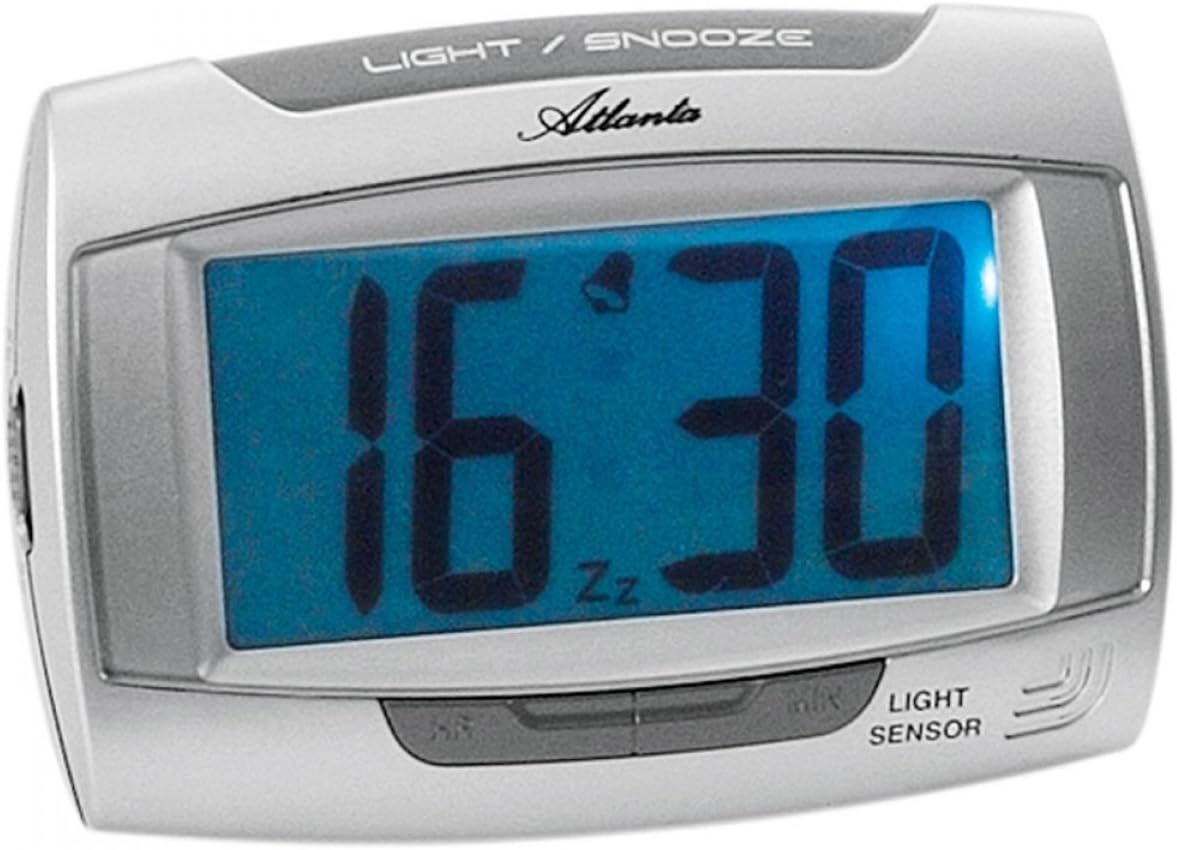
図1: フロント view of the Atlanta 1669/19 Quartz Alarm Clock. The clock features a large digital display, a "LIGHT / SNOOZE" button at the top, and a "LIGHT SENSOR" indicator at the bottom right. The display shows the time 16:30, with an alarm bell icon and 'Zz' indicating snooze functionality.
主要コンポーネント:
- デジタルディスプレイ: 時間とアラームのステータスを表示します。
- ライト/スヌーズボタン: Activates temporary backlight and snooze function.
- 光センサー: Automatically illuminates the display in dark environments.
- Control Buttons (Rear/Side): 時刻やアラームの設定に使用します。
- Battery Compartment (Rear): 必要な電池を収納します。
5. セットアップ
5.1. バッテリーの取り付け
- 目覚まし時計の背面にある電池ケースのカバーを見つけます。
- カバーをスライドまたは持ち上げて取り外します。
- Insert the required batteries (typically 1x AA, refer to compartment markings) ensuring correct polarity (+ and -).
- 電池収納部のカバーをしっかりと取り付けてください。
5.2. 初期時間設定
Upon battery installation, the display will typically show a default time. You will need to set the current time.
- Locate the time setting buttons, usually labeled "SET", "HOUR", and "MINUTE" or similar, on the back or side of the clock.
- Press the "SET" button (or equivalent) to enter time setting mode. The hour digits may start flashing.
- 「HOUR」ボタンを使用して時間を調整します。
- Press "SET" again to move to minute setting. The minute digits may start flashing.
- 「MINUTE」ボタンを使用して分を調整します。
- Press "SET" one more time to confirm and exit time setting mode.
6. 操作手順
6.1.アラームの設定
- Locate the alarm setting buttons, typically labeled "ALARM SET", "ALARM HOUR", and "ALARM MINUTE" or similar.
- Press the "ALARM SET" button to enter alarm setting mode. The alarm hour digits may flash.
- Use the "ALARM HOUR" button to adjust the desired alarm hour.
- Press "ALARM SET" again to move to alarm minute setting. The alarm minute digits may flash.
- Use the "ALARM MINUTE" button to adjust the desired alarm minutes.
- Press "ALARM SET" one more time to confirm and exit alarm setting mode.
6.2. アラームのオン/オフ
There is usually a switch or button to turn the alarm on or off. Look for a switch labeled "ALARM ON/OFF" or an alarm icon button. When the alarm is active, an alarm icon (e.g., a bell) will typically appear on the display.
6.3. スヌーズ機能
When the alarm sounds, press the large "LIGHT / SNOOZE" button located on the top of the clock. This will temporarily silence the alarm, and it will sound again after a few minutes (typically 5-9 minutes). The "Zz" icon on the display indicates that the snooze function is active.
6.4. Light Sensor and Display Backlight
- Automatic Backlight (Light Sensor): The clock is equipped with a light sensor. When enabled, the display will automatically illuminate with a soft, constant light in dark environments, making it easy to read the time at night without pressing any buttons. Look for a switch or button labeled "SENSOR ON/OFF" or similar to enable or disable this feature.
- 一時的なバックライト: To briefly illuminate the display in any lighting condition, press the "LIGHT / SNOOZE" button on the top of the clock. The backlight will stay on for a few seconds and then turn off automatically.
7. メンテナンス
- クリーニング: 時計は柔らかく乾いた布で拭いてください。研磨剤入りの洗剤や溶剤は時計を傷める恐れがあるため使用しないでください。asing またはディスプレイ。
- バッテリー交換: When the display dims or the clock stops functioning correctly, it is time to replace the batteries. Follow the battery installation steps in Section 5.1.
- ストレージ: If the clock will not be used for an extended period, remove the batteries to prevent leakage and damage.
8。 トラブルシューティング
| 問題 | 考えられる原因 | 解決 |
|---|---|---|
| 時計の表示が空白または暗い。 | 電池残量が少ない、または電池が切れている、または電池が正しく取り付けられていない。 | 正しい極性を確認して、新しい電池と交換してください。 |
| アラームは鳴りません。 | Alarm is not activated; alarm time is incorrect; low batteries. | Ensure alarm is switched ON (bell icon visible); verify alarm time setting; replace batteries. |
| Automatic backlight not working. | Light sensor feature is disabled; insufficient darkness. | Ensure the light sensor switch is ON; test in a completely dark room. |
| 時間が間違っています。 | Time was not set correctly; batteries were removed/replaced. | Reset the current time following Section 5.2. |
9. 仕様
| モデル | 1669/19 |
| ブランド | アトランタ |
| 操作モード | デジタル |
| 特集 | Alarm, Lighting (Light Sensor) |
| 材料 | プラスチック |
| フレーム素材 | プラスチック |
| 取り付けタイプ | テーブルトップ |
| 色 | Blue (display), Silver-coloured (case) |
| 電池が必要 | Yes (Type not specified, typically AA or AAA for such clocks) |
| 電池付属 | いいえ |
| 寸法(約) | 11 x 7 cm |
10. 保証とサポート
保証情報やテクニカルサポートについては、ご購入時に付属のマニュアルをご参照いただくか、販売店にお問い合わせください。保証請求の際に必要となるため、購入証明書は保管してください。