
1. はじめに
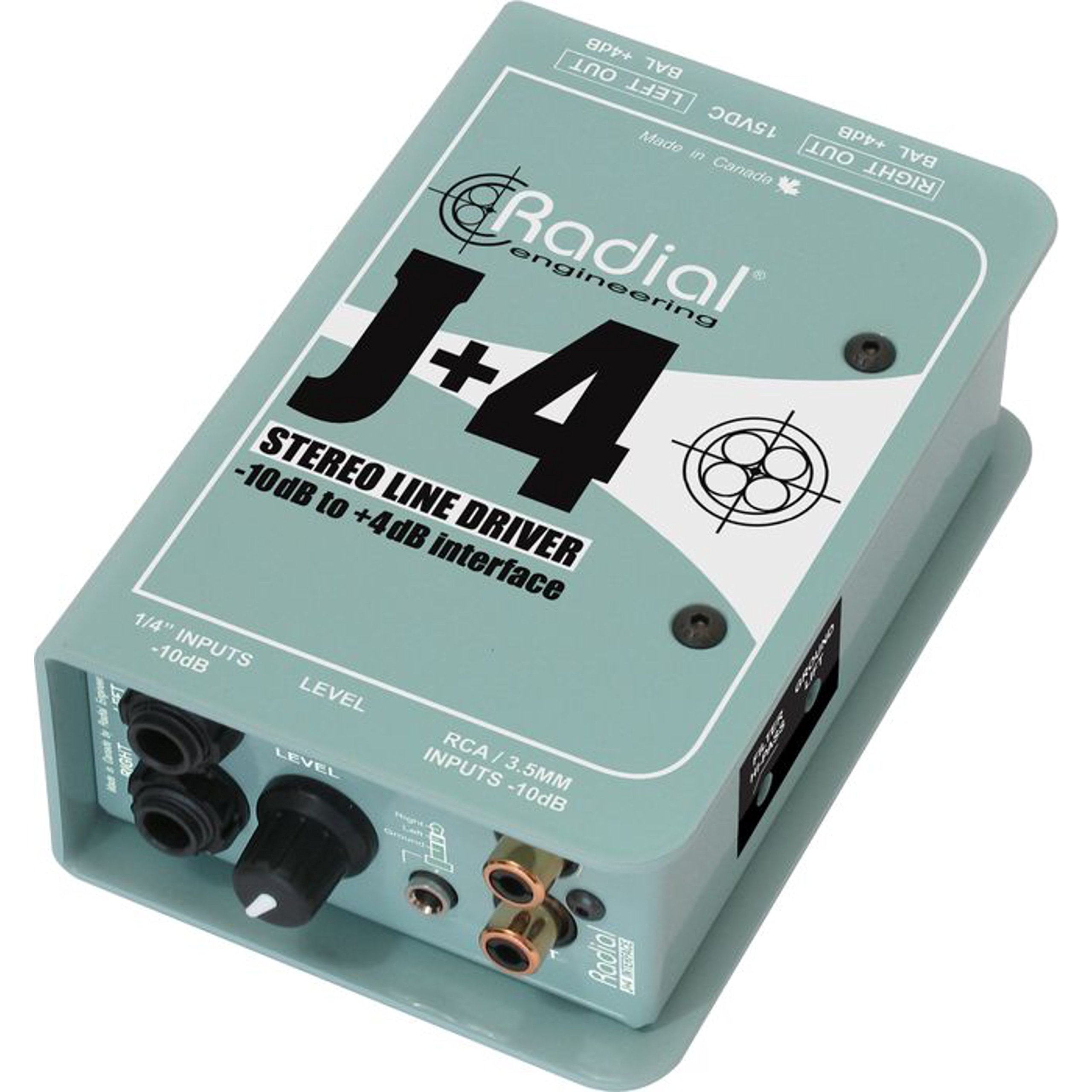
The Radial J+4 is a 2-channel signal level driver designed to interface professional audio equipment with consumer-level or low-output devices. It effectively boosts incoming signals from -10dB to a professional +4dB line level, ensuring optimal signal integrity and compatibility within recording studios, broadcast environments, and live sound applications. Its robust construction and active circuitry provide reliable performance and noise reduction.
2. 重要な安全情報
- 電源: Use only the specified power adapter for this unit. Incorrect voltage can damage the device and void the warranty.
- 水分: ユニットを雨、湿気、または過度の湿度にさらさないでください。
- 熱: ラジエーター、暖房送風口、ストーブ、その他の熱を発生する装置などの熱源の近くにユニットを置かないでください。
- 換気: 適切な換気を確保してください。通気口を塞がないでください。
- サービス: すべてのメンテナンスは資格を持ったサービス担当者にお任せください。本製品をご自身でメンテナンスすることは絶対におやめください。
- ケーブル: Ensure all cables are securely connected and free from damage to prevent signal loss or electrical hazards.
3. 主な特徴
- 2チャンネル操作: Processes two independent audio channels.
- Signal Level Matching: Boosts -10dB consumer-level signals to +4dB professional line level.
- Discrete Circuitry: 100% discrete signal path for optimal audio fidelity.
- Active Buffering: Maintains signal integrity over long cable runs.
- Transformer Isolation: Helps eliminate ground loop hum and noise.
- Stereo Gain Control: Allows precise level adjustment for both channels.
- ハイパスフィルター: 不要な低周波の振動やノイズを低減します。
- 地上リフトスイッチ: Breaks the ground connection to further combat hum.
- 多彩な入力: Features dual 1/4" TRS, RCA, and a stereo 1/8" TRS input.
- 耐久性のある構造: Built with 14-gauge steel for roadworthy reliability.
4. コントロールと接続
The Radial J+4 features a straightforward layout for easy integration into any audio setup.
フロントパネル
The front panel provides access to input connections and primary controls.
- INPUTS (1/4" TRS, RCA, 1/8" TRS): Connect your low-level audio sources here. The 1/4" and RCA jacks are typically for stereo pairs, while the 1/8" TRS is for portable devices.
- ゲインコントロール: A rotary knob to adjust the output level of the boosted signal.
- HIGHPASS Filter Switch: Engages a filter to remove low-frequency content.
- グラウンドリフトスイッチ: オーディオ グランドをシャーシ グランドから切断し、グランド ループによって発生するハムやバズを除去します。
背面パネル
The rear panel houses the output connections and power input.
- OUTPUTS (XLR): Balanced XLR outputs for connecting to professional audio equipment such as mixers, audio interfaces, or power amplifiers。
- 電源入力: Connection point for the external power supply.
5.セットアップガイド
Follow these steps for initial setup of your Radial J+4:
- すべての機器の電源をオフにします。 Before making any connections, ensure all audio equipment (source devices, mixers, amplifiers) are powered off.
- 入力ソースを接続します: Connect your low-level audio source (e.g., MP3 player, computer, instrument output) to the appropriate input jacks on the front panel of the J+4 (1/4" TRS, RCA, or 1/8" TRS).
- 出力を接続: Connect the XLR outputs of the J+4 to the line-level inputs of your professional audio equipment (e.g., mixer, audio interface). Use balanced XLR cables for optimal performance.
- 接続電源: Connect the provided power adapter to the POWER INPUT on the rear panel of the J+4, then plug the adapter into an appropriate power outlet.
- 電源オン: Power on your professional audio equipment first, then power on your source device. The J+4 will power on automatically when connected to its power supply.
- 初期ゲイン設定: Set the GAIN control on the J+4 to its minimum position before playing audio.
6. 操作
Once connected, operating the J+4 is straightforward:
- ゲインの調整: Play audio from your source device. Slowly increase the GAIN control on the J+4 until the desired output level is achieved at your professional audio equipment. Monitor the input levels on your mixer or interface to avoid clipping.
- Using the Highpass Filter: If you notice excessive low-frequency rumble or unwanted bass content, engage the HIGHPASS filter switch. This can help clean up the signal, especially with vocal or acoustic instrument sources.
- Addressing Hum and Buzz: If you experience a persistent hum or buzz, try engaging the GROUND LIFT switch. This can often resolve ground loop issues by breaking the electrical ground connection between the J+4 and other equipment. If the hum persists, check all cable connections and try different power outlets.
7. メンテナンス
The Radial J+4 is designed for durability and requires minimal maintenance.
- クリーニング: 本体の外装を清掃する際は、柔らかく乾いた布をご使用ください。研磨剤入りの洗剤、溶剤、ワックスは使用しないでください。
- 検査: ケーブルや接続部に摩耗や損傷の兆候がないか定期的に点検してください。
- ストレージ: 長期間使用しない場合は、乾燥したほこりのない環境に保管してください。
8。 トラブルシューティング
If you encounter issues with your Radial J+4, refer to the following common problems and solutions:
| 問題 | 考えられる原因 | 解決 |
|---|---|---|
| 音声出力なし |
|
|
| ハムまたはバズ |
|
|
| 歪んだ音 |
|
|
9. 仕様
- モデル: R800 8015
- チャンネル数: 2
- 接続技術: 1/4" TRS, 1/8" TRS, RCA (inputs), XLR (outputs)
- Signal Level Conversion: -10dB〜 + 4dB
- 材質タイプ: ステンレス鋼
- 製品寸法: 10.8 x 4.9 x 2.8インチ
- 商品の重量: 0.01オンス
- 対応デバイス: Personal Computer, various audio sources
- サポートされているソフトウェア: Pro Tools, Logic Pro, Ableton Live, FL Studio, Cubase (when used with compatible audio interfaces)
10. 保証とサポート
For warranty information and technical support, please refer to the official Radial Engineering webご購入の際は、ウェブサイトをご覧いただくか、カスタマーサービスまでお問い合わせください。保証請求の際は、購入証明としてレシートを保管してください。