
導入
This manual provides essential instructions for the setup, operation, and maintenance of your Logitech Stereo Headset H110. Please read this guide thoroughly before using the product to ensure optimal performance and longevity.
パッケージ内容
The Logitech Stereo Headset H110 package typically includes:
- Logitech Stereo Headset H110
- ユーザードキュメント(このマニュアル)
製品終了view
The Logitech Stereo Headset H110 is designed for clear audio communication and listening. It features a comfortable over-the-head design with an adjustable microphone.

画像1: The Logitech Stereo Headset H110, showing the adjustable headband, earcups with foam padding, and the flexible microphone boom.
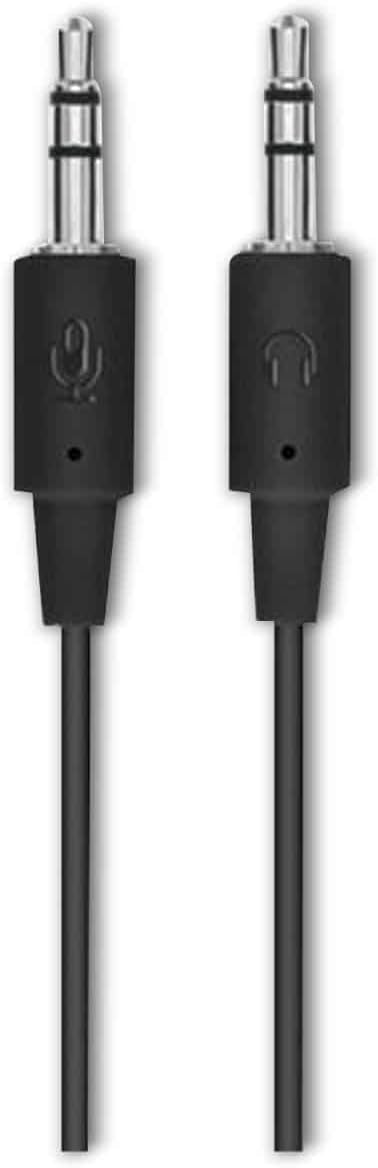
画像2: The two 3.5mm audio jacks for the Logitech H110 headset. One jack is for audio output (headphones), and the other is for microphone input.
設定
- ヘッドセットを接続します:
The Logitech H110 headset uses two 3.5mm audio jacks. One jack is typically green for audio output (headphones), and the other is pink for microphone input. Connect the green jack to your computer's audio output port and the pink jack to your computer's microphone input port.
注記: Some devices, such as laptops or smartphones, may use a single combined 3.5mm jack for both audio and microphone. An adapter (not included) may be required for compatibility with such devices.
- ヘッドセットを調整する:
Adjust the headband for a comfortable fit on your head. The earcups should rest gently over your ears.
- マイクを配置します。
Position the flexible microphone boom so that the microphone is approximately 1-2 inches (2.5-5 cm) from your mouth for optimal voice clarity.
操作手順
- オーディオ再生:
Once connected, your computer should automatically detect the headset as an audio output device. Play any audio (music, video, calls) to test the sound. Adjust the volume using your computer's system volume controls.
- マイクの使用:
For voice communication (e.g., video calls, online gaming), ensure the headset microphone is selected as the input device in your computer's sound settings or within the application you are using. Speak clearly into the microphone.
メンテナンス
- クリーニング:
Wipe the headset surfaces with a soft, dry cloth. Do not use liquid cleaners or abrasive materials. For the foam earpads, gently dab with a slightly damp 必要に応じて布で拭き、使用前に完全に自然乾燥させてください。
- ストレージ:
ヘッドセットは、極端な温度や直射日光を避け、清潔で乾燥した場所に保管してください。ケーブルが絡まないようにしてください。
- ケーブルのお手入れ:
ヘッドセットを取り外す際にケーブルを引っ張らないでください。必ずプラグをしっかりと握ってください。ケーブルを鋭角に曲げたり、ねじれたりすると内部損傷につながる恐れがあります。
トラブルシューティング
| 問題 | 考えられる解決策 |
|---|---|
| ヘッドセットから音が出ない |
|
| マイクが機能しない |
|
| 音質が悪い |
|
仕様
- モデル: H110
- 部品番号 (P/N): 981-000271
- 接続性: Dual 3.5mm audio jacks (one for audio, one for microphone)
- 寸法(高さ×幅×奥行き): 約5.91 x 2.36 x 0.79インチ(15 x 6 x 2 cm)
- 重さ: 約5.3オンス(150グラム)
- マイクロフォン: Adjustable, noise-cancelling (typical for basic headsets)
- イヤーカップ: Foam padded
保証とサポート
Specific warranty information for the Logitech Stereo Headset H110 is typically provided with the product packaging or available on the official Logitech website. For technical support, product registration, or further assistance, please visit the official Logitech support page:
注記: Warranty terms and conditions may vary by region and purchase date. Please retain your proof of purchase for warranty claims.