
1. はじめに
This manual provides essential information for the proper installation, operation, and maintenance of your Western Digital WD1600HLFS hard drive. The WD1600HLFS is a high-performance 3.5-inch internal hard disk drive designed for demanding applications, featuring a 160GB storage capacity, SATA 3Gb/s interface, and a 10,000 RPM spindle speed for rapid data access.
2. 安全情報
Please read and understand all safety precautions before installing or operating this device. Failure to do so may result in personal injury or damage to the product or other components.
- 静電気放電 (ESD) に関する予防措置: Always handle the hard drive by its edges and avoid touching the circuit board or connector pins. Use an anti-static wrist strap or ground yourself by touching a metal object before handling the drive to prevent ESD damage.
- 電源切断: Ensure your computer system is completely powered off and unplugged from the electrical outlet before installing or removing the hard drive.
- 物理的な取り扱い: Hard drives are delicate. Avoid dropping, striking, or exposing the drive to excessive vibration or shock.
- 換気: 過熱を防ぐために、コンピューター ケース内のハード ドライブの周囲に十分な空気の流れを確保してください。
- データのバックアップ: Seller is not responsible for data loss. Always back up your data before servicing or making changes to your hard disk.
3. パッケージ内容
パッケージに次のアイテムが含まれていることを確認してください。
- Western Digital WD1600HLFS 160GB Hard Drive
- Note: Additional accessories such as mounting screws, SATA data cables, or power adapters are typically supplied with your computer system or sold separately. The inclusion of a mounting tray may vary.
4. セットアップとインストール
4.1 システム要件
- Available 3.5-inch drive bay in your computer case.
- Available SATA port on your motherboard.
- Available SATA power connector from your power supply.
- Compatible operating system (e.g., Windows, macOS, Linux).
4.2物理的な設置
- システムを準備する: Power off your computer and unplug the power cord. Open the computer case according to your system's instructions.
- ドライブをマウントします。 Slide the WD1600HLFS hard drive into an available 3.5-inch drive bay. Secure it with screws on both sides of the drive bay. If your system uses a tool-less mounting mechanism, follow its specific instructions.
- データケーブルを接続します: Connect one end of a SATA data cable to the SATA data port on the hard drive and the other end to an available SATA port on your motherboard.
- 電源ケーブルを接続します: Connect a SATA power connector from your power supply to the SATA power port on the hard drive.

図1: 前面 view of the WD1600HLFS with its mounting tray, highlighting the SATA data and power interfaces.

図2:下 view of the WD1600HLFS, illustrating the printed circuit board (PCB) and screw points for secure installation.
4.3 初期システムセットアップ
- BIOS/UEFI 構成: After reassembling your computer and powering it on, enter your system's BIOS or UEFI settings. Ensure the new hard drive is detected and configured correctly (e.g., SATA mode set to AHCI for optimal performance).
- オペレーティング システムのセットアップ:
- 新規インストール: If installing an operating system on this drive, follow your OS installation media's instructions for partitioning and formatting the drive.
- Adding as Secondary Drive: If adding as a secondary drive, boot into your existing operating system. Use Disk Management (Windows) or Disk Utility (macOS/Linux) to initialize, partition, and format the new drive before use.
5. 操作
The Western Digital WD1600HLFS functions as a standard internal hard disk drive. Once properly installed and formatted, it can be used for:
- Operating System Storage: Install your operating system for fast boot times and application loading due to its 10,000 RPM speed.
- データストレージ: 店 file、アプリケーション、メディア。
- ゲーム: Benefit from quicker game loading times compared to slower drives.
- Workstation Applications: Ideal for applications requiring high I/O performance.
オペレーティングシステムの file explorer or command line interface, just like any other storage device.
6. メンテナンス
To ensure the longevity and optimal performance of your WD1600HLFS hard drive, consider the following maintenance practices:
- Regular Data Backups: Periodically back up critical data to another storage device. Hard drives can fail, and backups are your only protection against data loss.
- ドライブの状態を監視する: Utilize SMART (Self-Monitoring, Analysis and Reporting Technology) tools available in many operating systems or third-party utilities to monitor the drive's health status.
- Maintain Proper Cooling: Ensure your computer case has adequate ventilation to prevent the drive from overheating, which can reduce its lifespan.
- デフラグ(HDDの場合) While modern operating systems often handle this automatically, occasional defragmentation can help maintain performance on traditional hard drives.
- 物理的な衝撃を避ける: Protect your computer from drops or impacts while the drive is operating.
7。 トラブルシューティング
If you encounter issues with your WD1600HLFS hard drive, refer to the following common problems and solutions:
- ドライブが検出されません:
- Check all SATA data and power cable connections.
- システムの BIOS/UEFI 設定でドライブが有効になっていることを確認します。
- ドライブを別の SATA ポートに接続するか、別のケーブルを使用してみてください。
- Ensure your power supply is providing sufficient power.
- パフォーマンスが遅い:
- 過剰なバックグラウンド プロセスやマルウェアがないか確認します。
- ドライブがほぼいっぱいになっていないことを確認してください。
- Verify SATA drivers are up to date.
- Run a disk defragmenter (if applicable).
- Monitor drive temperature; overheating can cause throttling.
- 異常な音(カチカチ音、ガリガリ音):
- Immediately back up any accessible data.
- Unusual noises often indicate a mechanical failure. Discontinue use to prevent further damage.
- Contact Western Digital support if the drive is under warranty.
- データ破損:
- Run disk error checking utilities (e.g., CHKDSK on Windows).
- Ensure proper system shutdown to prevent data loss.
If these steps do not resolve your issue, consult the Western Digital support web現場または資格のある技術者に依頼してください。
8. 仕様
Below are the technical specifications for the Western Digital WD1600HLFS hard drive:

Figure 3: Product label of the WD1600HLFS, detailing model, serial, and part numbers.
- シリアル番号 (S/N): WXE0C79C3272
- 部品番号 (P/N): 490581-001
- Controller (CT): 2AHER013HY10B9
- Model (MDL): WD1600HLFS-60G6U1
- Spare Part Number (S/C): 8509C309GRH
| 特徴 | 説明 |
|---|---|
| モデル番号 | WD1600HLFS |
| ストレージ容量 | 160ギガバイト |
| インタフェース | SATA 3Gb/s (SATA/300) |
| スピンドル速度 | 10,000 回転 |
| バッファサイズ | 16MB |
| フォームファクター | 3.5インチ |
| Average Read Speed | 80.5 MB/秒 |
| Random Access (Read/Write) | 8.1ミリ秒 |
| 電力仕様 | 5VDC、0.90A; 12VDC、0.30A |
| アイテム重量 | 1.25ポンド(0.57kg) |
| 製品寸法(長さx幅x高さ) | 0.09 x 0.07 x 0.04インチ(約) |
| 規制当局の承認 | BSMI, cULus, C-Tick, MIC, CE, WEEE |
| 初回利用可能日 | 4年2010月XNUMX日 |
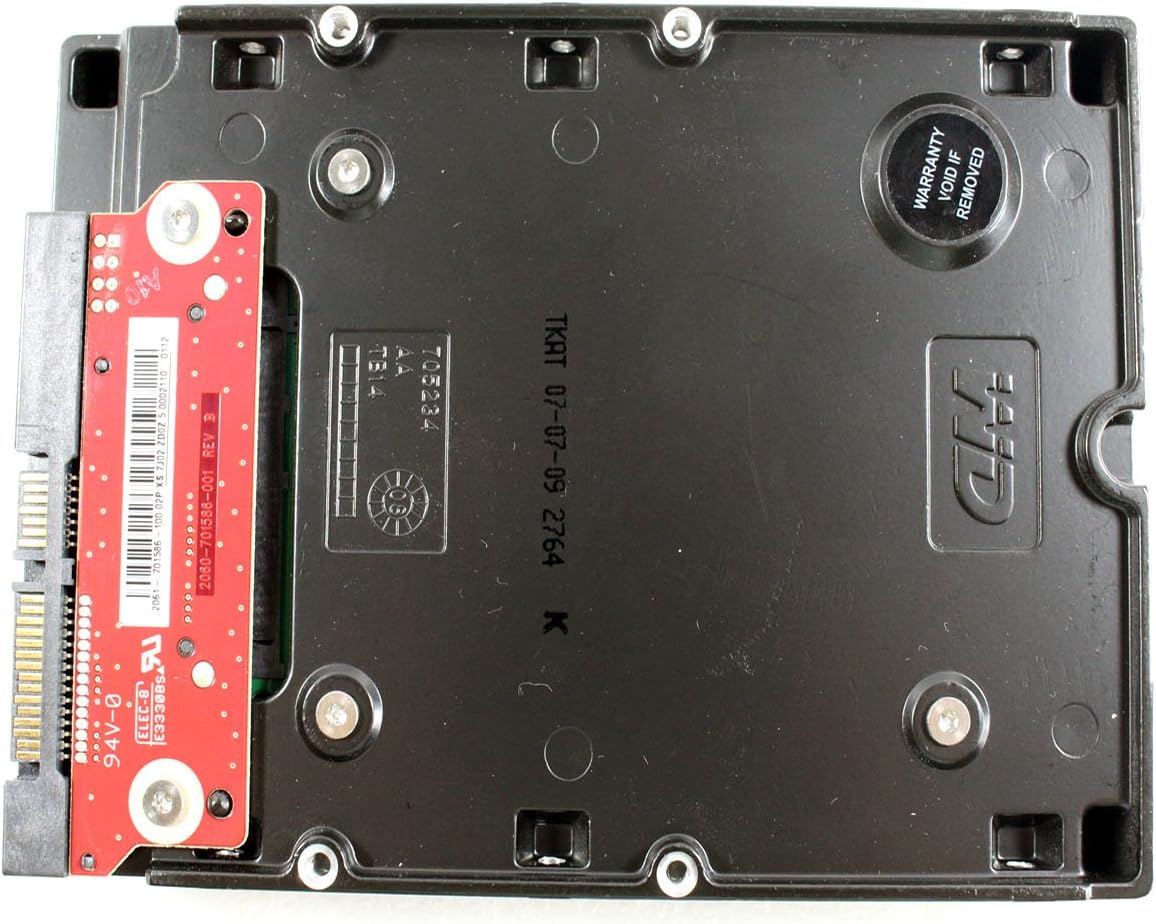
図4:下 view of the WD1600HLFS without the tray, showing the PCB and a warranty sticker.

図5:詳細 view of the WD1600HLFS PCB, including component markings.
9. 保証とサポート
法的免責事項: Seller is not responsible for data loss. Always back up your data before servicing your hard disk.
The WD1600HLFS hard drive is manufactured by Western Digital. For specific warranty terms, conditions, and duration, please refer to the documentation provided with your purchase or visit the official Western Digital website. Note that tampering with the drive, such as removing certain labels or components, may void the warranty, as indicated by the 'Warranty Void If Removed' sticker on the drive.
For technical assistance, driver downloads, or further support, please visit the official Western Digital support portal:
- Western Digital Support: https://support.wdc.com