
1. セットアップ
1.1 開梱と初期検査
Carefully remove your ASUS K52F-A2B laptop from its packaging. Inspect the laptop and all accessories for any signs of damage. The package should contain the laptop, AC adapter, power cord, and documentation.
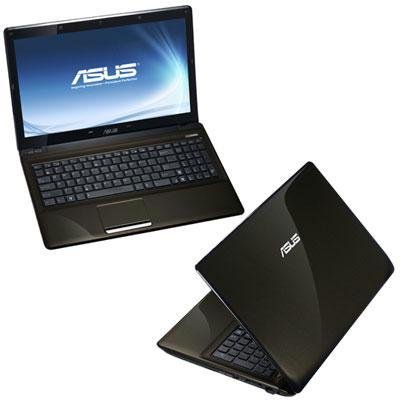
Image 1.1: The ASUS K52F-A2B laptop. This image shows the closed laptop from an angle, highlighting its dark brown finish and sleek design.
1.2 ACアダプタの接続
Before initial use, connect the AC adapter to the laptop and a power outlet. This ensures the battery is charged and provides stable power for setup.
- AC アダプターをノートパソコンの側面にある電源コネクタに差し込みます。
- 電源コードをACアダプターに差し込みます。
- 電源コードのもう一方の端を接地されたコンセントに差し込みます。
1.3初期電源オン
Once the AC adapter is connected, open the laptop lid and press the power button. The laptop will begin its initial boot sequence. Follow the on-screen instructions to complete the operating system setup (Windows 7 Professional 64-bit).
2. Operating Your ASUS K52F-A2B Laptop
2.1 電源のオン/オフとスリープモード
- 電源オン: キーボードの上にある電源ボタンを押します。
- 電源を切る: Click the Start button, then select 'Shut down'.
- スリープモード: Close the laptop lid or select 'Sleep' from the Start menu. Press the power button or any key to wake the laptop.
2.2 キーボードとタッチパッドの使用
The ASUS K52F-A2B features a full-sized keyboard and a multi-touch touchpad.
- キーボード: Standard QWERTY layout with function keys (Fn) for brightness, volume, and other system controls.
- タッチパッド: Supports multi-touch gestures for scrolling, zooming, and navigation. Refer to the operating system's help for detailed gesture information.
2.3 外部機器の接続
Your laptop provides various ports for connecting external devices:
- USB ポート: マウス、キーボード、外部ストレージなどの USB デバイスを接続します。
- HDMIポート: Connects to external displays or TVs for high-definition video and audio output.
- VGAポート: Connects to older external monitors or projectors.
- オーディオジャック: ヘッドフォンとマイク用。
- イーサネットポート: 有線ネットワーク接続用。
2.4 Using the Optical Disk Drive
The laptop includes a Super Multi Optical Disk Drive for reading and writing CDs and DVDs.
- ドライブの取り出しボタンを押してトレイを開きます。
- ラベル面を上にして CD または DVD をトレイに置きます。
- カチッと音がして閉まるまで、トレイをラップトップにゆっくりと押し戻します。
3. メンテナンス
3.1 ノートパソコンの掃除
定期的なクリーニングは、ラップトップの外観と機能を維持するのに役立ちます。
- 画面: 柔らかく糸くずの出ない布を軽く拭いてください。amp水またはスクリーンクリーナーで拭き取ってください。液体を画面に直接吹き付けないでください。
- キーボードとCasing: 柔らかく乾いた布を使用してください。頑固な汚れには、布で軽く拭いてください。ampened with mild soap and water can be used. Ensure the laptop is powered off and unplugged before cleaning.
- 通気口: Use compressed air to clear dust from the cooling vents to prevent overheating.
3.2バッテリーケア
バッテリー寿命とパフォーマンスを最大限に高めるには:
- バッテリーを頻繁に完全に放電することは避けてください。
- 長期間使用しない場合は、ノートパソコンを涼しく乾燥した場所に保管してください。
- 長期間保管する場合は、保管前にバッテリーを約50%まで充電してください。
3.3ソフトウェアアップデート
最適なパフォーマンスとセキュリティを確保するため、オペレーティングシステムとドライバーを定期的に更新してください。ASUSサポートをご確認ください。 website for the latest drivers for your K52F-A2B model.
4。 トラブルシューティング
This section addresses common issues you might encounter with your ASUS K52F-A2B laptop.
4.1 電源の問題
- ノートパソコンが起動しない: Ensure the AC adapter is securely connected to both the laptop and a working power outlet. Check if the power outlet is functional. If the battery is completely drained, allow it to charge for a few minutes before attempting to power on.
- ラップトップが突然シャットダウンする: This could indicate overheating. Ensure cooling vents are clear and the laptop is on a hard, flat surface.
4.2 表示の問題
- 画面に何も表示されない: Connect an external monitor to the VGA or HDMI port to check if the issue is with the laptop's internal display. Press Fn+F8 to toggle display output modes.
- ディスプレイを暗くする: Adjust screen brightness using the Fn+F5 (dim) and Fn+F6 (bright) function keys.
4.3 接続の問題
- Wi-Fi が接続されない: Ensure Wi-Fi is enabled (often via a function key, e.g., Fn+F2). Check network settings in Windows.
- USBデバイスが認識されません: デバイスを別のUSBポートに接続してみてください。デバイスドライバーがインストールされていることを確認してください。
4.4 Operating System Recovery
The ASUS K52F-A2B comes with Windows 7 Professional. For system recovery or reinstallation, it is recommended to use the recovery partition or create recovery media as instructed by ASUS. Note that official support for downgrading to Windows XP Pro may be limited, and recovery media for Windows 7 Pro might need to be created by the user.
5. 技術仕様
| 特徴 | 仕様 |
|---|---|
| モデル番号 | K52F-A2B |
| プロセッサ | インテル Core i3-350M (2.26GHz) |
| オペレーティング·システム | Windows 7 プロフェッショナル 64 ビット |
| 画面 | 15.6-inch HD (1366x768) LED |
| グラフィックス | Intel GMA HD(統合型) |
| RAMメモリ | 3 GB DDR3 1066MHz (Max 8GB) |
| ストレージ | 320 GB Hard Drive (5400 RPM) |
| 光学ドライブ | DVD スーパーマルチ |
| ワイヤレス接続 | 802.11bgn |
| ポート | HDMI, VGA, USB, Audio Jacks |
| Webカム | 0.3 MP |
| 重さ | 5.8 ポンド |
6. 保証とサポート
6.1 保証情報
Your ASUS K52F-A2B laptop comes with the following warranty coverage:
- 2年間のグローバル保証
- 1-Year Accidental Damage Warranty
- 30-Day Zero Bright Dot Guarantee
- 2-way FREE shipping for repairs
6.2 テクニカルサポート
技術的なサポート、ドライバーのダウンロード、または詳しい情報については、ASUSの公式サポートをご覧ください。 website. 24/7 technical support is available as part of your warranty.
For the most up-to-date support contact information, please refer to the documentation included with your product or visit www.asus.com/support.


