
導入
This manual provides detailed instructions for the operation and maintenance of your Calypso K5558/2 Digital Quartz Watch. Please read this manual thoroughly to ensure proper use and to maximize the lifespan of your watch. This watch features a digital display, backlight, stopwatch, intermediate times, and an alarm function, all housed in a durable plastic case with a multicolored rubber strap.
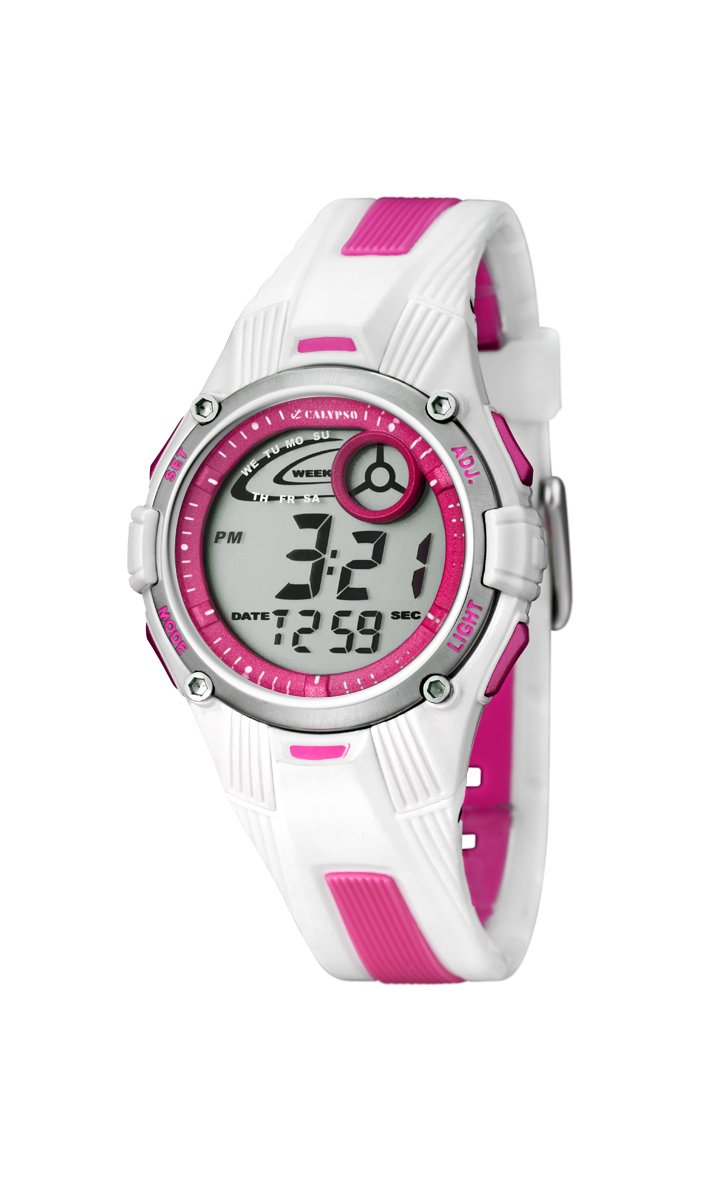
画像: 正面 view of the Calypso K5558/2 Digital Quartz Watch. This image shows the watch's digital display and the overall design.
設定
初期アクティベーション
Your Calypso K5558/2 watch comes with a battery pre-installed. If the display is not active, gently press any button to activate it. If the watch remains inactive, the battery may need to be replaced (refer to the Maintenance section).
時刻と日付の設定
- 設定モードに入る: を押し続けます モード button (usually located on the bottom left) until the seconds start flashing.
- 秒数を調整: を押す リセット button (usually top right) to reset the seconds to zero.
- 次の項目を選択: を押す モード button again to move to the next setting item (e.g., hours, minutes, month, date, day).
- 値を調整: 使用 始める button (usually top left) to increase the value of the flashing item.
- 設定を確認: 押し続ける モード to cycle through all settings. Once all adjustments are made, press モード 最後にもう一度押して設定モードを終了します。

画像: 斜め view of the Calypso K5558/2 Digital Quartz Watch, showing the watch face and side buttons.
操作手順
時間表示モード
を押す モード button to cycle through different display modes: Time, Stopwatch, and Alarm.
バックライトの使用
暗い場所でディスプレイを点灯させるには、 ライト button (usually located on the top right). The backlight will remain active for a few seconds.
Stopwatch Function (Chronometer and Intermediate Times)
- ストップウォッチモードに入る: を押す モード button until "00:00:00" appears on the display.
- 開始/停止: を押す 始める ボタンを押すと計測が始まります。もう一度押すと一時停止します。
- ラップ/スプリットタイム: ストップウォッチが作動中に、 リセット button to record an intermediate (lap/split) time. The display will show the lap time for a few seconds before returning to the running total.
- リセット: When the stopwatch is paused, press the リセット button to clear the time to "00:00:00".
アラームの設定と使用
- アラームモードに入る: を押す モード button until the alarm time is displayed (e.g., "AL").
- アラーム時間の設定: を押し続けます リセット button until the alarm hours start flashing. Use the 始める ボタンを押して時間を調整します。 モード 分単位で移動して調整する 始める.
- アラームのアクティブ化/非アクティブ化: アラームモードで、を押します 始める button to toggle the alarm ON/OFF. An alarm icon (e.g., a bell) will appear on the display when activated.
- アラーム音を停止: アラームが鳴ったら、いずれかのボタンを押してアラームを停止してください。
耐水性
This watch is water-resistant up to 100 meters (10 ATM). This means it is suitable for swimming and snorkeling. 時計が水中に浸かっている間はボタンを押さないでください。 防水シールが損なわれる可能性があるため、時計を熱湯や蒸気にさらさないでください。
メンテナンス
時計のクリーニング
時計のケースとストラップは定期的に柔らかくて乾いた布で拭いてください。amp cloth. For stubborn dirt, a mild soap solution can be used, followed by rinsing with clean water and drying thoroughly. Avoid using harsh chemicals or abrasive cleaners, as these can damage the watch materials.
ストラップのお手入れ
The rubber strap may show signs of discoloration over time, especially lighter colors, due to exposure to dirt, sweat, and UV light. Regular cleaning can help mitigate this. If discoloration becomes significant or the strap shows signs of wear, consider replacing it with an official Calypso replacement strap.
バッテリー交換
When the display becomes dim or the watch stops functioning, the battery may need replacement. This watch uses a "C" type battery. Battery replacement should ideally be performed by a qualified watch technician to ensure proper sealing and maintain water resistance. Attempting to replace the battery yourself may void any implied warranty and compromise the watch's water resistance.
トラブルシューティング
| 問題 | 考えられる原因 | 解決 |
|---|---|---|
| ディスプレイが空白または暗い。 | バッテリー残量が少ない、または消耗しています。 | バッテリーを交換してください(メンテナンスセクションを参照)。 |
| ボタンが反応しません。 | 時計がロックモードになっているか、内部に故障がある可能性があります。 | すべてのボタンをしっかりと押してみてください。問題が解決しない場合は、技術者にご相談ください。 |
| 時間が不正確です。 | 時刻設定が間違っているか、電池残量が少ないです。 | Reset the time (refer to Setup section). If problem continues, replace battery. |
| 時計の中に水が入りました。 | Water resistance compromised (e.g., buttons pressed underwater, seals damaged). | すぐに時計を専門の技術者に持ち込み、点検と修理を依頼してください。ご自身で乾燥させようとしないでください。 |
仕様
- モデル番号: K5558/2
- 表示タイプ: デジタル
- 移動タイプ: 石英
- ケース素材: プラスチック
- ストラップ素材: Rubber (Multicolored)
- ケース直径: 36ミリメートル
- ケースの厚さ: 10ミリメートル
- 耐水深度: 100メートル(10気圧)
- 特別な機能: Alarm, Stopwatch, Backlight, Intermediate Times
- 留め具タイプ: バックル
- 電源: 電池式(単2電池1本付属)
- 商品の重量: 34グラム
保証とサポート
保証: This product is sold without a manufacturer's warranty ("Pas de garantie"). Please refer to your retailer's return policy for any initial defects.
サポート: For further assistance or inquiries regarding your Calypso K5558/2 watch, please contact your point of purchase or visit the official Calypso webカスタマーサービス情報のサイト。