
導入
ご購入ありがとうございますasing the Optimus F-1760 16-inch Wave Oscillating Stand Fan. This manual provides important information regarding the safe operation, assembly, maintenance, and troubleshooting of your fan. Please read these instructions thoroughly before use and retain them for future reference.

Image: The Optimus F-1760 stand fan positioned in a bedroom, showcasing its design and size relative to furniture.
重要な安全上の注意事項
電気製品を使用するときは、火災、感電、人への傷害のリスクを軽減するために、次のような基本的な注意事項を常に従う必要があります。
- このファンを使用する前に、すべての手順をお読みください。
- このファンは、本書に記載されている用途にのみ使用してください。推奨されていない用途で使用すると、火災、感電、または人身傷害を引き起こす可能性があります。
- 感電を防ぐため、ファンを窓に置いたり、ユニット、プラグ、コードを水に浸したり、液体を吹きかけたりしないでください。
- いかなる機器も、子供が使用したり、子供の近くで使用したりする場合には、厳重な監視が必要です。
- 使用していないとき、ファンを別の場所へ移動させるとき、および清掃する前には、ファンのプラグをコンセントから抜いてください。
- Do not operate fan in the presence of explosive and/or flammable fumes.
- 直火、調理器具、その他の暖房器具の近くにファンや部品を置かないでください。
- Do not operate fan with a damaged cord or plug, or after the fan malfunctions or has been dropped or damaged in any manner.
- 可動部品との接触を避けてください。
- 取り外すには、プラグを掴んで壁のコンセントから引き抜きます。コードを引っ張らないでください。
- 必ず乾燥した平らな場所で使用してください。
- ファンを壁や天井に吊るしたり、取り付けたりしないでください。
- ファン グリルが適切な位置にない状態で操作しないでください。
- This product employs overload protection (fuse). A blown fuse indicates an overload or short-circuit situation. If the fuse blows, unplug the product from the outlet. Replace the fuse as per the servicing instructions (follow product marking for proper fuse rating) and check the product. If the replacement fuse blows, a short-circuit may be present and the product should be discarded or returned to an authorized service facility for examination and/or repair.
セットアップと組み立て
The Optimus F-1760 fan requires minimal assembly. Ensure all components are present and undamaged before proceeding.
- ベースアセンブリ: Attach the weighted base legs to the main pole. Ensure they are securely fastened to provide stability. The base is designed to be sturdy, with weights at the ends of the feet.
- 高さ調整: The fan's height can be adjusted. Loosen the height adjustment knob on the pole, extend or retract the pole to the desired height, and then securely tighten the knob.
- ファンヘッドアタッチメント: Ensure the fan head is securely attached to the top of the pole. The motor housing and fan blade are plastic, while the grill is metal.
- 配置: Place the fan on a dry, level surface. Ensure there is adequate space around the fan for proper air circulation and oscillation.
操作手順
The Optimus F-1760 fan offers multiple control options and features for customized comfort.
コントロールパネル
The fan features a 4-position push-button switch on the pole for basic operation.
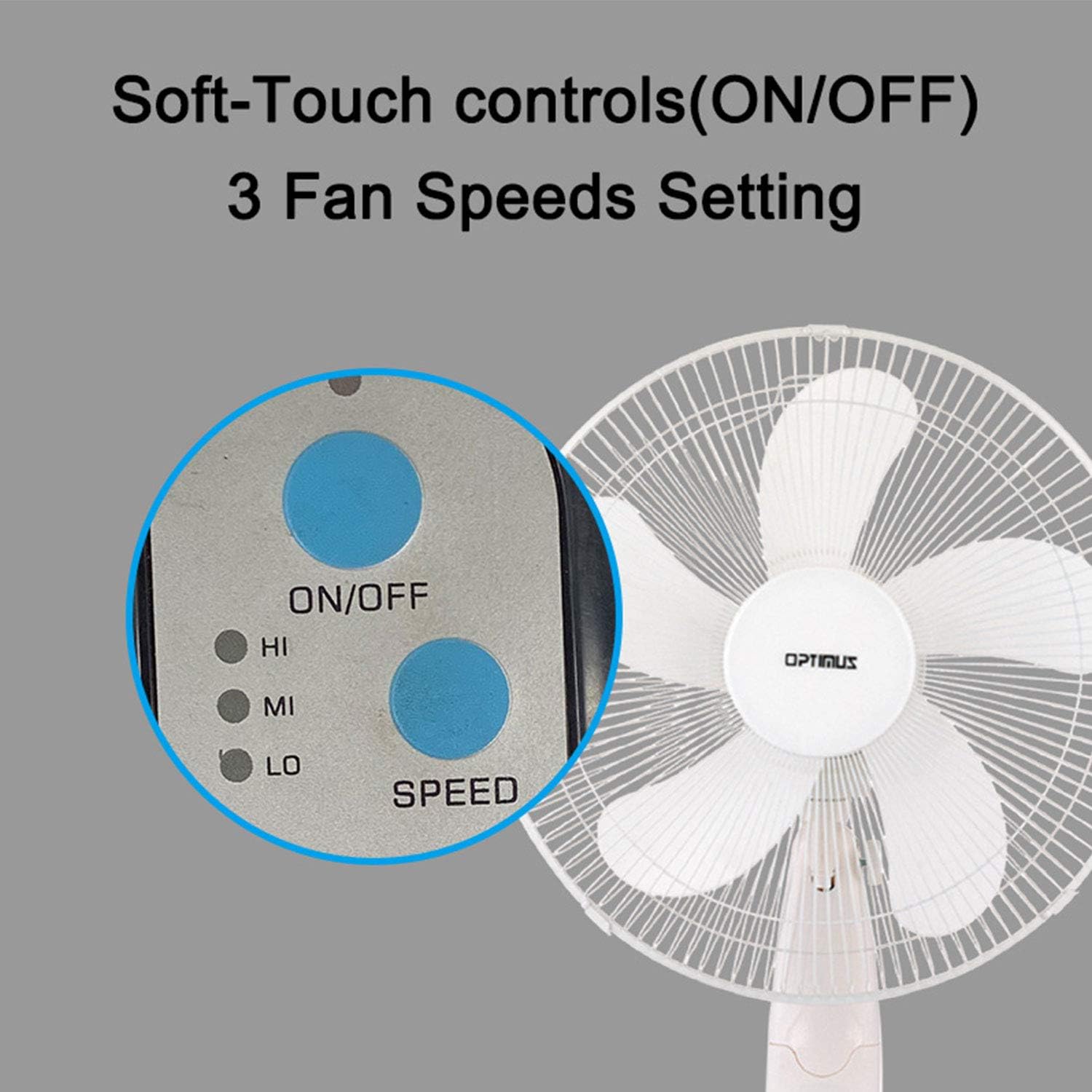
Image: The fan's soft-touch control panel, showing buttons for ON/OFF and SPEED, with indicators for High (HI), Medium (MI), and Low (LO) fan speeds.
- オン/オフ: 押してファンをオンまたはオフにします。
- 速度設定: Select from Low, Medium, or High speeds. The 3-speed, energy-saving, whisper-quiet operation motor provides efficient airflow.
リモートコントロール
The fan comes with a remote control for convenient operation from a distance. (Batteries not included).

Image: The remote control for the fan, featuring buttons for Mode, Time, Speed, and ON/OFF functions.
- オン/オフ: ファンをオンまたはオフにします。
- スピード: Cycles through the three fan speeds (Low, Medium, High).
- モード: Selects between different wind modes.
- 時間: Activates and sets the shut-off timer.
風モード
The fan offers three distinct wind modes to suit your preference:

Image: The fan's control panel highlighting the MODE button and indicators for Normal, Natural, and Sleep wind modes.
- 通常モード: The fan blows at a constant speed based on your selected setting.
- ナチュラルモード: The fan speed fluctuates to mimic a natural breeze.
- スリープモード: The fan operates at a lower, quieter speed, ideal for sleeping, with gentle speed variations.
発振
The F-1760 features unique wave oscillation for comprehensive air distribution.

Image: A diagram illustrating the fan's capability for both vertical (up/down) and horizontal (left/right) wave oscillation, providing wider air coverage.
- Up/Down & Left/Right Wave Oscillating: Activates a unique oscillation pattern that moves the fan head both horizontally and vertically, distributing air throughout the room.
- 振動を停止するには、もう一度振動ボタンを押します。
タイマー機能
指定された時間後にファンが自動的にオフになるように設定します。

Image: The fan's control panel showing the TIME button and indicators for 1 hour (1H), 2 hours (2H), and 4 hours (4H) timer settings. The fan can be programmed for up to 7 hours.
- The timer can be set for 1, 2, 4, or up to 7 hours. Press the TIME button repeatedly to cycle through the desired duration.
メンテナンスと清掃
定期的に清掃することで、ファンの性能を維持し、寿命を延ばすことができます。
- 洗浄前: 清掃する前に必ずファンを電源コンセントから抜いてください。
- 外装清掃: 柔らかくてamp ファンの外側を布で拭いてください。研磨剤入りの洗剤や溶剤は使用しないでください。
- Grill Cleaning: The metal grill can be cleaned with a soft brush or vacuum cleaner to remove dust. For thorough cleaning, the grill may need to be carefully removed.
- ブレードクリーニング: If necessary, the fan blades can be cleaned. Ensure the fan is completely off and unplugged. The care instructions specify "Hand Wash" for components.
- ストレージ: 長期間使用しない場合は、ファンを涼しく乾燥した場所に、できれば元の梱包のまま保管してください。
トラブルシューティング
| 問題 | 考えられる原因 | 解決 |
|---|---|---|
| ファンが作動しません。 | No power supply. Blown fuse. | Ensure the fan is plugged into a working outlet. Check the fuse in the plug and replace if necessary (refer to safety instructions for fuse replacement). |
| Fan operates but air movement is weak. | Low speed setting. Dust accumulation on blades/grill. | Increase the fan speed. Clean the fan blades and grills as per maintenance instructions. |
| リモコンが動作しません。 | Dead batteries. Obstruction between remote and fan. | Replace batteries in the remote control. Ensure a clear line of sight between the remote and the fan's receiver. |
| Fan changes speed automatically or unexpectedly. | Interference from other remote controls (e.g., TV remote). | This fan may respond to frequencies from other remote controls. Try operating the fan manually or repositioning the fan/other devices to minimize interference. |
| Fan makes clicking noises during oscillation. | Normal operation of oscillation gears. | A slight clicking noise from the oscillation gears can occur during normal operation. If the noise is excessive or new, ensure the fan head is securely attached. |
| Fan feels unstable. | Base not properly assembled or tightened. Uneven surface. | Ensure all base components are securely fastened and the fan is placed on a firm, level surface. |
仕様
- モデル名: F-1760
- ブランド: オプティマス
- ファン直径: 16インチ
- 電動ファンの設計: フロアファン
- 電源: コード式電気
- ワットtage: 60ワット
- 巻tage: 6ボルト
- ブレードの数: 3
- 速度設定: 3 RPM (Low, Medium, High)
- 制御方法: リモート、プッシュボタン
- 特別な機能: Up/Down & Left/Right Wave Oscillating, Adjustable Height, Timer Function (up to 7 hours), Wind Modes (Normal, Natural, Sleep)
- 屋内/屋外での使用: 屋内
- 商品の重量: 9.9ポンド
- 含まれるコンポーネント: 製品、マニュアル
保証情報
This Optimus F-1760 fan comes with a 1年間の限定保証 from the date of purchase. This warranty covers defects in materials and workmanship under normal use. It does not cover damage resulting from misuse, accident, alteration, or unauthorized repair. Please retain your proof of purchase for warranty claims.
カスタマーサポート
For technical assistance, warranty claims, or questions regarding your Optimus F-1760 fan, please contact Optimus customer service. Refer to the product packaging or the official Optimus web最新の連絡先情報については、サイトをご覧ください。