
導入
This manual provides detailed instructions for the safe and effective use of your Canon EOS 7D Digital SLR camera body. Please read this manual thoroughly before using the camera and keep it for future reference.

フロント view of the Canon EOS 7D Digital SLR camera body, showing the lens mount and grip.
設定
1. バッテリーの取り付け
The EOS 7D uses one Battery Pack LP-E6. A CR1616 lithium-ion battery is also used for date/time retention.
- カメラの下部にある電池ケースのカバーを開きます。
- LP-E6 バッテリー パックを、電気接点を内側にして挿入し、カチッと音がして所定の位置に収まることを確認します。
- 電池カバーをしっかりと閉じてください。
- For the date/time battery, refer to the dedicated section in the full user manual for replacement instructions.
2. CF Card Installation
The camera records images directly to a CompactFlash (CF) card.
- Open the CF card slot cover on the side of the camera.
- Insert the CF card with the correct orientation until it is fully seated.
- Close the CF card slot cover securely.
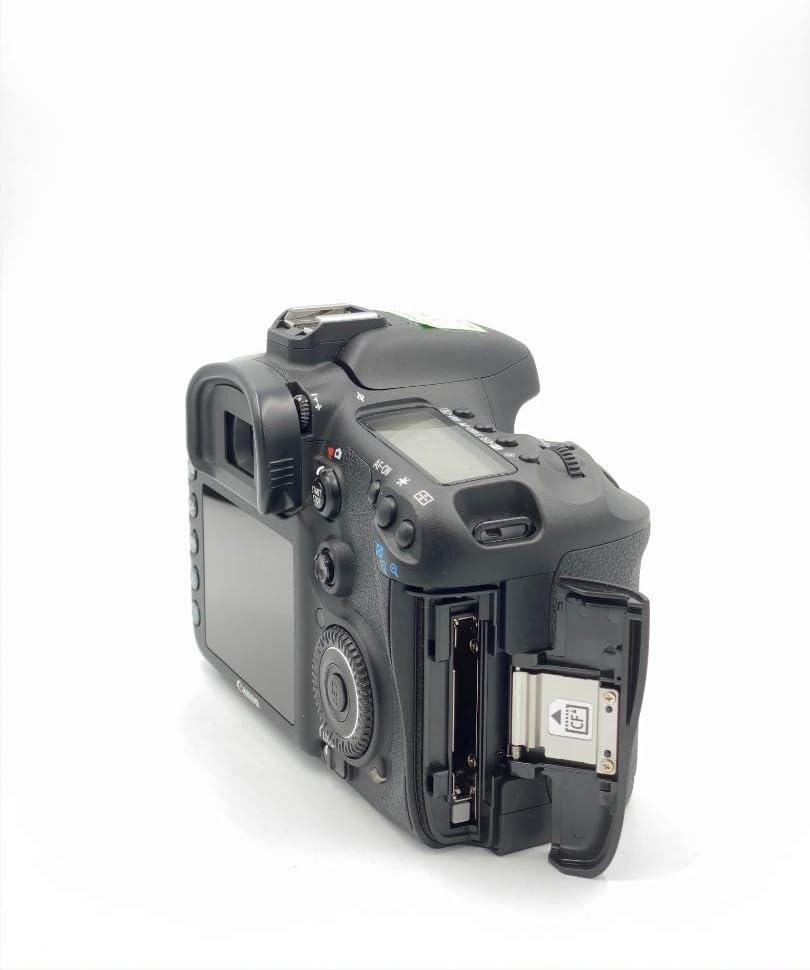
側 view of the Canon EOS 7D, showing the open CF card slot for media insertion.
3. レンズの取り付け
The EOS 7D is compatible with Canon EF and EF-S lenses.
- カメラのボディキャップとレンズのリアキャップを外します。
- レンズの赤または白のインデックスマークをカメラ本体の対応するマークに合わせます。
- 所定の位置にロックされるまで、レンズを時計回りに回転させます。
4. 初期設定
Upon first power-on or after battery replacement, you may need to set the language and time zone.
- 電源スイッチを使用してカメラの電源をオンにします。
- 画面上の指示に従って、希望の言語を選択してください。
- 日付、時刻、タイムゾーンを設定します。
操作手順
1. 基本操作
To power on the camera, slide the power switch to the "ON" position. To take a photo, press the shutter button halfway to focus, then press fully to capture the image.
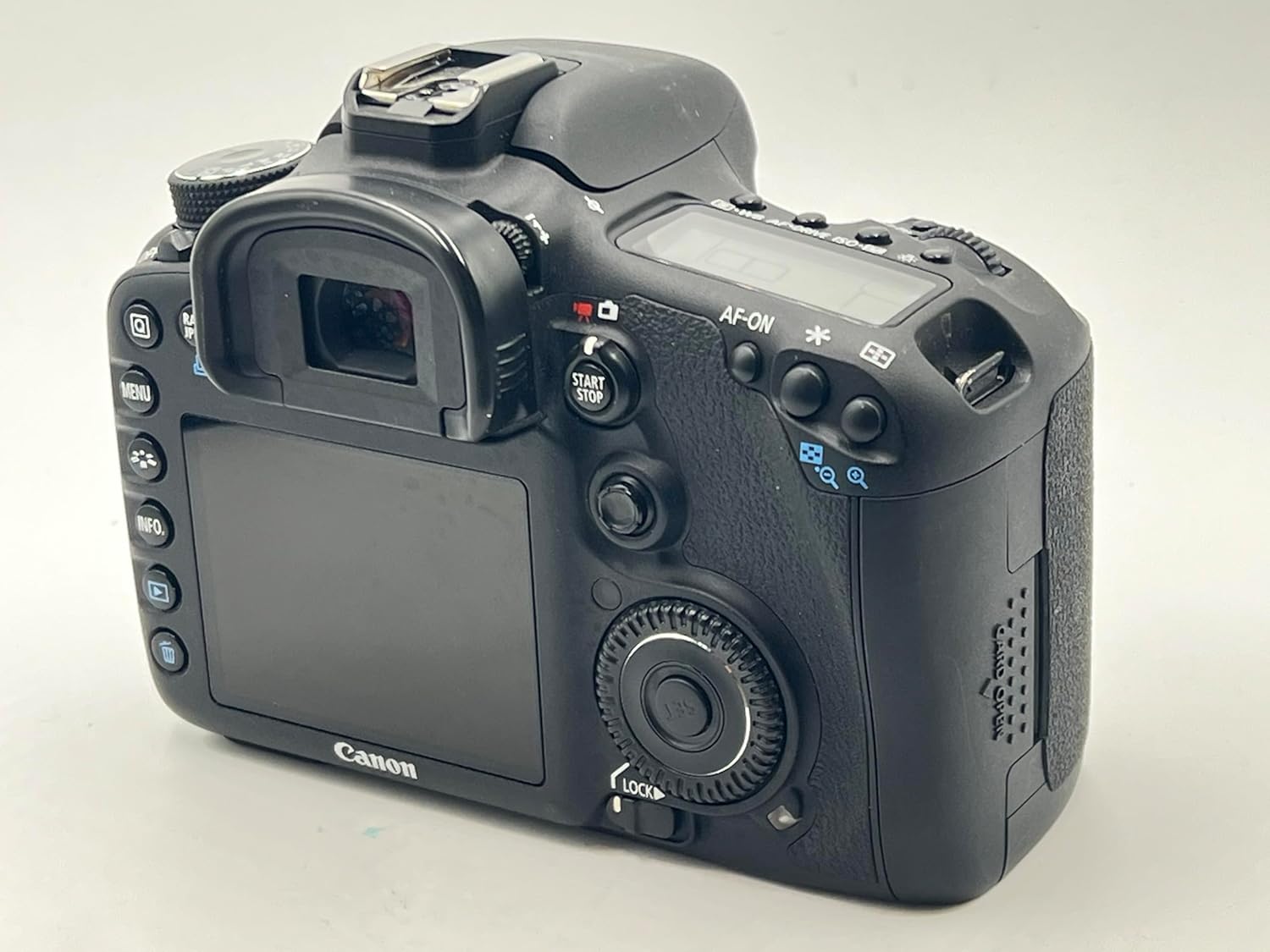
後方 view of the Canon EOS 7D, showing the LCD monitor and control buttons.
2. Image Capture Settings
- イメージセンサー: 18.0 Megapixel APS-C size CMOS sensor.
- Image Processors: Dual DIGIC 4 for high speed and quality.
- ISO速度: Range from 100 to 6400, expandable to 12800.
- 連続撮影: 最大8.0フレーム/秒(fps)。
- 録音フォーマット: JPEG, RAW (14-bit), M-RAW, S-RAW. Video in MOV (H.264).
- 画像スタイル: Select from Standard, Portrait, Landscape, Neutral, Faithful, Monochrome, or User Defined settings.
- ホワイトバランス: Auto, Daylight, Shade, Cloudy, Tungsten Light, White Fluorescent Light, Flash, Custom, Color Temperature setting.
3. オートフォーカスシステム
The EOS 7D features a sophisticated 19-point all cross-type AF system for precise focusing.
- AF Points: 19-point all cross-type, with dual diagonal cross-type sensors at the center (f/2.8 and f/5.6).
- フォーカスモード: One-Shot AF (for still subjects), AI Servo AF (for moving subjects), AI Focus AF (automatic switching), and Manual Focus (MF).
- AF Point Selection: Manual selection (Single point, Spot AF, AF point expansion, Zone AF) or Automatic selection (19 point AF).
- AF Assist Beam: Emitted from an external Speedlite when necessary.
4.露出制御
Accurate exposure is achieved through various metering modes and controls.
- メータリングモード: Evaluative (63 zones, linked to active AF point), Partial (approx. 9.4% of viewfinder), Spot (approx. 2.3% of viewfinder), and Center-weighted average.
- Exposure Control Systems: Program AE, Shutter-priority AE, Aperture-priority AE, Creative Auto, Full auto, Manual exposure, and E-TTL II autoflash.
- 露出補正: Adjustable up to ±5 stops in 1/3- or 1/2-stop increments.
- AEロック: Available automatically in One-Shot AF with evaluative metering, or manually via the AE lock button.
5. Shutter and Flash
- シャッタースピード: From 30 seconds to 1/8000th second, plus Bulb mode. X-sync at 1/250th second.
- 内蔵フラッシュ: Retractable, auto pop-up flash with a Guide Number of 12/39 (meters/feet at ISO 100).
- 外部フラッシュ: Compatible with E-TTL II Speedlites, offering flash exposure compensation and FE Lock.
6.ライブ View およびビデオ録画
The camera supports Live View for both still photos and video, with advanced video capabilities.
- ライブ View: Offers Quick mode, Live mode, Face detection Live mode, and Manual focusing with magnification.
- ビデオ録画: Full HD (1920 x 1080) at 30p, 24p, 25p; HD (1280 x 720) at 60p, 50p; SD (640 x 480) at 60p, 50p.
- オーディオ: Linear PCM (monaural). Manual audio level adjustment is available with Firmware Version 2.0.X.
- 連続記録: Approximately 12 minutes for Full HD/HD, 24 minutes for SD (with a 4GB card).
7. Playback and Customization
- 再生: View single images, histograms, magnified views, and perform in-camera RAW processing, JPEG resizing, and image rating.
- カスタム関数: 27 customizable functions to tailor camera operation to your preferences.
- カスタムコントロール: Assign desired functions to various buttons and dials for personalized control.
- ユーザー設定: Register up to three sets of camera settings (C1, C2, C3) on the Mode Dial for quick recall.
メンテナンス
1. Dust Deletion Feature
The EOS 7D includes features to manage dust on the image sensor:
- 自動センサークリーニング: The low-pass filter is automatically cleaned when the power is turned on or off.
- Dust Delete Data: The camera can detect dust adhering to the low-pass filter and append its coordinates to captured images. This data can be used by provided software to automatically erase dust spots.
- 手動クリーニング: For persistent dust, manual cleaning of the sensor is possible. Refer to the full user manual for detailed instructions or consult a Canon service center.
2.一般的なクリーニング
- カメラ本体: カメラ本体は柔らかく乾いた布で拭いてください。頑固な汚れには、軽くamp布を水で濡らしてください。有機溶剤の使用は避けてください。
- レンズ: Use a lens blower brush to remove dust. For smudges, use a lens cleaning solution and a clean lens cloth.
- 液晶モニター: Gently wipe with a soft cloth. Avoid pressing hard on the screen.
3. バッテリーのお手入れ
- Always use the provided Canon Battery Charger LC-E6 to charge the LP-E6 battery pack.
- バッテリーを使用しないときは、涼しく乾燥した場所に保管してください。
- バッテリーの寿命を延ばすために、バッテリーを頻繁に完全に放電することは避けてください。
トラブルシューティング
このセクションでは、EOS 7D で発生する可能性のある一般的な問題について説明します。
1. カメラの電源が入らない
- Ensure the battery pack LP-E6 is fully charged and correctly inserted.
- 電池ケースのカバーがしっかりと閉まっているか確認してください。
- If using an AC Adapter Kit ACK-E6, ensure it is properly connected to a power source.
2. Unable to Take Photos
- Check if a CF card is inserted and has sufficient free space.
- Ensure the lens is properly attached and the focus mode switch on the lens is set to AF (Autofocus) or MF (Manual Focus) as desired.
- If the shutter button is pressed halfway and the camera does not focus, check the AF mode and lighting conditions.
- If the built-in flash is used, ensure it has recycled (flash-ready icon is lit).
3. 画像がぼやけている
- レンズがきれいで汚れがないことを確認します。
- Ensure the camera is properly focused on the subject. In AF mode, confirm the AF point is on the desired area.
- Check the shutter speed. If it is too slow for the shooting conditions, use a faster shutter speed or a tripod to prevent camera shake.
- Consider using a higher ISO setting in low light to allow for faster shutter speeds.
4. Exposure Problems (Too Dark/Too Bright)
- Check the metering mode. Evaluative metering is generally suitable for most situations.
- Review the exposure compensation setting. Reset it to ±0 if unintended compensation was applied.
- In manual mode, adjust aperture, shutter speed, and ISO to achieve the desired exposure.
- If using flash, check flash exposure compensation settings.
5. ファームウェアのアップデート
Canon periodically releases firmware updates to enhance camera performance and add features. Refer to the official Canon website for the latest firmware and detailed update instructions. Firmware Version 2.0.X, for example, introduced features like manual audio level adjustment and improved burst rates.
仕様
| 特徴 | 詳細 |
|---|---|
| イメージセンサー | 18.0メガピクセル APS-C CMOS |
| 画像プロセッサ | Dual DIGIC 4 |
| ISO感度 | 100~6400(12800まで拡張可能) |
| シャッタースピード | 30 seconds to 1/8000th second, Bulb |
| 連続撮影 | Max. 8.0 shots/sec. |
| オートフォーカスシステム | 19-point all cross-type AF |
| 計量システム | 63-zone dual-layer iFCL metering |
| ビデオ録画 | Full HD 1080p (30p/24p/25p) |
| 液晶モニター | 3.0-inch TFT color, approx. 920,000 dots |
| Viewファインダ | Eye-level pentaprism, approx. 100% coverage, 1.0x magnification |
| ストレージメディア | コンパクトフラッシュ(CF)カード |
| 接続性 | USB 2.0 Hi-Speed, mini-HDMI OUT, Video OUT (NTSC/PAL) |
| 電源 | バッテリーパック LP-E6 |
| 寸法(幅×高さ×奥行き) | Approx. 5.8 x 4.4 x 2.9 in. (148.2 x 110.7 x 73.5mm) |
| 体重(本体のみ) | 約。 28.9オンス。 (820g) |
| 動作環境 | Temperature: 32-104°F (0-40°C), Humidity: 85% or less |
保証とサービスプラン
Standard warranty information is typically provided with the product at the time of purchase. Please refer to the documentation included in your product packaging for specific warranty terms and conditions.
Optional CarePAK PLUS Protection Plans
Canon offers optional CarePAK PLUS protection plans for extended coverage beyond the standard warranty. These plans provide protection from accidental damage (drops, spills, power surges) and normal wear and tear. Benefits may include Image Recovery, priority repair service, free return shipping, and genuine Canon factory service.
- CarePAK PLUS (2YR): 2-year protection plan.
- CarePAK PLUS (3YR): 3-year protection plan.
購入の詳細についてはasing and registering for CarePAK PLUS, please visit the official Canon webサイトをご覧いただくか、キヤノンのカスタマーサポートにお問い合わせください。
サポートとリソース
For additional support, resources, and accessories, please refer to the following:
- 公式キヤノン Webサイト: キヤノンを訪問 website for product information, driver downloads, firmware updates, and FAQs.
- Canon Developer Community: If you are a developer interested in controlling select Canon cameras within your application, the Canon EDSDK is available at developercommunity.usa.canon.com.
- 付属品: A wide range of accessories, including batteries, chargers, cables, cases, and remote controllers, are available through authorized Canon retailers and the Canon Store.