
キヤノン G11
Canon PowerShot G11 デジタルカメラ ユーザーマニュアル
モデル: G11
導入
The Canon PowerShot G11 is a compact digital camera designed for advanced amateurs, offering a blend of advanced features and user-friendly operation. It incorporates a 10-megapixel High Sensitivity System, a 28mm wide-angle lens with 5x optical zoom, and a 2.8-inch Vari-Angle PureColor System LCD. This manual provides essential information for setting up, operating, and maintaining your camera.
箱の中身
- PowerShot G11 Camera Body
- Lithium Battery Pack NB-7L
- バッテリーチャージャー CB-2LZ
- ネックストラップ NS-DC9
- デジタルカメラソリューション CD-ROM
- USBインターフェースケーブル IFC-400PCU
- AVケーブル AVC-DC400
設定
1. バッテリーの充電
Before first use, fully charge the Lithium Battery Pack NB-7L using the provided Battery Charger CB-2LZ. Insert the battery into the charger and plug the charger into a power outlet. The charging indicator light will change to indicate completion.
2. バッテリーとメモリーカードの挿入
Open the battery/card compartment cover on the bottom of the camera. Insert the charged battery, ensuring correct orientation. Insert an SD/SDHC memory card (not included) into the card slot until it clicks into place. Close the compartment cover securely.

画像: 背面 view of the Canon PowerShot G11, showing the general camera body. The battery and memory card compartment are located on the bottom.
3. ネックストラップの取り付け
Thread the Neck Strap NS-DC9 through the strap eyelets on the camera body as shown in the camera's quick start guide. Ensure it is securely fastened to prevent accidental drops.

画像: 正面 view of the Canon PowerShot G11 with its lens extended, ready for use.
カメラの操作
撮影モード
The PowerShot G11 offers a variety of shooting modes accessible via the mode dial on the top of the camera. These include:
- スマートオート: Automatically detects the scene and applies optimal settings from 22 predefined situations.
- プログラムAE(P): カメラは絞りとシャッタースピードを設定しますが、他の設定はユーザーが制御できます。
- シャッター優先AE(Tv): ユーザーはシャッタースピードを設定し、カメラは絞りを設定します。
- 絞り優先AE(Av): ユーザーは絞りを設定し、カメラはシャッタースピードを設定します。
- マニュアル(M): 絞りとシャッタースピードを完全に手動で制御します。
- Custom (C1, C2): Save and recall preferred shooting settings.
- 低光量: Optimized for shooting in very dim conditions, automatically adjusting ISO speed.
- 映画: Records standard definition video.
- Various Scene Modes (e.g., Portrait, Landscape, Night Snapshot, Indoor, Kids & Pets, Foliage, Snow, Beach, Fireworks, Aquarium, ISO 3200, Color Accent, Color Swap, Stitch Assist).
Using the Vari-Angle LCD
The 2.8-inch Vari-Angle PureColor System LCD can be rotated and swiveled, allowing for flexible shooting angles, including self-portraits or shots from high or low perspectives. To adjust, gently pull the screen out from the camera body and rotate it to the desired position.
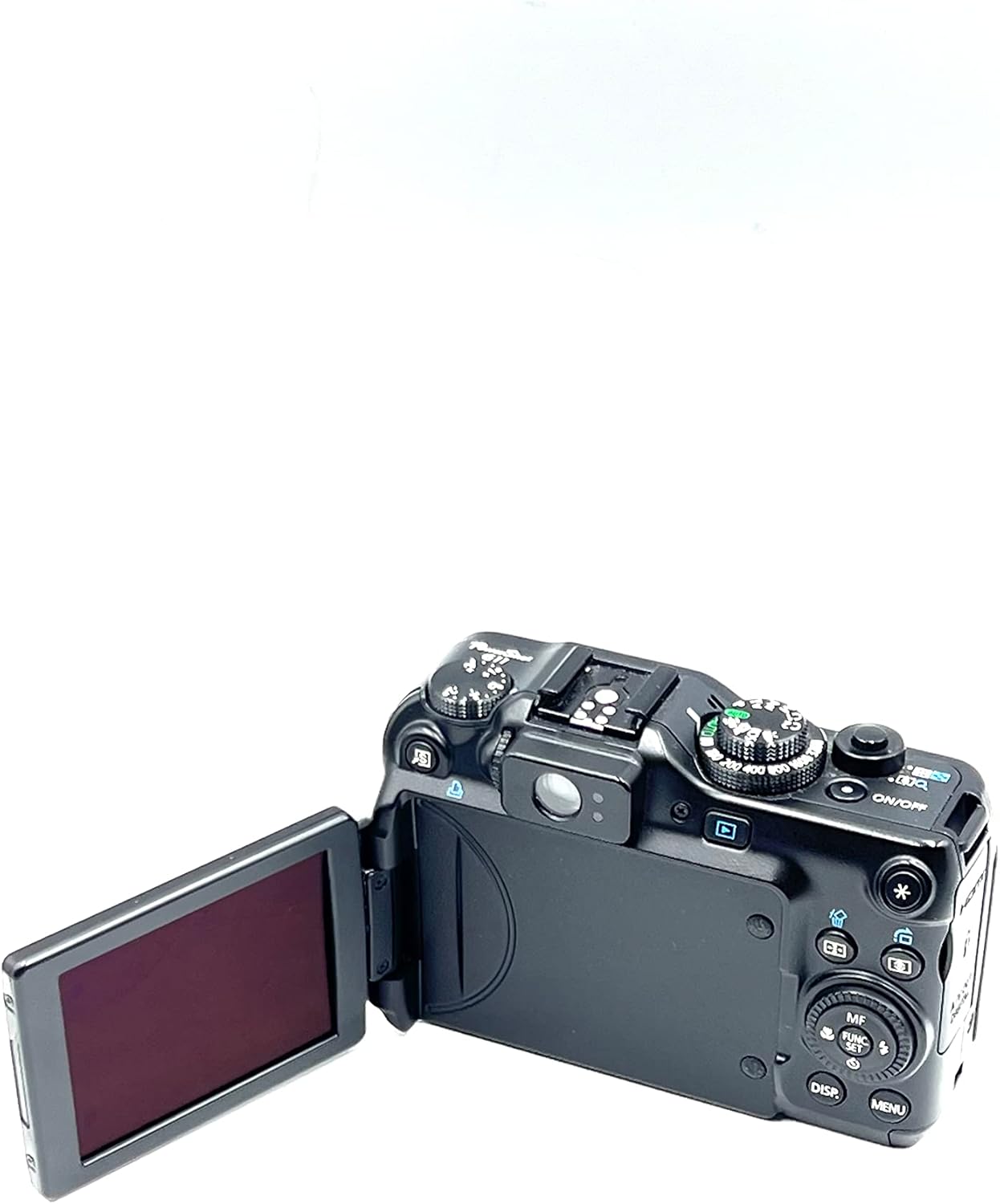
Image: The Canon PowerShot G11 with its Vari-Angle LCD screen extended and rotated, demonstrating its flexibility.
ズーム操作
The camera features a 5x optical zoom lens (equivalent to 28-140mm). Use the zoom lever located around the shutter button to zoom in (telephoto) or out (wide-angle). The Optical Image Stabilizer helps to reduce blur, especially at longer focal lengths or in low light.

画像: サイド view of the Canon PowerShot G11 showing the lens extended, indicating zoom capability.
RAW + JPEG Shooting
The PowerShot G11 supports simultaneous recording of both RAW and JPEG image files. RAW files provide maximum flexibility for post-processing, while JPEG files are ready for immediate use. This setting can be configured in the camera's menu.
高度な機能
- High Sensitivity System: Combines a powerful CCD sensor and DIGIC 4 Image Processor for improved image quality and reduced noise, especially at high ISO speeds (up to ISO 3200).
- i-Contrast(インテリジェントコントラスト補正): Automatically adjusts compensation levels to brighten dark areas while preserving bright areas, resulting in more balanced images. This can also be applied in playback mode.
- 赤目補正: Identifies and corrects red-eye in flash pictures during shooting or playback.
- Face Detection and Face Self-Timer: Automatically detects faces for optimal focus and exposure. The Face Self-Timer can delay the shutter release until a new face enters the frame.
- HDMI出力: Connect the camera directly to an HDTV using the mini-HDMI connector (cable not included) to view photos and videos in high resolution.
メンテナンス
カメラの掃除
- カメラ本体: 柔らかく乾いた布で拭いてください。頑固な汚れには、軽く湿らせた布を使用してください。amp水で洗い流し、完全に乾燥させてください。
- レンズ: レンズブラシまたはブロワーを使用してほこりを取り除きます。汚れには、レンズクリーニングクロスとレンズクリーニング液をご使用ください。指でレンズ表面に触れないようにしてください。
- LCDスクリーン: 柔らかく乾いた布で優しく拭いてください。画面を強く押さないでください。
バッテリーケア
- バッテリーを使用しないときは、涼しく乾燥した場所に保管してください。
- バッテリーを極端な温度や直射日光にさらさないでください。
- バッテリーが完全に消耗する前に充電して、寿命を延ばしてください。
ストレージ
When storing the camera for extended periods, remove the battery and memory card. Store the camera in a dry, well-ventilated area, preferably in a camera bag or case to protect it from dust and impacts.
トラブルシューティング
| 問題 | 考えられる原因 | 解決 |
|---|---|---|
| カメラの電源が入りません。 | 電池が消耗しているか、正しく挿入されていません。 | バッテリーを完全に充電してください。バッテリーを正しく挿入し直してください。 |
| 写真を撮ることができません。 | Memory card is full, not inserted, or locked. | Delete unnecessary images, insert a memory card, or unlock the memory card (slide the lock switch). |
| 画像がぼやけてしまいます。 | カメラの揺れ、被写体の動き、または焦点のずれ。 | Hold the camera steady, use a tripod, or enable Image Stabilization. Ensure proper focus. |
| フラッシュは発光しません。 | フラッシュモードがオフに設定されているか、バッテリー残量が少なくなっています。 | フラッシュモードを自動またはオンに変更してください。バッテリーを充電してください。 |
| LCD 画面が真っ白です。 | Camera is off, or display is turned off. | Power on the camera. Press the DISP. button to cycle through display modes. |
仕様
| 特徴 | 詳細 |
|---|---|
| モデル名 | キヤノン パワーショット G11 |
| フォトセンサー解像度 | 10メガピクセル |
| フォトセンサー技術 | CCD |
| 画像プロセッサ | デジック4 |
| 光学ズーム | 5x |
| 焦点距離 | 28-140mm(35mm換算) |
| 画像安定化 | 光学 |
| LCD画面サイズ | 2.8インチ |
| 表示タイプ | Vari-Angle PureColor System LCD |
| ISO感度 | 拡張ISO最小80、拡張ISO最大3200 |
| サポート File フォーマット | RAW、JPEG |
| ビデオ解像度 | 480p |
| 接続性 | USB、HDMI |
| ストレージメディア | SD, SDHC, MMC, MMCplus, HC MMCplus card |
| 電池のタイプ | Lithium-Ion NB-7L rechargeable battery |
| アイテム重量 | 0.83 ポンド |
保証とサポート
For detailed warranty information and technical support, please refer to the documentation included with your product or visit the official Canon support website. You can also find additional resources and frequently asked questions online.
キヤノンサポート Webサイト: www.usa.canon.com/support