
1. はじめに
This manual provides detailed instructions for the proper setup, operation, and maintenance of your Veho VMS-004 Discovery Deluxe USB Microscope. Please read this manual thoroughly before using the device to ensure optimal performance and longevity.
The Veho VMS-004 is a versatile USB microscope designed for detailed observation and digital capture of magnified images and videos. It features up to 400x magnification, a 2.0 Megapixel CMOS lens, and adjustable LED illumination, making it suitable for various applications including educational, hobbyist, and professional use.
2. 安全情報
- 分解しないでください: Attempting to disassemble or modify the microscope may cause damage and void the warranty.
- 直射日光を避けてください: Do not expose the microscope to direct sunlight or high temperatures.
- 取り扱いには注意してください: The lens and internal components are delicate. Avoid dropping or subjecting the device to strong impacts.
- 乾いた状態に保つ: このデバイスは防水ではありません。水や高湿度にさらさないでください。
- 電源: Use only the specified USB power source.
- 子供たち: Keep out of reach of small children. Adult supervision is recommended during use.
3. パッケージ内容
パッケージにすべてのアイテムが含まれていることを確認します。
- Veho VMS-004 Discovery Deluxe USB Microscope
- Flexi Alloy Stand
- Software CD (for drivers and application)
- ユーザーマニュアル(このドキュメント)
4.製品オーバーview
Familiarize yourself with the main components of the Veho VMS-004 microscope.

Figure 4.1: The Veho VMS-004 Discovery Deluxe USB Microscope mounted on its flexi alloy stand.
- 顕微鏡本体: Contains the lens, CMOS sensor, and illumination LEDs.
- フォーカスホイール: Located on the microscope body, used to adjust the focus for clear images.
- スナップショットボタン: A button on the microscope body for capturing still images.
- LED Illumination Control: A small wheel or dial to adjust the brightness of the built-in LEDs.
- USBケーブル: For connecting the microscope to your computer.
- Flexi Alloy Stand: Provides a stable base and adjustable positioning for the microscope.

図 4.2: 拡大図 view of the focus wheel and magnification markings on the microscope body.

図4.3: 前面 view of the microscope lens, showing the integrated LED illumination ring.
5. セットアップ
5.1 スタンドの組み立て
The flexi alloy stand provides stability and allows for precise positioning of the microscope.
- Attach the microscope holder to the flexible arm of the stand.
- Secure the microscope into the holder. Ensure it is firmly seated but not overly tightened to avoid damage.
- スタンドを安定した平らな面に置きます。
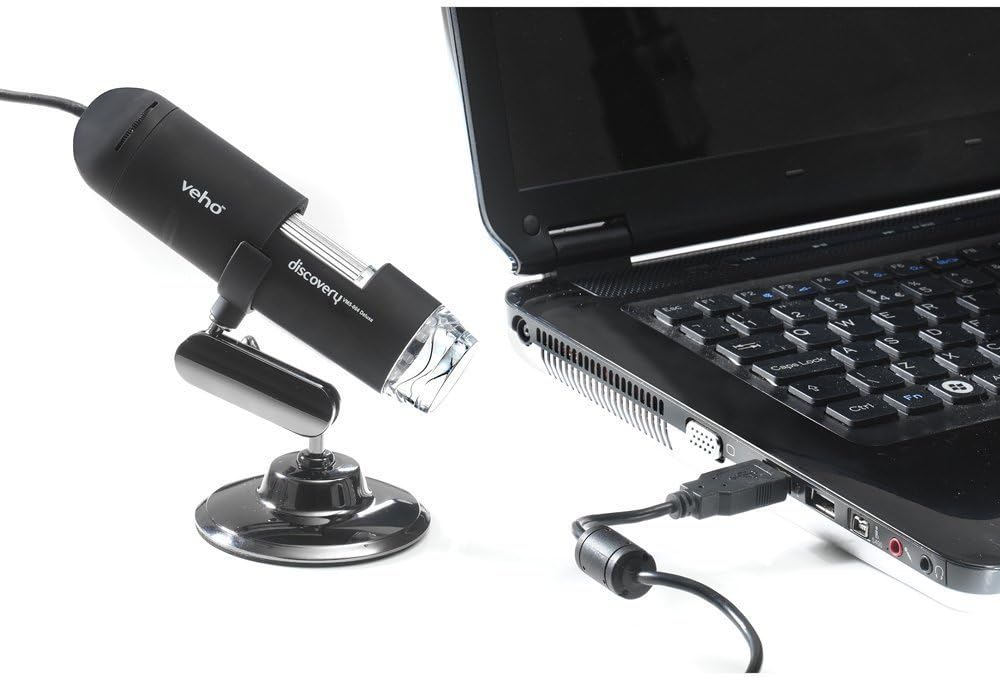
Figure 5.1: The microscope securely mounted on its flexi alloy stand.
5.2 ソフトウェアのインストール
The Veho VMS-004 requires driver and software installation for full functionality on your computer (PC or Mac compatible).
- Insert the provided software CD into your computer's CD/DVD drive. If your computer does not have a CD drive, please visit the official Veho support website to download the necessary drivers and software.
- Follow the on-screen instructions to install the drivers and the accompanying application.
- インストール後にプロンプトが表示されたら、コンピューターを再起動してください。
5.3 顕微鏡の接続
Once the software is installed, connect the microscope to your computer.
- Plug the USB cable of the microscope into an available USB port on your computer.
- The computer should automatically detect the device.
- Launch the installed microscope application. You should see a live feed from the microscope's camera.

Figure 5.2: The USB microscope connected to a laptop, ready for use.
6. 操作手順
6.1 オブジェクトの配置
Position the object you wish to observe directly beneath the microscope lens. Adjust the flexible stand to bring the lens close to the object.

Figure 6.1: The microscope positioned over a coin for observation.
6.2 倍率とフォーカスの調整
The microscope offers up to 400x digital magnification. To achieve a clear image:
- Adjust the distance between the microscope lens and the object using the flexible stand.
- Rotate the focus wheel on the microscope body until the image on your computer screen is sharp and clear.
- 注記: The effective magnification changes with the distance from the object and the focus setting.
6.3 LED照明制御
The microscope features built-in LEDs to illuminate your subject. To adjust the brightness:
- Locate the LED illumination control (a small wheel or dial) on the microscope cable or body.
- Rotate the control to increase or decrease the LED brightness as needed for optimal viewing。
6.4 画像とビデオのキャプチャ
The included software allows you to capture still images and record videos.
- Still Image: Press the snapshot button on the microscope body or click the capture button within the software interface.
- ビデオ録画: Use the record function within the software application to start and stop video capture.
- 捕獲された files are typically saved to a default folder on your computer, which can usually be configured within the software settings.
6.5 Measurement Software
The accompanying software includes measurement capabilities. Refer to the software's help documentation for detailed instructions on how to calibrate and use the measurement tools. For accurate measurements, it is recommended to use a known reference scale in your image.
7. メンテナンス
- レンズの掃除: 光学レンズ専用の柔らかく糸くずの出ない布を使用してください。研磨剤入りのクリーナーや溶剤は使用しないでください。
- 本体のクリーニング: 顕微鏡本体とスタンドを乾いた布か軽く拭いてください。amp、柔らかい布。
- ストレージ: 使用していないときは、顕微鏡を清潔で乾燥したほこりのない環境に保管してください。
- ソフトウェアアップデート: Periodically check the Veho official website for software and driver updates to ensure compatibility and optimal performance.
8。 トラブルシューティング
| 問題 | 考えられる原因 | 解決 |
|---|---|---|
| 画面に画像が表示されない / デバイスが検出されない |
|
|
| 画像がぼやけている、または焦点が合っていない |
|
|
| 画像が暗すぎる、または明るすぎる |
|
|
| Magnification does not appear to be 400x |
|
|
9. 仕様
| モデル番号 | VMS-004D |
| 倍率 | Up to x400 (digital) |
| レンズ | 2.0メガピクセルCMOS |
| 照明 | On/Off LEDs (adjustable brightness) |
| ハウジング | Tacton Rubber Touch |
| 立つ | Flexi Alloy Stand |
| 接続性 | USB |
| 互換性 | PCおよびMac互換 |
| 製品寸法 | 13.46 x 10.92 x 22.35 cm |
| アイテム重量 | 159グラム |
| 巻tage | 5ボルト(USB電源) |
| 光源の種類 | ハロゲン |
| の本当の角度 View | 30度 |
10.保証とサポート
For warranty information, technical support, or service inquiries, please refer to the warranty card included with your product or visit the official Veho webサイトでご確認ください。保証請求に備えて購入証明書を保管してください。
Veho Official Webサイト: ベホワールド