1. はじめに
The DigiTech RP255 is a versatile guitar multi-effect processor designed for musicians who gig, practice, and compose. It offers a wide array of tonal possibilities with 94 amps, cabinets, stompboxes, and effects. This unit also features USB streaming audio, allowing for direct recording to a computer. Key functionalities include a built-in 20-second looper, an integrated wah, whammy, and volume pedal, and 60 high-quality drum patterns for practice and songwriting.
2. セットアップと接続
Proper connection of your RP255 is essential for optimal performance. Follow these steps to set up your device:
- 電源接続: Connect the included 9V AC adapter to the 9VAC 1.3A power input jack on the rear panel of the RP255. Plug the adapter into a suitable power outlet.
- ギター入力: ギターをに接続します 入力 標準の 1/4 インチ楽器ケーブルを使用して、背面パネルのジャックに接続します。
- に出力 Ampミキサー: Use 1/4-inch cables to connect the LEFT (Mono) OUTPUT そして 右出力 jacks to your guitar amplifier, mixer, or audio interface. For mono operation, use only the LEFT (Mono) OUTPUT.
- 補助入力: To play along with external audio sources (e.g., MP3 player), connect the device to the AUX IN jack using a 1/8-inch stereo cable.
- ヘッドフォン: For silent practice, connect stereo headphones to the ヘッドフォン ジャック。
- USB接続: Connect the RP255 to your computer using a USB cable for audio streaming and editing presets via software.
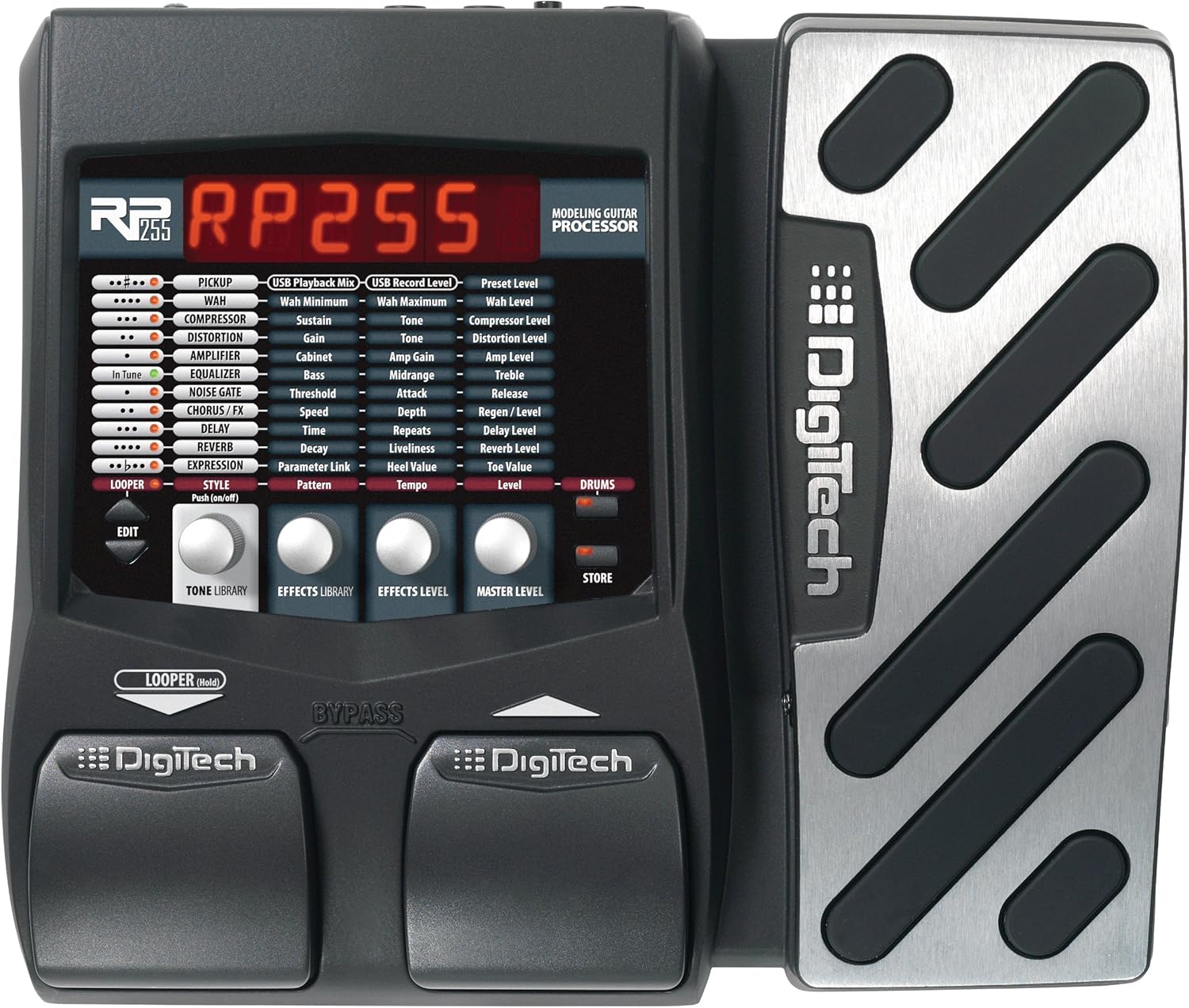
図1: 前面 view of the DigiTech RP255, showing the display and control pedals.

Figure 2: Rear panel of the DigiTech RP255, illustrating input, output, USB, and power connections.
3. 操作手順
3.1 プリセットのナビゲーション
The RP255 comes with numerous factory presets. Use the footswitches to scroll through them. The display will show the preset number and name.
3.2 効果と Amp モデリング
The RP255 features 94 amps, cabinets, stompboxes, and effects. These can be combined and customized to create unique tones. Refer to the detailed manual for specific parameter adjustments for each effect type.
- Stompboxes: Access various overdrive, distortion, and fuzz effects.
- Amps & Cabinets: Emulate a wide range of classic and modern guitar ampスピーカーキャビネットとリピーター。
- モジュレーション効果: Includes chorus, flanger, phaser, and tremolo for adding movement to your sound.
- Delay & Reverb: Essential time-based effects for depth and atmosphere.
3.3 ルーパー機能
The built-in 20-second looper allows you to record and layer guitar phrases. This is ideal for practice, songwriting, or creating complex arrangements. Consult the full manual for detailed instructions on recording, overdubbing, and playback.
3.4 Drum Patterns
The RP255 includes 60 high-quality drum patterns. These can be used as a rhythmic backing for practice sessions or as a foundation for new song ideas. Adjust tempo and volume to suit your needs.
3.5 USB Audio Streaming
Connect the RP255 to your computer via USB to use it as an audio interface. This allows you to record your guitar directly into a Digital Audio Workstation (DAW) with the RP255's effects and amp models. It also enables editing and managing presets using dedicated software.
4. メンテナンス
DigiTech RP255 の寿命を延ばし、最適なパフォーマンスを確保するには、次のメンテナンス ガイドラインに従ってください。
- クリーニング: 本体の外装は、柔らかく乾いた布で拭いてください。研磨剤入りの洗剤、溶剤、ワックスなどは、仕上げを傷める可能性があるため、使用しないでください。
- ストレージ: RP255 は、直射日光、極端な温度、高湿度を避け、涼しく乾燥した場所に保管してください。
- 取り扱い: Avoid dropping the unit or subjecting it to strong impacts. Always disconnect power and cables when moving the device.
- 電源: Use only the specified 9V AC power adapter. Using an incorrect power supply can damage the unit and void the warranty.
5。 トラブルシューティング
If you encounter issues with your DigiTech RP255, try the following troubleshooting steps:
- 電源なし: Ensure the power adapter is securely connected to both the RP255 and a working power outlet. Verify the power adapter is the correct type (9V AC).
- 音が出ない: すべてのケーブル接続を確認してください(ギター、出力 amp/mixer, headphones). Ensure your guitar's volume is up and your amplifier is turned on and set to an audible volume. Verify that the RP255 is not in Tuner/Bypass mode if you expect an effect.
- 予期しない音/ノイズ: Check for loose cable connections. Ensure proper grounding. Try resetting the unit to factory defaults (refer to the full manual for instructions).
- USB 接続の問題: Ensure the USB cable is securely connected. Try a different USB port or cable. Reinstall any necessary drivers or software on your computer.
For more complex issues, consult the complete DigiTech RP255 user manual or contact DigiTech customer support.
6. 仕様
- 商品の重量: 4.75ポンド
- 製品寸法: 14.25 x 2.75 x 8.75インチ
- 商品モデル番号: RP255
- ハードウェアインターフェイス: USB
- 信号フォーマット: アナログ
- 電源: コード式電気
- 巻tage: 9ボルト
- 色: 黒
- 効果: 94 Amps, cabinets, stompboxes, and effects
- ルーパー: 20秒ルーパー内蔵
- ペダル: Built-in wah, whammy, and volume pedal
- ドラムパターン: 60種類の高品質なドラムパターン
7. 保証とサポート
The DigiTech RP255 comes with a manufacturer's warranty. Please refer to the warranty card included with your product for specific terms and conditions. For technical support, service, or additional information, please visit the official DigiTech webご購入の際は、ウェブサイトをご覧いただくか、カスタマーサービスまでお問い合わせください。保証請求の際は、購入証明としてレシートを保管してください。


