
1. はじめに
The Definitive Technology Subamp 600 is a high-powered amplifier designed specifically for use with Definitive Technology IWSub in-wall subwoofers. This amplifier features two discrete high-power amplifier channels within a single housing, making it suitable for driving one or two IWSubs in various audio setups, including whole-house distributed audio or dedicated home theater systems. It is engineered to provide optimal power and simplify the integration of in-wall subwoofers into your audio environment.
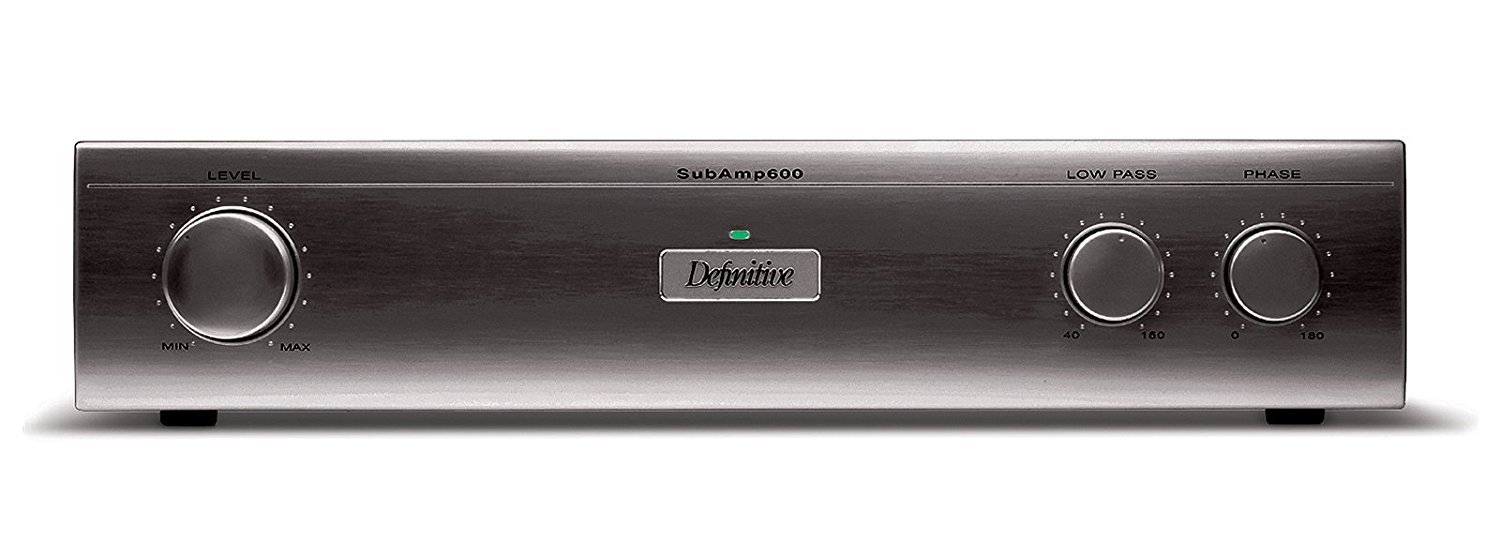
図1: 前面 view of the Definitive Technology Subamp 600 120V Ampライフファイア。この画像は amplifier's front panel, typically black, with various controls and indicators for operation.
2. 安全情報
Please read all safety and operating instructions before using this product. Retain these instructions for future reference.
- 電源: 接続する amplifier only to a 120V AC power source as indicated on the unit.
- 換気: 適切な換気を確保してください。通気口を塞がないでください。メーカーの指示に従って設置してください。
- 水と湿気: 本製品を雨や湿気にさらさないでください。花瓶など、液体の入った物を本製品の上に置かないでください。
- 熱: ラジエーター、暖房レジスター、ストーブ、その他の機器(以下を含む)などの熱源の近くに設置しないでください。 amp熱を発生する装置。
- サービス: この製品を自分で修理しようとしないでください。 すべてのサービスを資格のあるサービス担当者に依頼してください。
- クリーニング: 清掃する前に、本製品のプラグを壁のコンセントから抜いてください。清掃には乾いた布を使用してください。
- ケーブル: 特にプラグ、コンセント、および装置から出ている部分で、電源コードが踏まれたり挟まれたりしないように保護してください。
3. パッケージ内容
Carefully unpack your Definitive Technology Subamp 600. Ensure all items listed below are present and in good condition. If any items are missing or damaged, contact your dealer immediately.
- Definitive Technology IW Sub Amp 600 Ampリファイアー
- 電源コード
- 取扱説明書(本書)
4. セットアップとインストール
4.1 配置
The Subamp 600 is designed to fit conveniently in standard audio equipment racks. Ensure adequate space around the unit for proper ventilation, especially at the rear where connections are made and heat may dissipate.
4.2 Connecting to IWSub In-Wall Subwoofers
The Subamp 600 features two discrete high-power amplifier channels, allowing it to drive one or two Definitive Technology IWSub in-wall subwoofers. The speaker posts are conveniently located on the rear panel for easy access and secure connections.
- 電源を切る: Ensure the Subamp 600 and all connected audio components are powered off before making any connections.
- スピーカーワイヤーの準備: Strip approximately 1/2 inch (12mm) of insulation from the ends of your high-quality speaker wires. Twist the bare strands tightly.
- Connect to IWSub: Connect the positive (+) terminal of the Subamp 600's speaker output to the positive (+) terminal of your IWSub. Connect the negative (-) terminal of the Subamp 600's speaker output to the negative (-) terminal of your IWSub. Repeat for a second IWSub if applicable, using the second ampライフチャンネル。
- 入力接続: Connect the audio input from your receiver or pre-amplifier to the appropriate input jacks on the Subamp 600. Use high-quality RCA cables for optimal signal transfer.
4.3電源接続
Once all audio connections are made, connect the supplied power cord to the AC inlet on the rear of the Subamp 600, and then plug the other end into a grounded 120V AC wall outlet.
5. 操作手順
5.1 電源のオン/オフ
The Subamp 600 features an automatic signal sensing power-on function. When an audio signal is detected from your source component, the amplifier will automatically power on. When no signal is detected for a period, it will enter a standby mode.
- 自動操作: Simply ensure the amplifier is plugged in and your source component is playing audio.
- 手動パワー: A power switch may be present on the front or rear panel for manual control. Refer to the specific unit for its location.
5.2 設定の調整
The Subamp 600 typically includes controls for adjusting volume (gain), crossover frequency, and phase. These controls allow you to integrate the subwoofer seamlessly with your main speakers and room acoustics.
- ボリューム/ゲイン: Adjust this to match the output level of your main speakers. Start low and gradually increase.
- クロスオーバー: This control determines the highest frequency the subwoofer will reproduce. Set it to blend smoothly with your main speakers' low-frequency cutoff.
- 段階: Adjust the phase (0° or 180°) to ensure the subwoofer's output is in phase with your main speakers, preventing cancellation at the crossover point.
6. メンテナンス
Proper care and maintenance will ensure the longevity and optimal performance of your Subamp 600.
- クリーニング: 柔らかく乾いた布を使用して、 amplifier. Do not use liquid cleaners, aerosols, or abrasive cloths, as these may damage the finish.
- 換気: 定期的に通気口に埃やゴミが詰まっていないか確認してください。通気口が塞がれていると過熱の原因となる可能性があります。
- 接続: Occasionally check all cable connections to ensure they are secure. Loose connections can degrade audio quality.
7。 トラブルシューティング
If you experience issues with your Subamp 600 の場合は、次の一般的な問題と解決策を参照してください。
| 問題 | 考えられる原因 | 解決 |
|---|---|---|
| サブウーファーから音が出ない |
|
|
| 音質が歪んでいる、または悪い |
|
|
| Ampリファーが過熱する |
|
|
8. 仕様
| 特徴 | 詳細 |
|---|---|
| モデル名 | サブamp 600 |
| モデル識別子 | UCYC |
| ブランド | 決定的なテクノロジー |
| Output Power (1 Channel) | 275ワット |
| Output Power (2 Channels) | チャンネルあたり 230 ワット |
| チャンネル数 | 2 |
| 巻tage | 120ボルト |
| 商品の寸法 (長さ x 幅 x 高さ) | 9.63 x 17.06 x 3.69インチ |
| アイテム重量 | 25 ポンド |
| 取り付けタイプ | Designed for equipment rack placement (Note: "Wall Mount" is listed in some specifications, but product description indicates rack placement.) |
| 欧州連合 | 093207018589 |
9. 保証情報
This Definitive Technology Subamp 600 amplifier is covered by a manufacturer's warranty. For specific details regarding the warranty period, coverage, and terms, please refer to the warranty card included with your product or visit the official Definitive Technology webサイトでご確認ください。保証請求に備えて購入証明書を保管してください。
10. カスタマーサポート
If you have any questions, require technical assistance, or need to report a problem that cannot be resolved using the troubleshooting guide, please contact Definitive Technology customer support.
For the most up-to-date contact information, please visit the official Definitive Technology webサイト: