
導入
Thank you for choosing the RadioShack Lightweight Stereo Headphones, Model 33-1116. These headphones are designed for comfortable listening with clear audio. This manual provides essential information for setting up, operating, maintaining, and troubleshooting your headphones to ensure optimal performance and longevity.
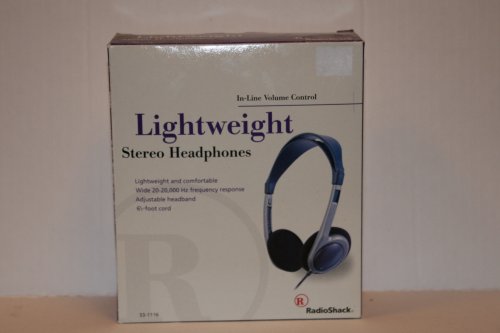
Image: RadioShack Lightweight Stereo Headphones, Model 33-1116. This image displays the headphones with an adjustable headband and a visible audio cable.
安全情報
- 聴覚保護: 聴覚障害を防ぐため、長時間大音量で聞くことは避けてください。
- 環境への意識: 運転中、自転車に乗っているとき、または交通量の多い場所で歩いているときなど、周囲の音が聞こえないと危険になる可能性がある状況では、ヘッドホンを使用しないでください。
- クリーニング: お手入れには柔らかく乾いた布をご使用ください。液体洗剤やエアゾールは使用しないでください。
- ストレージ: Store headphones in a clean, dry place away from extreme temperatures.
パッケージ内容
パッケージに以下の項目が含まれているか確認してください。
- RadioShack Lightweight Stereo Headphones (Model 33-1116)
設定
- オーディオソースに接続: Insert the 3.5mm audio jack at the end of the headphone cable into the headphone output port of your audio device (e.g., smartphone, tablet, computer, stereo system).
- ヘッドバンドを調整します: Place the headphones on your head. Adjust the sliding headband on both sides until the earcups comfortably cover your ears and the headphones feel secure without excessive pressure.
オペレーティング
- 電源オン時のオーディオソース: オーディオ デバイスの電源がオンになっていて、オーディオが再生されていることを確認します。
- 音量を調整: Use the in-line volume control located on the headphone cable to adjust the listening volume to a comfortable level. You may also need to adjust the volume on your audio source.
- リスニング: Enjoy your audio.
メンテナンス
- Cleaning Earcups and Headband: Use a soft, dry, lint-free cloth to gently wipe the earcups and headband. Do not use abrasive cleaners, solvents, or spray directly onto the headphones.
- ケーブルのお手入れ: Avoid sharply bending or twisting the 6.5-foot cable. Store the cable neatly to prevent tangling and damage.
- ストレージ: 使用しないときは、ヘッドフォンを涼しく乾燥した場所に保管してください。
トラブルシューティング
ヘッドフォンで問題が発生した場合は、次の一般的な問題と解決策を参照してください。
- 音が出ない:
- Ensure the 3.5mm audio jack is fully inserted into your audio device.
- Check the volume level on both the in-line control and your audio device. Increase if necessary.
- デバイスの問題を排除するために、別のオーディオ ソースでヘッドフォンをテストします。
- 歪んだ音:
- Lower the volume on both the headphones and your audio device. High volume can cause distortion.
- オーディオ ジャックが清潔でゴミがないことを確認します。
- Test with another audio source or audio file.
- 不快なフィット感:
- Adjust the headband sliders on both sides to achieve a comfortable and secure fit.
仕様
| ブランド | ラジオシャック |
| モデル番号 | 33-1116 |
| 接続技術 | 有線 |
| 周波数応答 | 20 Hz - 20 kHz |
| ケーブル長さ | 6.5フィート(約2メートル) |
| 追加機能 | Adjustable Headband, Lightweight Design, In-line Volume Control |
保証とサポート
For warranty information, please refer to the documentation included with your purchase or the retailer's policy where the product was acquired. For further support or inquiries, please visit the official RadioShack brand store or contact their customer service.
RadioShack Brand Store: https://www.amazon.com/stores/RadioShack/page/428CD7AB-87FF-4B6C-B5C3-96B7B297DFC4