
導入
Thank you for choosing the TRIXIE Automatic Fish Feeder Model 86200. This device is designed to provide reliable and convenient feeding for your aquarium fish, ensuring they receive their meals even when you are away. Please read this manual carefully before initial use to ensure proper setup and operation.
安全に関する注意事項
- 給餌器が水槽内に落ちないようにしっかりと取り付けられていることを確認してください。
- Do not immerse the feeder in water. It is not waterproof.
- お子様やペットの手の届かない場所に保管してください。
- Use only the specified battery type (not included). Rechargeable batteries may not function correctly with this device.
- 古い電池と新しい電池、または異なる種類の電池を混ぜないでください。
- フィーダーを長期間使用しない場合は、電池を取り外してください。
パッケージ内容
- TRIXIE Automatic Fish Feeder (Model 86200)
- 取付金具
- 取扱説明書
設定
1. バッテリーの取り付け
- フィーダーの下側にある電池ボックスを見つけます。
- 電池ボックスのカバーを開きます。
- Insert the required batteries (not included), ensuring correct polarity (+/-).
- 電池カバーをしっかりと閉じてください。
- Note: The device requires batteries to operate. Rechargeable batteries are not recommended as they may cause malfunctions.
2. フィーダーの取り付け
The feeder can be mounted on the edge of your aquarium. Ensure it is positioned directly above the water surface where the food will dispense freely.
- Attach the mounting bracket to the feeder.
- Place the feeder with the bracket onto the rim of your aquarium.
- Adjust the position to ensure the food dispensing opening is clear and directly over the water.
- ネジやクランプを締めるamps on the bracket to secure the feeder firmly in place.
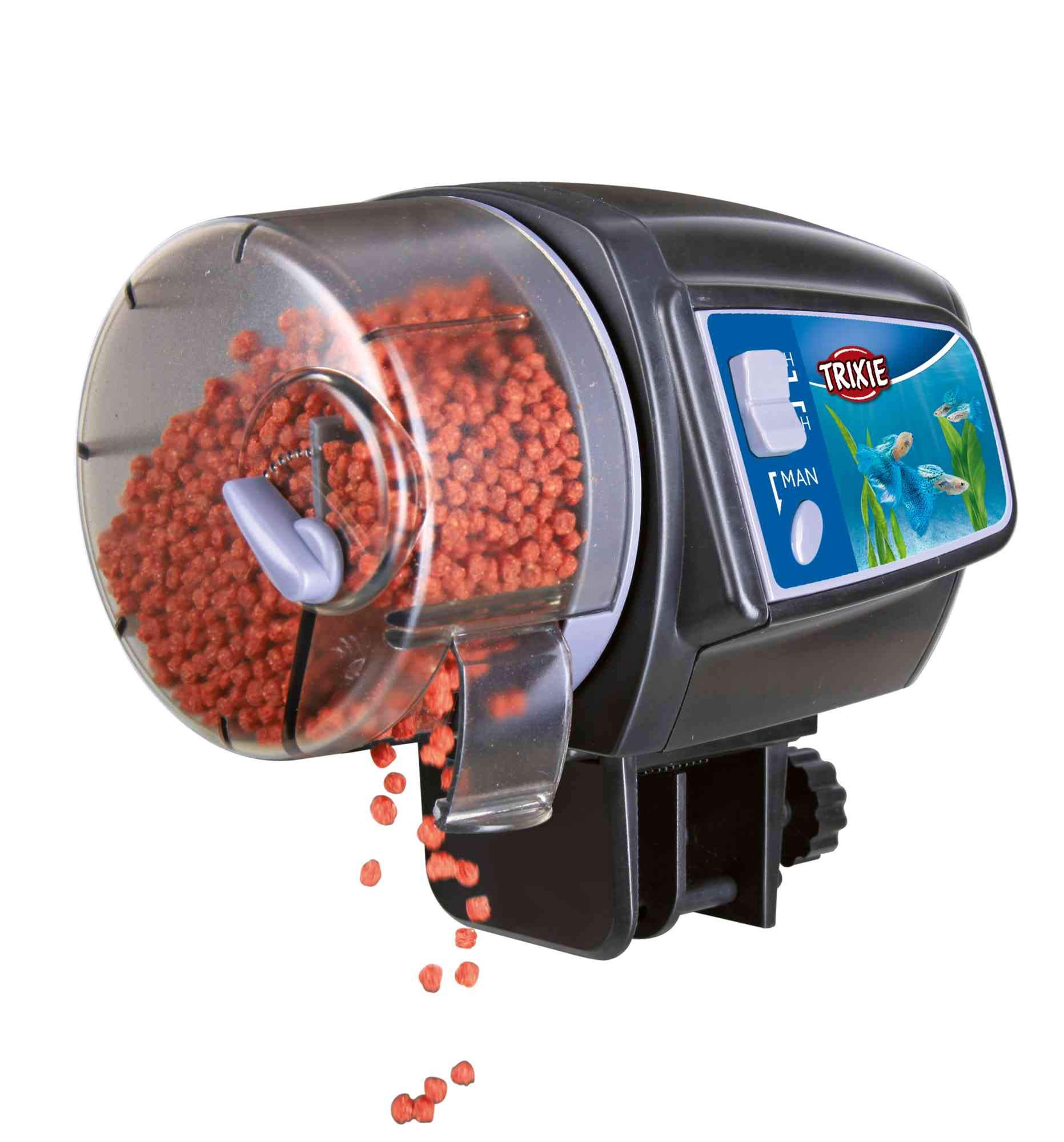
Image: The TRIXIE Automatic Fish Feeder Model 86200 securely mounted on the edge of an aquarium, with the food drum visible and fish swimming below.
3. 食品容器への充填
- 食品容器の蓋を開けます。
- Fill the container with dry fish food, such as flakes or granules.
- Important: Do not overfill the container. Fill it to a maximum of two-thirds capacity to ensure proper dispensing.
- Close the lid securely to protect the food from moisture.
操作手順
1. Setting Feeding Times
The TRIXIE Automatic Fish Feeder allows you to set feeding intervals for either 12 or 24 hours.
- Locate the timer switch on the feeder.
- Select the desired feeding interval:
- 12時間目: The feeder will dispense food every 12 hours.
- 24時間目: The feeder will dispense food every 24 hours.
- The first feeding will occur at the time you set the timer. For example, if you set it to 24H at 8:00 AM, the next feeding will be at 8:00 AM the following day.
2. Adjusting Food Quantity
The amount of food dispensed can be controlled to suit the needs of your fish.
- There is an adjustable slider or opening on the food drum.
- Slide the control to increase or decrease the size of the opening, which directly affects the amount of food dispensed per rotation.
- Recommendation: Test the dispensing quantity over a few cycles before relying on the feeder for extended periods. Observe your fish to ensure they are not being overfed or underfed.
3. 手動給餌
A manual feeding function is available for immediate dispensing of food outside of the programmed schedule.
- Press the "MAN" button (Manual) on the feeder.
- The feeder will dispense one portion of food immediately.
- This will not affect the set automatic feeding schedule.
メンテナンス
1. Cleaning the Food Container
Regular cleaning prevents food clumping and ensures hygienic feeding.
- Remove the food container from the main unit.
- Empty any remaining food.
- Wash the container with warm water and a mild, non-toxic detergent. Rinse thoroughly to remove all soap residue.
- Allow the container to dry completely before refilling and reattaching to the feeder. Moisture can cause food to clump.
2. バッテリーの交換
Replace batteries when the feeder's operation becomes inconsistent or stops. Low battery power can lead to missed feedings.
- 「セットアップ」セクションに記載されているバッテリーの取り付け手順に従ってください。
- 古い電池は、地域の規制に従って責任を持って処分してください。
3. 一般的なケア
- フィーダーの外側を広告で拭きますamp 必要に応じて布で拭きます。
- 研磨剤や溶剤は使用しないでください。
- Ensure the feeder is kept dry and away from direct splashes from the aquarium.
トラブルシューティング
| 問題 | 考えられる原因 | 解決 |
|---|---|---|
| Feeder does not dispense food automatically. |
|
|
| Too much or too little food is dispensed. |
|
|
| Food gets wet or clogs. |
|
|
仕様
| 特徴 | 詳細 |
|---|---|
| モデル番号 | 86200 |
| ブランド | トリクシー |
| 寸法(長さ×幅×高さ) | 16 x 15.19 x 15.19 cm |
| 重さ | 600グラム |
| 対象種 | 魚 |
| 推奨用途 | Indoor Aquariums |
| 特集 | Adjustable food quantity |
| 動作モード | 自動、手動 |
| Feeding Intervals | 12時間、24時間 |
| 電池が必要 | はい(含まれていません) |
| GTIN | 04011905862002 |
保証情報
TRIXIE products are manufactured to high-quality standards. For specific warranty details regarding your Automatic Fish Feeder Model 86200, please refer to the warranty card included with your purchase or visit the official TRIXIE webサイトでご確認ください。保証請求に備えて購入証明書を保管してください。
カスタマーサポート
If you encounter any issues or have questions not covered in this manual, please contact TRIXIE customer support. You can find contact information on the official TRIXIE webサイトまたは小売店を通じてご購入いただけます。
- オンライン: Visit the official TRIXIE webFAQ とサポート連絡先の詳細については、サイトをご覧ください。
- 小売業者: Contact the store where you purchased the product.