
1. はじめに
Thank you for choosing the TFA Dostmann Digital Weather Station 35.1065. This device provides accurate indoor temperature, humidity, time, date, and a weather trend forecast. Please read this manual carefully before using the device to ensure proper operation and to prevent damage.
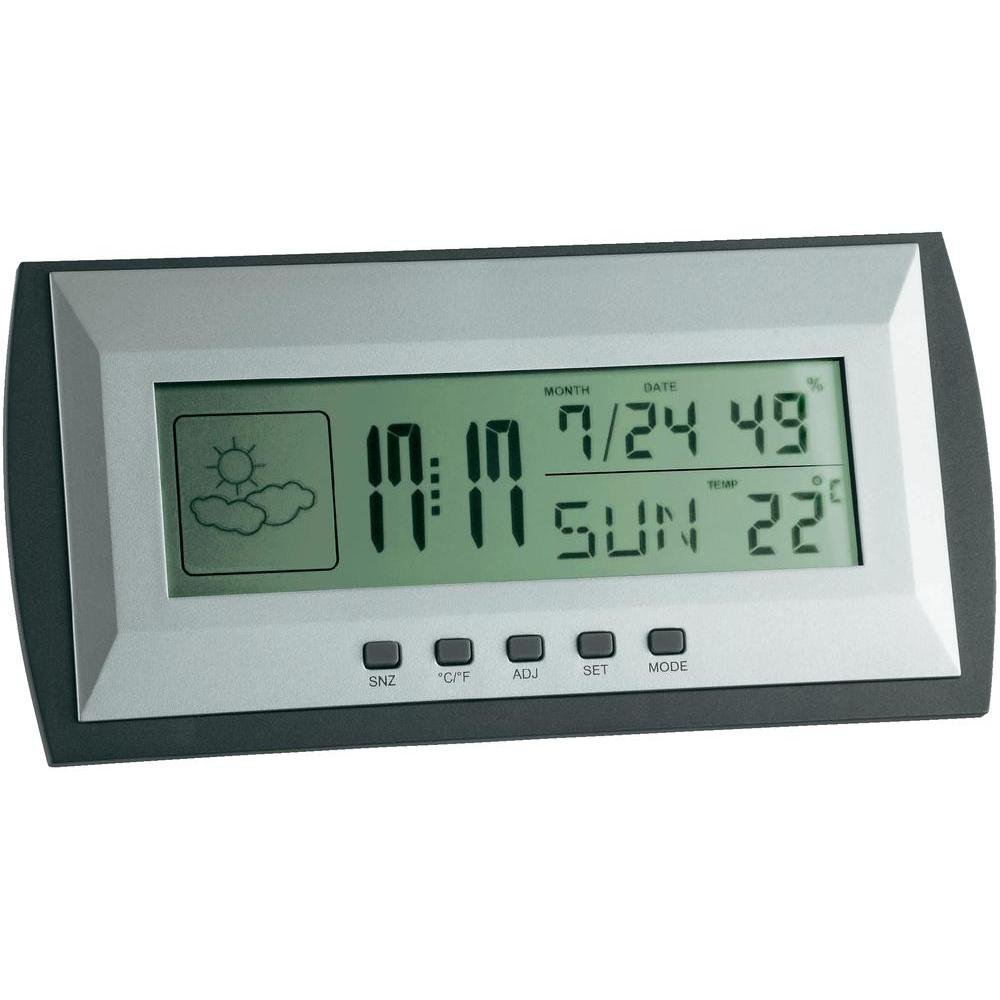
Figure 1: TFA Dostmann Digital Weather Station 35.1065 on a wooden desk. This image shows the weather station displaying time, date, and weather information in a typical home or office setting.
2. 安全情報
- このマニュアルは将来の参照用に保管してください。
- デバイスを極端な温度、振動、または衝撃にさらさないでください。
- 直射日光や湿気を避けてください。
- デバイスを水に浸さないでください。
- ご自身でデバイスの修理や改造を試みないでください。修理については、資格のある担当者にご相談ください。
- 使用済みバッテリーは、地域の規制に従って廃棄してください。
3. セットアップ
3.1 パッケージ内容
すべての項目が揃っていることを確認します。
- TFA Dostmann Digital Weather Station 35.1065
- 単三電池2本
- ユーザーマニュアル(このドキュメント)
3.2 バッテリーの取り付け
- Locate the battery compartment cover on the back of the weather station.
- カバーをスライドさせて開きます。
- Insert two (2) AA batteries, observing the correct polarity (+ and - markings).
- 電池カバーをしっかりと閉じてください。
デバイスは自動的に電源が入り、初期の測定値が表示されます。
3.3 初期設定(時刻、日付、温度単位)
Upon first power-on or after battery replacement, you may need to set the time, date, and preferred temperature unit.
- を押し続けます セット button for a few seconds to enter setting mode. The digit to be set will flash.
- 使用 調整済み 点滅している値(時間、分、年、月、日など)を調整するボタン。
- を押す セット ボタンをもう一度押すと設定が確定し、次のパラメータに移動します。
- Repeat steps 2 and 3 until all desired settings (time, date) are configured.
- 摂氏(°C)と華氏(°F)を切り替えるには、 °C /°F ボタン。
4. 気象観測所の操作
4.1ディスプレイオーバーview
LCD ディスプレイにはさまざまな情報が表示されます。
- 時間: Current time in 12-hour or 24-hour format.
- 日付: Current month, day, and day of the week.
- 温度: Indoor temperature, displayed in °C or °F.
- 湿度: Indoor humidity percentage.
- 天気予報アイコン: Indicates a trend forecast (e.g., sunny, cloudy, rainy). This is a prediction based on atmospheric pressure changes and may not always reflect actual weather.
4.2 ボタンの機能
- SNZ(スヌーズ): アラームのスヌーズ機能を有効にします。
- °C /°F: 摂氏と華氏の温度表示を切り替えます。
- ADJ (Adjust): 設定モード中に値を調整するために使用されます。
- セット: Enters and confirms settings.
- モード: Switches between different display modes (e.g., time, alarm time).
4.3アラームの設定
- を押す モード button repeatedly until the alarm time is displayed.
- を押し続けます セット ボタンを押します。アラームの時刻が点滅します。
- 使用 調整済み ボタンを押して希望のアラーム時間を設定します。
- プレス セット 確認して議事録に進みます。
- 使用 調整済み 希望するアラームの分数を設定します。
- プレス セット アラーム設定を確認して終了します。
- アラームをオン/オフにするには、 調整済み button while the alarm time is displayed. An alarm icon will appear/disappear.
5. メンテナンス
5.1 クリーニング
柔らかくて乾いた布でデバイスを清掃してください。amp cloth. Do not use abrasive cleaners or solvents. Ensure no water enters the device.
5.2 電池の交換
When the display becomes dim or the device stops functioning, replace the batteries. Follow the steps in Section 3.2. Always replace both batteries at the same time with new AA batteries.
5.3 ストレージ
If the device will not be used for an extended period, remove the batteries to prevent leakage and damage. Store in a cool, dry place.
6。 トラブルシューティング
| 問題 | 考えられる原因 | 解決 |
|---|---|---|
| 何も表示されないか、表示が暗い。 | 電池残量が少ないか、正しく取り付けられていません。 | 正しい極性を確認して、新しい電池と交換してください。 |
| 時刻/日付が正しくありません。 | 時刻/日付が正しく設定されていません。 | 時刻と日付を設定するには、セクション 3.3 を参照してください。 |
| 温度/湿度の測定値が不正確です。 | デバイスを熱源、通気口、または直射日光の当たる場所に設置します。 | Relocate the weather station to a stable indoor environment away from extreme temperature fluctuations. Allow time for readings to stabilize. |
| Weather forecast icon seems incorrect. | Weather forecast is a trend prediction based on atmospheric pressure, not a real-time forecast. | Understand that the icon indicates a general trend over the next 12-24 hours, not current conditions. |
7. 仕様

Figure 2: TFA Dostmann Digital Weather Station 35.1065 with dimensions. This image provides a detailed view of the device, including its width (18 cm), height (9 cm), and depth (3.81 cm).
- ブランド: TFAドストマン
- モデル: 35.1065
- 電源: Battery-powered (2 x AA batteries, included)
- 材料: プラスチック
- 特別な機能: Trend forecast
- 表示タイプ: 液晶
- 商品の寸法(奥行き×幅×高さ): 3.8 cm x 18 cm x 9 cm
- 商品の重量: 164グラム
- 含まれるコンポーネント: Weather station, batteries, user manual
- 推奨用途: ホームオフィス
- 具体的な用途: Date, Humidity, Temperature, Time
- 原産国: 中国
8. 保証とサポート
For warranty information, please refer to the documentation provided at the time of purchase or visit the official TFA Dostmann website. For technical support or further assistance, please contact TFA Dostmann customer service through their official channels.
Official TFA Dostmann Webサイト: www.tfa-dostmann.de