
1. はじめに
This manual provides detailed instructions for the installation, operation, and maintenance of the Lutron MA-ALFQ35 Maestro Companion Fan and Light Control. This device is designed to work in conjunction with a compatible Lutron Maestro Multi-Location Fan and Light Control (MA-LFQ3 or MA-LFQM) to provide multi-location control of your ceiling fan speed and light levels.
2. 重要な安全情報
警告:感電の危険があります。
- このデバイスを設置または保守する前に、必ず回路ブレーカーまたはヒューズ ボックスの電源をオフにしてください。
- Do not use this device with any fan or light control other than specified Lutron Maestro models.
- 設置は資格のある電気技師が行うか、すべての地方および国の電気規則に従って行う必要があります。
- 最大ワット数を超えないでくださいtage ratings for connected loads.
- この製品は屋内専用です。
3.製品オーバーview
The Lutron MA-ALFQ35 is a companion control unit that extends the functionality of a primary Maestro Multi-Location Fan and Light Control. It allows you to adjust both the fan speed and light intensity from additional locations within a room or area. This unit does not function independently and must be paired with a compatible Maestro master control.
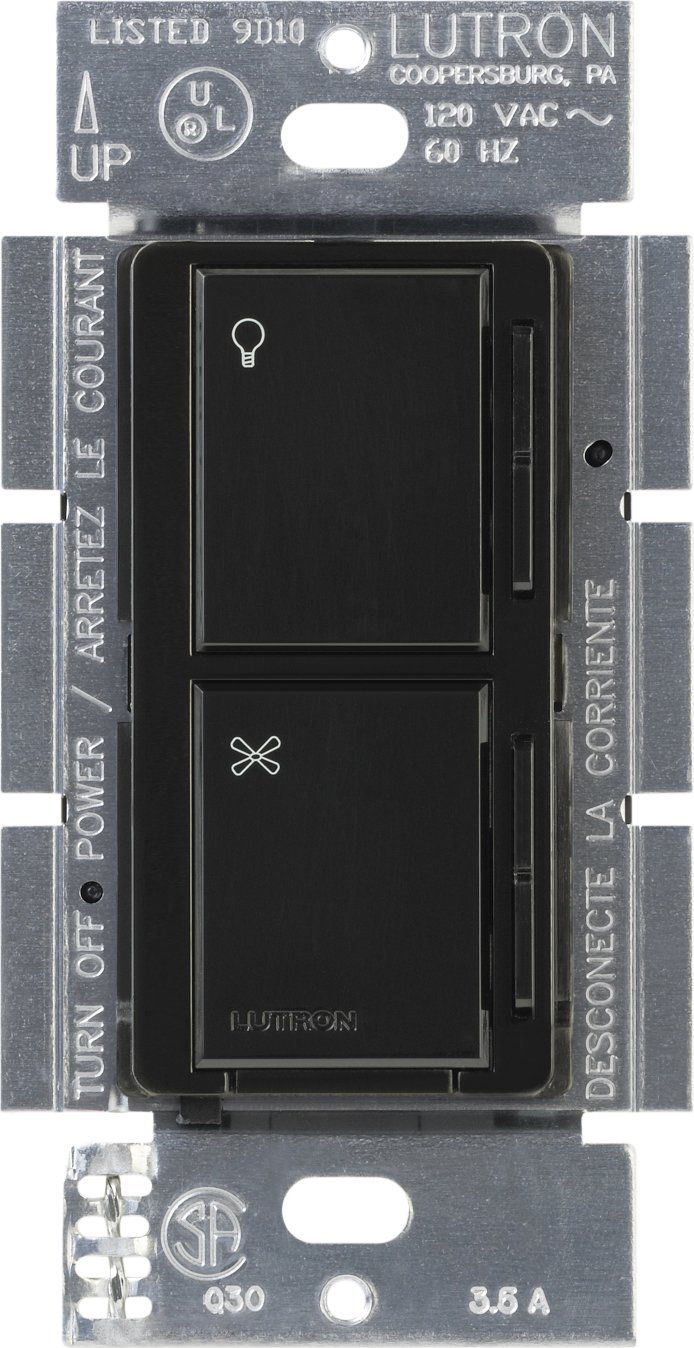
画像1:正面 view of the Lutron MA-ALFQ35 Maestro Companion Fan and Light Control. This black wall-mounted unit features separate touch controls for light (top) and fan (bottom), with a small Lutron logo at the base.
主な機能は次のとおりです。
- Multi-location control for fan speed and light level.
- Adjusts fan speed and light level from up to three locations (when used with additional companion controls).
- Sets and recalls 7 distinct light levels and fan speeds.
- Touch control method for intuitive adjustments.
4. 互換性
This companion control unit is designed to operate exclusively with specific Lutron Maestro Multi-Location Fan and Light Controls. It is not a standalone device and will not function without a compatible master unit.
Compatible Master Control Models:
- Lutron MA-LFQ3
- Lutron MA-LFQM
Ensure you have one of these master units installed before attempting to install the MA-ALFQ35 companion control.
5. インストール(セットアップ)
Installation of the MA-ALFQ35 companion control requires basic electrical wiring knowledge. If you are unsure about any steps, consult a qualified electrician.
5.1 始める前に
- 電源を切る: Locate the circuit breaker or fuse box that controls the power to the fan and light fixture. Turn off the power completely to prevent electric shock. Verify power is off using a voltageテスター。
- 配線を識別する: Carefully remove the existing wall plate and switch. Identify the wiring in the wall box. This companion control typically requires a neutral wire, a hot wire, and a traveler wire connected to the master control. Refer to the wiring diagram provided with your マスター Maestro Multi-Location Fan and Light Control for specific connections.
- ワイヤーを準備する: Strip insulation from wires if necessary, ensuring approximately 1/2 inch (12 mm) of bare wire is exposed.
5.2 Wiring the Companion Control
The MA-ALFQ35 companion control connects to the master control unit via traveler wires. The exact wiring configuration will depend on your specific setup (e.g., 3-way or 4-way control). Always follow the wiring instructions provided with the マスター Lutron Maestro Multi-Location Fan and Light Control (MA-LFQ3 or MA-LFQM).
- Connect the appropriate wires from the wall box to the terminals on the MA-ALFQ35.
- すべての配線接続が安全であることを確認します。
5.3 取り付けと仕上げ
- コントロールをマウントします。 Carefully push the wired MA-ALFQ35 into the wall box. Secure it with the provided mounting screws.
- ウォールプレートの取り付け: Attach a coordinating Claro wallplate (sold separately) over the companion control.
- 電力を回復する: 回路ブレーカーまたはヒューズボックスで電源を再びオンにします。
- テスト機能: Test both the fan and light controls from all locations to ensure proper operation.
6. 操作
The Lutron MA-ALFQ35 companion control provides intuitive touch-based operation for your ceiling fan and lights.
6.1 照明制御
- オン/オフ: Tap the top section of the control (light icon) to turn the lights on or off.
- 明るさを調整: Press and hold the top section to dim or brighten the lights. Release when the desired brightness is reached. The control supports 7 distinct light levels.
- プリセットを思い出してください: A quick tap will often recall the last set brightness level.
6.2 ファン速度制御
- オン/オフ: Tap the bottom section of the control (fan icon) to turn the fan on or off.
- 速度を調整: Press and hold the bottom section to increase or decrease the fan speed. Release when the desired speed is reached. The control supports 7 distinct fan speeds.
- プリセットを思い出してください: A quick tap will often recall the last set fan speed.
7. メンテナンス
The Lutron MA-ALFQ35 requires minimal maintenance.
- クリーニング: To clean the surface of the control, wipe with a soft, damp 布で拭いてください。研磨剤入りの洗剤、溶剤、化学スプレーは使用しないでください。表面や内部部品を損傷する恐れがあります。
- ユーザーが修理可能な部品はありません: There are no user-serviceable parts inside this unit. Do not attempt to open or repair the control.
8。 トラブルシューティング
If your Lutron MA-ALFQ35 companion control is not functioning as expected, consider the following:
- 電源なし: Ensure the circuit breaker or fuse supplying power to the fan and light circuit is in the ON position.
- 応答なし: Verify that the master Maestro Multi-Location Fan and Light Control (MA-LFQ3 or MA-LFQM) is properly installed and functioning. The companion unit relies on the master unit for operation.
- 配線ミス: Double-check all wiring connections, especially the traveler wires between the companion and master units. Refer to the master unit's installation guide for correct wiring diagrams. Ensure all connections are secure.
- Incompatible Master Unit: Confirm that the master control unit is one of the specified compatible Lutron Maestro models (MA-LFQ3 or MA-LFQM). This companion control will not work with other types of fan or light controls.
- 緩い接続: Turn off power at the breaker and re-check all wire connections in the wall box for tightness.
If problems persist after checking these points, contact Lutron customer support or a qualified electrician.
9. 仕様
| モデル | MA-ALFQ35-BL |
| ブランド | ルートロン |
| 操作モード | オンオフ |
| 制御方法 | 触る |
| ポジション数 | 7 (for both fan speed and light level) |
| ワットtage | 300 Watts (when used with compatible master) |
| 対応デバイス | MA-LFQ3, MA-LFQM |
| 取り付けタイプ | プラグインマウント |
| アイテム重量 | 0.3 ポンド |
| 色 | 黒 |
10. 保証とサポート
10.1 保証情報
The Lutron MA-ALFQ35 Maestro Companion Fan and Light Control comes with a 1年間の限定保証 on materials and manufacture. Please retain your proof of purchase for warranty claims. This warranty covers defects in materials and workmanship under normal use.
10.2 カスタマーサポート
For technical assistance, troubleshooting beyond this manual, or warranty inquiries, please contact Lutron customer support. Visit the official Lutron web連絡先情報と追加リソースについては、こちらのサイトをご覧ください。