
1. はじめに
ご購入ありがとうございますasing the GPX CDP6806DT Personal CD Player. This manual provides important safety instructions, operational guidelines, and maintenance procedures to ensure optimal performance and longevity of your device. Please read this manual thoroughly before using the product and retain it for future reference.
2. 安全情報
重要な安全上の注意事項
- ユニットを水や湿気にさらさないでください。
- ラジエーター、暖房口、ストーブ、その他の機器(電気を含む)などの熱源の近くにユニットを置かないでください。 amp熱を発生する装置。
- ユニットを分解したり改造したりしないでください。修理は必ず資格のあるサービス担当者にご依頼ください。
- Use only the specified batteries (2 x AA batteries). Ensure correct polarity when inserting batteries.
- ユニットを長期間使用しない場合は、電池を取り外してください。
- 聴覚障害を防ぐため、大音量で長時間聴くことは避けてください。
- 乾いた布でのみユニットを清掃してください。
3. パッケージ内容
Carefully unpack your GPX CDP6806DT Personal CD Player and ensure all items are present:
- GPX CDP6806DT Personal CD Player
- ユーザーマニュアル(このドキュメント)
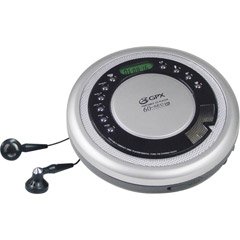
Figure 1: GPX CDP6806DT Personal CD Player. This image illustrates the compact design and general appearance of the device.
4. コントロールと機能
Familiarize yourself with the controls and features of your GPX CDP6806DT for optimal use.
- LCDディスプレイ: 6-digit display for track number, time, and FM frequency.
- 再生/一時停止(►/−): Press to start or pause CD playback.
- 停止(■): CD の再生を停止するには押します。
- スキップ/検索 (◀◀/▶▶): Press to skip tracks. Hold to search within a track.
- 音量(+/-): 音声出力レベルを調整します。
- MODE/PROG: Selects playback mode (Repeat, Random) or programs CD tracks.
- FM TUNER (ON/OFF/BAND): Switches to FM radio mode, turns FM on/off, or changes FM band.
- PRESET (+/-): Navigates saved FM radio presets.
- CDコンパートメント: Area for inserting audio CDs.
- バッテリーコンパートメント: Located on the bottom, holds 2 AA batteries.
- ヘッドホンジャック(3.5mm): プライベートリスニング用にヘッドフォンを接続します。
Figure 2: GPX CDP6806DT Controls Layout. This image provides a visual reference for the location of various buttons and ports on the device.
5. セットアップ
5.1 バッテリーの取り付け
The GPX CDP6806DT requires two (2) AA batteries (not included) for portable operation.
- 本体下部の電池ボックスの位置を確認します。
- バッテリーコンパートメントカバーをスライドさせて開きます。
- 電池ボックス内の指示に従って、極性 (+ と -) が正しいことを確認して、単 3 電池 2 本を挿入します。
- 電池カバーをしっかりと閉じてください。
5.2 ヘッドフォンの接続
For private listening, connect your 3.5mm stereo headphones (not included) to the headphone jack located on the side of the unit.
6. 操作手順
6.1 CD再生
The unit supports CD and CD-R/RW disc formats.
- Open the CD compartment lid by gently pressing the OPEN button (if present, or lifting the lid).
- ラベル面を上にして CD をセンタースピンドルに置きます。
- CDコンパートメントの蓋をカチッと音がするまでしっかりと閉じます。
- を押す 再生/一時停止(►/−) button to begin playback. The track number and elapsed time will appear on the LCD display.
- 再生を一時停止するには、を押します 再生/一時停止(►/−)。 もう一度押すと再開します。
- 再生を停止するには、を押します 停止(■) ボタン。
- 次のトラックにスキップするには、 SKIP/SEARCH (▶▶).
- To go back to the beginning of the current track, press スキップ/検索 (◀◀) once. Press twice to go to the previous track.
- To search rapidly forward or backward within a track, hold down SKIP/SEARCH (▶▶) or (◀◀) それぞれ。
- を使用して音量を調整します ボリューム(+/-) コントロール。
6.2 FMラジオの操作
The unit features a digital FM tuner with station presets.
- スライドして FMチューナー switch to the ON position or press the バンド ボタンを押してFMモードに入ります。
- を押す SKIP/SEARCH (▶▶) or (◀◀) 希望の周波数に手動でチューニングするためのボタン。
- To auto-scan and save stations, hold down the 再生/一時停止(►/−) button (or refer to specific instructions for auto-scan if available on the device).
- To recall saved presets, use the プリセット(+/-) ボタン。
6.3 CD Programming (24-Track)
最大 24 トラックを特定の順序で再生するようにプログラムできます。
- CDが停止した状態で、 MODE/PROG ボタンを押します。ディスプレイに「PROG」が点滅します。
- 使用 SKIP/SEARCH (▶▶) or (◀◀) プログラムする最初のトラックを選択するためのボタンです。
- プレス MODE/PROG again to confirm the selection. The display will show the program number and the next available program slot.
- Repeat steps 2 and 3 to add up to 24 tracks to your program.
- 希望するトラックをすべてプログラムしたら、 再生/一時停止(►/−) プログラム再生を開始します。
- プログラムをクリアするには、 停止(■) ボタンを2回押します。
6.4 スキップ防止保護(ASP)
The GPX CDP6806DT features a 60-second Anti-Skip Protection system. This system buffers audio data to minimize interruptions caused by minor shocks or vibrations during CD playback. The ASP activates automatically when a CD is playing.
7. メンテナンス
7.1 ユニットのクリーニング
- 本体の外側は、乾いた柔らかい布で拭いてください。
- 研磨剤入りの洗剤、ワックス、溶剤は使用しないでください。
- If the CD lens needs cleaning, use a specialized CD lens cleaner disc or a soft, lint-free cloth designed for optical lenses.
7.2バッテリーケア
- Remove batteries if the unit is not used for an extended period to prevent leakage.
- 古い電池と新しい電池、または異なる種類の電池を混ぜないでください。
- 使用済みバッテリーは地域の規制に従って責任を持って廃棄してください。
8。 トラブルシューティング
If you experience issues with your GPX CDP6806DT, please consult the following table for common problems and solutions.
| 問題 | 考えられる原因 / 解決策 |
|---|---|
| ユニットの電源が入りません。 | Check if batteries are inserted correctly with proper polarity. Ensure batteries are fresh and not depleted. |
| ヘッドホンから音が出ません。 | Ensure headphones are fully plugged into the headphone jack. Increase the volume level. Test with another pair of headphones. |
| CD がスキップしたり、再生が中断されます。 | Ensure the CD is clean and free of scratches or smudges. Clean the CD with a soft, lint-free cloth. Ensure the unit is on a stable surface or held steadily during use. |
| CDが再生されません。 | Ensure the CD is inserted correctly with the label side up. Close the CD compartment lid completely. Check if the CD is a supported format (CD, CD-R/RW). |
| FMラジオの受信状態が悪いです。 | Extend the headphone cable as it acts as the antenna. Try moving to a different location. |
9. 仕様
- ブランド: グプエックス
- モデル: CDP6806DT
- サポートされているディスク形式: CD、CD-R / RW
- スキップ防止保護: 60秒
- 画面: 6桁のLCD
- 無線: Digital FM Tuner with Presets
- CD Programming: 24トラック
- 電源: 単三電池2本(別売)
- 接続性: 3.5mm Headphone Jack (Auxiliary)
10. 保証とサポート
For detailed warranty information, please refer to the warranty card included with your original product packaging. For technical support, service inquiries, or to purchase replacement parts, please visit the official GPX webサイトをご覧いただくか、製品ドキュメントに記載されている連絡先情報を使用してカスタマー サービス部門にお問い合わせください。
保証請求のために購入証明書を保管してください。


