
1. はじめに
This manual provides comprehensive instructions for the setup, operation, maintenance, and troubleshooting of your COBY CR-A78 AM/FM Digital Alarm Clock with Time Projector. Please read this manual thoroughly before using the device to ensure proper function and to maximize your user experience. Keep this manual for future reference.
2.製品オーバーview
The COBY CR-A78 is a versatile digital alarm clock featuring an AM/FM radio tuner and a unique time projection function. It is designed to provide reliable timekeeping, alarm functions, and radio entertainment, with the added convenience of projecting the current time onto a wall or ceiling.
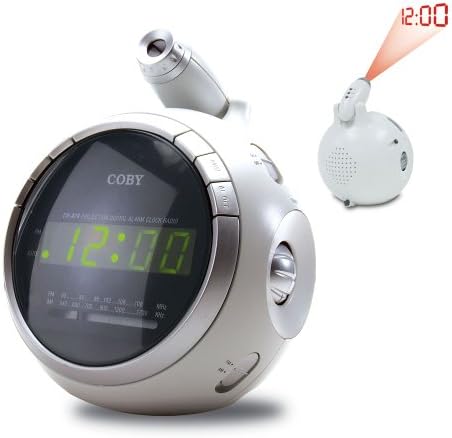
画像2.1: フロント view of the COBY CR-A78 digital alarm clock, showing the green LED display and the adjustable time projector. An inset image illustrates the time '12:00' being projected onto a surface.
3. 特徴
- AM/FMデジタルチューナー: お気に入りのラジオ局を聴くために。
- Large Green LED Display: Provides clear visibility of the time.
- Integrated Time Projector: Projects the current time onto a wall or ceiling for easy viewing。
- デュアルアラーム機能: 異なる起床時間に合わせて 2 つの独立したアラームを設定します。
- スヌーズ機能: Allows for a temporary pause of the alarm.
- 目覚まし時計: 自動電源オフ機能で音楽を聴きながら眠りにつくことができます。
- バッテリーバックアップ: 停電中でも時間とアラーム設定を維持しますtages (requires 9V battery, not included).
4. パッケージ内容
- COBY CR-A78 AM/FM Digital Alarm Clock
- AC電源アダプター
- ユーザーマニュアル(このドキュメント)
5. セットアップ
5.1. 電源接続
- Insert the small end of the AC power adapter into the DC IN jack located on the back of the unit.
- Plug the other end of the AC power adapter into a standard wall outlet (AC 120V, 60Hz).
- The unit will power on, and the display will flash, indicating it is ready for time setting.
5.2. バッテリーバックアップの取り付け
A 9-volt battery (not included) can be installed to provide backup power for the clock and alarm settings during a power interruption.
- 本体下部の電池ケースカバーを見つけます。
- Remove the cover by sliding it off.
- Connect a 9-volt battery to the battery connector inside the compartment, observing polarity (+ and -).
- Place the battery into the compartment and replace the cover securely.
6. 操作手順
6.1.時間を設定する
- を押し続けます 時間設定 時間の数字が点滅し始めるまでボタンを押します。
- を押す 時間 ボタンを繰り返し押して時間を調整します。正しいAM/PM設定を確認するには、PMインジケーターを確認してください。
- を押す 分 ボタンを繰り返し押して分を調整します。
- を押す 時間設定 もう一度ボタンを押して確定し、時間設定モードを終了します。
6.2.アラームの設定
The CR-A78 features two independent alarms, Alarm 1 and Alarm 2.
- を押し続けます アラーム1セット (または アラーム2セット)ボタンを押して、アラームの時間の数字が点滅するまで待ちます。
- を押す 時間 ボタンを押して希望のアラーム時間を設定します。
- を押す 分 ボタンを押して希望のアラーム分を設定します。
- を押す アラーム1セット (または アラーム2セット) button again to confirm the alarm time.
- アラームを鳴らすには、 アラーム1オン/オフ (または アラーム2オン/オフ) switch to the 'ON' position. Select 'BUZZER' for a beeping alarm or 'RADIO' to wake to the radio.
6.3. スヌーズ機能の使用
アラームが鳴ったら、を押します スヌーズ button. The alarm will temporarily stop and sound again after approximately 9 minutes. To turn off the alarm completely, press the アラームのオン/オフ 「OFF」に切り替えます。
6.4. ラジオの操作(AM/FM)
- を押す ラジオオン/オフ ラジオをオンにするボタン。
- スライドして FM/AM switch to select the desired band.
- 回転する チューニング ノブを回して希望の放送局を見つけます。
- を使用して音量を調整します 音量 ノブ。
- ラジオをオフにするには、を押します ラジオオン/オフ もう一度ボタンを押します。
6.5. Using the Time Projector
- ユニット上部のプロジェクターレンズを見つけます。
- を押す プロジェクターのオン/オフ button to activate the time projection.
- Rotate the projector lens to adjust the focus of the projected time.
- Adjust the angle of the projector arm to direct the time onto your desired surface (wall or ceiling).
- を押す プロジェクターのオン/オフ button again to turn off the projection.
7. メンテナンス
- クリーニング: 本体の外装を清掃する際は、柔らかく乾いた布をご使用ください。研磨剤入りの洗剤や溶剤は使用しないでください。
- レンズケア: Gently wipe the projector lens with a soft, lint-free cloth if it becomes dusty.
- 配置: ユニットは直射日光、熱源、過度の湿気を避け、安定した平らな面に置いてください。
- バッテリー交換: Replace the 9-volt backup battery annually or if the unit experiences frequent power outages to ensure continuous backup functionality.
8。 トラブルシューティング
| 問題 | 考えられる原因 | 解決 |
|---|---|---|
| ユニットの電源が入りません。 | ACアダプタが正しく接続されていません。 | AC アダプターがユニットと機能している壁のコンセントにしっかりと差し込まれていることを確認します。 |
| アラームは鳴りません。 | アラームが作動していないか、または正しく設定されていません。 | Verify the alarm time is set correctly and the ALARM ON/OFF switch is in the 'ON' position (BUZZER or RADIO). |
| ラジオの受信状態が悪い。 | Antenna not extended or unit too close to interference. | Extend the FM wire antenna fully. For AM, rotate the unit for best reception. Move away from other electronic devices. |
| 予測時間が不明瞭です。 | Projector focus not adjusted. | Rotate the projector lens to adjust the focus until the time is clear. |
| 電源を切ると時間/設定が失われるtage. | バックアップバッテリーが切れているか、取り付けられていません。 | Install a fresh 9-volt battery or replace the existing one. |
9. 仕様
| 特徴 | 仕様 |
|---|---|
| ブランド | コビー |
| モデル | CR-A78 |
| 表示タイプ | デジタルLED(緑) |
| ラジオチューナー | AM/FMアナログ |
| 電源 | AC 120V、60Hz |
| バッテリーバックアップ | 9V電池1個(別売) |
| 製品寸法(長さ x 幅 x 高さ) | 12.7 x 10.16 x 15.24 cm(5 x 4 x 6インチ) |
| 製品重量 | 567 g (1.25 ポンド) |
| 色 | 銀 |
10. 保証とサポート
For warranty information or technical support, please refer to the documentation provided at the time of purchase or contact Coby customer service. Keep your purchase receipt as proof of purchase for any warranty claims.