
導入
This manual provides essential instructions for the setup, operation, maintenance, and troubleshooting of your Lowrance iFinder Expedition C Plus Waterproof Hiking GPS. Designed for outdoor navigation, this 16-channel handheld GPS unit features a color display, electronic compass, barometric altimeter, and MP3 player capabilities. Please read this manual thoroughly to ensure proper use and to maximize the performance of your device.
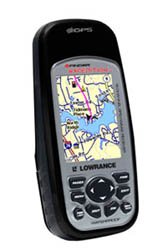
Image of the Lowrance iFinder Expedition C Plus handheld GPS unit, showcasing its color display and button layout.
設定
- バッテリーの取り付け: Open the battery compartment cover on the back of the unit. Insert the required batteries (not included) according to the polarity indicators. Close the cover securely to maintain the waterproof seal.
- Memory Card (MMC/SD) Installation: Locate the memory card slot. Insert the provided MMC/SD memory card, ensuring it is correctly oriented. This card is essential for storing additional maps and data.
- 初回電源投入: Press and hold the power button until the device screen illuminates. Follow any on-screen prompts for initial setup, such as language selection and time zone.
- MapCreate USA Topo Software Installation: For custom, high-detail mapmaking, install the exclusive MapCreate USA Topo mapping software on your personal computer. Use the provided MMC/SD card reader with a USB connector to transfer maps to your device.
操作手順
基本的なナビゲーション
- GPS信号の取得: For optimal performance, use the device outdoors with a clear view of the sky. The 16-channel GPS receiver will automatically acquire satellite signals.
- 地図 Viewing: Use the directional pad to pan across the map. Zoom in and out using the dedicated zoom buttons. The 2.83-inch diagonal color TFT display with 320 x 240 resolution provides clear map details.
- ウェイポイントの作成: Mark your current location as a waypoint by pressing the 'Mark' button. You can name and save these points for future reference.
高度な機能
- スカウトモード: Activate 'Scout Mode' to mark area perimeters and create custom borders on your map. This is useful for defining hunting grounds, property lines, or exploration areas.
- 電子コンパス: The built-in electronic compass provides accurate heading information even when stationary. Calibrate the compass periodically as instructed on-screen.
- 気圧高度計: The integrated barometric altimeter provides precise altitude readings and can track changes in atmospheric pressure, useful for weather forecasting.
- MP3プレーヤー: The device includes MP3 player capabilities. Load your favorite audio files onto the MMC/SD card to enjoy music during your expeditions.
- マイクロフォン: Utilize the built-in microphone for voice notes or other audio recordings.
メンテナンス
- クリーニング: 柔らかくて乾いた布でデバイスを清掃してください。amp 布で拭いてください。画面やコンピュータを傷つける可能性のある研磨剤入りのクリーナーや溶剤は使用しないでください。asing.
- 防水ケア: While the iFinder Expedition C Plus is waterproof, ensure all port covers and the battery compartment are securely closed before exposure to water. Do not submerge the device beyond its rated depth or for extended periods.
- ストレージ: 長期間使用しない場合は、液漏れを防ぐため電池を取り外してください。直射日光や極端な温度を避け、涼しく乾燥した場所に保管してください。
- ソフトウェアアップデート: 定期的にローランスをチェックする web最適なパフォーマンスと新機能へのアクセスを確保するために、ファームウェア アップデート サイトにアクセスしてください。
トラブルシューティング
- デバイスの電源が入っていない:
- 電池の向きを確認し、新しい電池であることを確認してください。
- 電池ケースのカバーが完全に閉まっていることを確認してください。
- GPSが信号を取得できません:
- 開けた場所に移動して view 空の。
- デバイスが衛星を取得するまで数分間お待ちください。
- Screen Issues (Dim/Unresponsive):
- バックライトの設定を調整します。
- Perform a soft reset (refer to the device's on-screen menu for instructions).
- Map Data Not Displaying:
- Ensure the MMC/SD card is properly inserted.
- その地図を確認する files are correctly loaded onto the memory card using MapCreate USA Topo software.
仕様
| 特徴 | 詳細 |
|---|---|
| モデル番号 | 112-87 |
| ブランド | ローランス |
| GPSチャネル | 16チャンネル |
| 表示タイプ | Color TFT with white LED backlight |
| 画面サイズ | 2.83インチ(対角) |
| ディスプレイ解像度 | 320 x 240 ピクセル |
| 寸法(幅×高さ×奥行き) | 5.6 x 2.5 x 1.2 インチ (14.2 x 6.35 x 3.05 cm) |
| 重さ | 8.7 ounces (0.25 kg) / 1.11 kg (shipping weight) |
| ヒューマンインターフェイス入力 | マイクロフォン |
| メモリカードのサポート | MMC/SD |
| 欧州連合 | 042194528304 |
保証情報
Warranty details for the Lowrance iFinder Expedition C Plus are typically included with the product packaging or available on the official Lowrance web当サイトでは、具体的な利用規約や登録手順などについて、以下のリソースをご参照ください。
サポート
For further assistance, technical support, or to download the latest software updates, please visit the official Lowrance website. You may also find FAQs and additional resources there to help you with your iFinder Expedition C Plus GPS unit.