
Coby CT-P9040 SVR
Coby CT-P9040 5.8 GHz Analog Cordless Phone User Manual
Model: CT-P9040 SVR
導入
This manual provides comprehensive instructions for the setup, operation, and maintenance of your Coby CT-P9040 5.8 GHz Analog Cordless Phone. Please read this manual thoroughly before using your phone to ensure proper functionality and to prevent damage.
パッケージの内容とコンポーネント
始める前に、パッケージにすべてのコンポーネントが含まれていることを確認してください。
- コードレスハンドセット
- 基本単位
- AC電源アダプター
- 電話回線コード
- 充電式バッテリーパック
- ユーザーマニュアル(このドキュメント)
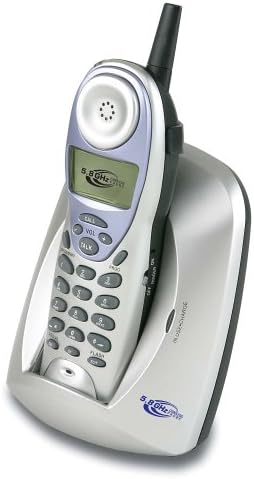
Image: The Coby CT-P9040 cordless phone, showing the handset docked in its silver base unit. The handset features a display screen, numeric keypad, and function buttons. The base unit has a charging cradle for the handset.
セットアップガイド
1. バッテリーの取り付け
- ハンドセットの背面にある電池ボックスを見つけます。
- 電池ボックスのカバーを開きます。
- Connect the rechargeable battery pack connector to the jack inside the compartment.
- Place the battery pack into the compartment and close the cover securely.
2. ベースユニットの接続
- Connect one end of the telephone line cord to the "LINE" jack on the back of the base unit.
- 電話回線コードのもう一方の端を標準の電話壁ジャックに接続します。
- Connect the AC power adapter to the "DC IN" jack on the back of the base unit.
- AC 電源アダプタを標準の電源コンセントに差し込みます。
3. 初期充電
Place the handset in the base unit's charging cradle. Ensure the "IN CHARGE" indicator light on the base unit illuminates, indicating proper charging. For optimal battery performance, charge the handset for at least 12-14 hours before initial use.
操作手順
電話をかける
- Pick up the handset from the base unit or press the 話す ボタン。
- ダイヤルトーンを聞きます。
- 希望の電話番号をダイヤルします。
- 通話を終了するには、 話す button again or place the handset back in the base unit.
電話に出る
電話が鳴ったら、受話器を取るか、 話す 電話に出るにはボタンを押してください。
リダイヤル機能
最後にかけた番号にリダイヤルするには、を押します リダイヤル ハンドセットのボタン。
音量調整
通話中は、 VOL+ そして 巻 - buttons on the handset to adjust the earpiece volume.
フラッシュ機能
を押す フラッシュ button to use call waiting or transfer calls if supported by your telephone service provider.
Storing Phone Numbers (Speed Dial)
Your phone can store up to 10 numbers for frequently called contacts. Refer to the detailed instructions in the full manual for programming speed dial entries.
メンテナンスとケア
- 携帯電話を熱源、直射日光、湿気から遠ざけてください。
- 携帯電話の表面を柔らかくて清潔な布で拭いてください。amp 布で拭いてください。研磨剤や溶剤は使用しないでください。
- 適切な充電を維持するために、ハンドセットとベースユニットの充電接点が清潔であることを確認してください。
- 電話機を長期間使用しない場合は、端末からバッテリーを取り外してください。
トラブルシューティング
| 問題 | 考えられる原因 | 解決 |
|---|---|---|
| 発信音なし | 電話回線コードが外れています。 | 電話回線コードがベースユニットと壁のジャックの両方にしっかりと接続されていることを確認します。 |
| 端末が充電されない | ハンドセットがクレードルに正しく装着されていないか、充電接点が汚れています。 | Reseat the handset in the base unit. Clean the charging contacts on both the handset and base unit with a dry cloth. |
| 音質が悪い / 雑音がある | Interference from other electronic devices or out of range. | Move the base unit away from other electronic devices (e.g., microwaves, Wi-Fi routers). Move closer to the base unit. |
| 電話をかけたり受けたりできない | Power adapter disconnected or battery low. | Check if the AC power adapter is securely plugged in. Ensure the handset battery is fully charged. |
仕様
- モデル: CT-P9040 SVR
- 頻度: 5.8GHzアナログ
- チャンネル: 40 Channel Auto Scan
- メモリ: 10-number speed dial storage
- 機能: Flash, Redial, Pause, Tone/Pulse Switch
- ヘッドセットジャック: Built-in 2.5mm
- 取り付け: Desk and Wall Mountable
- 寸法(長さ×幅×高さ): 5 x 8 x 4インチ
- 重さ: 1.8ポンド
- 色: 銀
- 発信者番号: サポートされていません
- 複数行の操作: 単線操作
保証とサポート
For warranty information and technical support, please refer to the warranty card included with your product or visit the official Coby webサイトでご確認ください。保証請求の際は購入証明として領収書を保管してください。
For further assistance, you may contact Coby customer service. Contact details are typically available on the manufacturer's webサイトまたは製品のパッケージ内。
Ask a question about this manual
Ask about setup, troubleshooting, compatibility, parts, safety, or missing instructions. Manuals+ will review the question and use this page’s manual context to help answer it.