
1. はじめに
ご購入ありがとうございますasing the GPX BCD2004 Boombox. This portable audio system features a top-loading CD player and an AM/FM tuner, designed for versatile audio playback. This manual provides essential information for setting up, operating, and maintaining your device to ensure optimal performance and longevity.
2. 安全情報
- 手順を読む: Carefully read all operating instructions before using the unit.
- 指示を保持する: このマニュアルは将来の参照用に保管してください。
- 水と湿気: 本製品を水滴や水しぶきにさらさないでください。花瓶など、液体の入った物を本製品の上に置かないでください。
- 換気: 適切な換気を確保してください。通気口を塞がないでください。
- 熱: ラジエーター、暖房口、ストーブ、その他の機器(電気を含む)などの熱源の近くに置かないでください。 amp熱を発生する装置。
- 電源: Use only the power source indicated on the appliance.
- 電池: Follow battery safety guidelines. Do not mix old and new batteries, or different types of batteries. Remove batteries if the unit is not used for extended periods.
- サービス: すべてのメンテナンスは資格のあるサービス担当者に依頼してください。
3. パッケージ内容
パッケージに以下のアイテムが含まれていることを確認してください。
- GPX BCD2004 Boombox Unit
- AC電源コード
- ユーザーマニュアル
4. コントロールと機能view
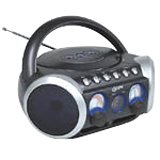
図1: フロント view of the GPX BCD2004 Boombox. This image shows the overall design of the boombox, including the speaker grilles and the general layout of the front panel.
Familiarize yourself with the main controls and features of your boombox:
- CDコンパートメント: Top-loading bay for inserting CDs.
- 機能スイッチ: Selects between CD, AM, FM, and OFF modes.
- 音量コントロール: Rotary dial to adjust the audio output level.
- チューニングダイヤル: Rotary dial for selecting AM or FM radio frequencies.
- 再生/一時停止ボタン: Starts or temporarily stops CD playback.
- 停止ボタン: CDの再生を停止します。
- スキップ/検索ボタン (◀◀ / ▶▶): Skips to the previous/next track or searches within a track.
- プログラムボタン: Used to program a sequence of tracks for CD playback.
- 繰り返しボタン: Repeats the current track or the entire CD.
- AM/FMアンテナ: Telescopic antenna for FM reception, internal antenna for AM.
- AC電源入力: Jack for connecting the AC power cord.
- バッテリーコンパートメント: Located on the bottom or rear for 'C' batteries.
- Fold-down Carrying Handle: 持ち運びに便利です。
5. セットアップ
5.1 ユニットの電源供給
Your GPX BCD2004 Boombox can be powered by either AC power or batteries.
AC電源操作
- Ensure the Function Switch is in the OFF position.
- Insert the small end of the AC power cord into the AC power input jack on the back of the unit.
- AC 電源コードのもう一方の端を標準の AC 壁コンセント (120V ~ 60Hz) に差し込みます。
バッテリー駆動
ポータブルで使用する場合、ブームボックスには 8 個の「C」サイズの電池が必要です (別売)。
- Ensure the Function Switch is in the OFF position.
- 本体の底面または背面にある電池ケースのカバーを開きます。
- Insert 8 'C' size batteries, observing the correct polarity (+ and -) as indicated inside the compartment.
- 電池カバーをしっかりと閉じてください。
- 注記: バッテリー電源で動作させる場合は、ユニットから AC 電源コードを外してください。
6. CDプレーヤーの操作
The GPX BCD2004 is compatible with standard audio CDs, CD-R, and CD-RW discs.
6.1 CDの読み込み
- Lift the CD compartment door located on the top of the unit.
- ラベル面を上にして、CD をセンタースピンドルに置きます。
- Gently close the CD compartment door until it clicks shut.
6.2 基本的なCD再生
- ファンクションスイッチをCDの位置に設定します。
- The CD player will begin to read the disc. The track number will typically display.
- Press the PLAY/PAUSE (▶/██) button to start playback.
- 音量コントロールを希望のリスニングレベルに調整します。
- To pause playback, press the PLAY/PAUSE (▶/██) button. Press it again to resume.
- To stop playback, press the STOP (■) button.
6.3 Skipping and Searching Tracks
- トラックをスキップ: During playback, press the SKIP/SEARCH FORWARD (▶▶) button to go to the next track. Press the SKIP/SEARCH BACKWARD (◀◀) button to go to the beginning of the current track, or press it twice to go to the previous track.
- Search Within Track: During playback, press and hold the SKIP/SEARCH FORWARD (▶▶) or SKIP/SEARCH BACKWARD (◀◀) button to fast forward or rewind through the current track. Release the button to resume normal playback.
6.4 プログラム再生
最大 16 トラックを特定の順序で再生するようにプログラムできます。
- In STOP mode, press the PROGRAM button. The program indicator will flash.
- Use the SKIP/SEARCH buttons (◀◀ / ▶▶) to select your desired first track.
- Press the PROGRAM button again to confirm the selection.
- 手順 2 と 3 を繰り返して、プログラム リストに最大 16 トラックを追加します。
- After programming all desired tracks, press the PLAY/PAUSE (▶/██) button to start programmed playback.
- To clear the program, press the STOP (■) button twice.
6.5 Repeat Play
During CD playback, press the REPEAT button:
- 一度押すと 1を繰り返す (repeats the current track).
- 2回押すと すべて繰り返す (repeats the entire CD or programmed tracks).
- Press a third time to cancel repeat function.
7. AM/FMラジオの操作
7.1 Tuning to Radio Stations
- Set the Function Switch to either the AM or FM position.
- Adjust the Tuning Dial to select your desired radio station.
- 音量コントロールを希望のリスニングレベルに調整します。
7.2 Improving Radio Reception
- FM受信: 伸縮アンテナを完全に伸ばし、受信状態が最適になるように位置を調整します。
- 午前受付: The unit has a built-in AM antenna. Rotate the entire boombox for optimal AM reception.
8. メンテナンス
8.1 ユニットのクリーニング
- 本体の外側を柔らかい布で拭いてください。amp 布で拭いてください。研磨剤や溶剤は使用しないでください。
- CD レンズの場合は、専用の CD レンズ クリーナー ディスク、または光学レンズ用に特別に設計された柔らかく糸くずの出ない布を使用してください。
8.2バッテリーケア
- 長期間使用しない場合は、液漏れを防ぐため電池を取り外してください。
- 使用済みバッテリーは地域の規制に従って責任を持って廃棄してください。
9。 トラブルシューティング
If you experience issues with your boombox, please refer to the following common problems and solutions:
| 問題 | 考えられる原因 | 解決 |
|---|---|---|
| 電源なし | AC cord not connected; Batteries dead or incorrectly inserted; Function switch OFF. | Check AC cord connection; Replace batteries or check polarity; Set Function switch to CD, AM, or FM. |
| CDが再生されない | CD inserted incorrectly; CD dirty or scratched; CD compartment door open; Function switch not on CD. | Insert CD with label side up; Clean or replace CD; Close CD door securely; Set Function switch to CD. |
| ラジオの受信状態が悪い | アンテナが延長/調整されていないため、信号が弱いです。 | Extend and adjust FM antenna; Rotate unit for AM reception; Try a different location. |
| 音が出ない、または音量が小さい | Volume too low; Unit in pause mode. | Increase volume; Press Play/Pause button to resume playback. |
10. 仕様
- モデル: BCD2004
- ブランド: グプエックス
- CD互換性: CD、CD-R、CD-RW
- ラジオチューナー: FM/AM
- 電源: AC 120V ~ 60Hz or 8 x 'C' Batteries (not included)
- 講演者: 2 Full-range speakers
- 寸法(約): 33.02 x 27.94 x 17.02 cm (長さ x 幅 x 高さ)
- 重量(約): 2.18キロ
- 特徴: 16-track programming, Repeat play, Song skip/search, Fold-down carrying handle
11. 保証とサポート
This GPX BCD2004 Boombox comes with a 90日間の保証 ご購入日から1年間有効です。この保証は、通常の使用における材料および製造上の欠陥を対象としています。
For warranty service or technical support, please refer to the contact information provided with your purchase documentation or visit the official GPX website. Please have your model number (BCD2004) and proof of purchase ready when contacting support.


