
導入
This manual provides essential instructions for the safe installation, operation, and maintenance of your APC AP7922 32A 230V Switched Rack PDU. The AP7922 is a rack-mountable power distribution unit designed to provide advanced power control and monitoring capabilities for IT equipment in data centers and server rooms. It features AC 230V input, Ethernet 10/100 connectivity, and 16 output connectors, all within a 2U, 19-inch form factor.
重要な安全情報
Please read and understand all safety instructions before installing or operating this equipment. Failure to follow these instructions could result in electric shock, fire, or serious injury.
- このデバイスは屋内での使用のみを目的としています。
- Connect the PDU to a properly grounded power source.
- Do not attempt to open or service the PDU. Refer all servicing to qualified personnel.
- Ensure the total current draw of connected equipment does not exceed the PDU's maximum current rating (32 Amps)。
- メンテナンスやインストール手順を実行する前に、電源を切断してください。
パッケージ内容
開梱時にすべてのアイテムが揃っていることを確認します。
- APC AP7922 Switched Rack PDU
- インストールガイド
- ラックマウントブラケット
- Serial configuration cable
- ドキュメンテーションCD
製品の特徴
The APC AP7922 Switched Rack PDU offers the following key features:
- 切り替えられたアウトレット: Remotely control power to individual outlets for power cycling, delayed sequencing, and load shedding.
- ネットワーク管理: Full-featured network management interface via Ethernet 10/100 for remote monitoring and control.
- 現在のモニタリング: Monitor the aggregate current draw per PDU to prevent circuit overloads.
- ラックマウント可能な設計: Occupies 2U of rack space, compatible with standard 19-inch racks.
- 出力コネクタ: Equipped with 16 C13 output connectors.
- 入力ボリュームtage: Supports AC 230V input.
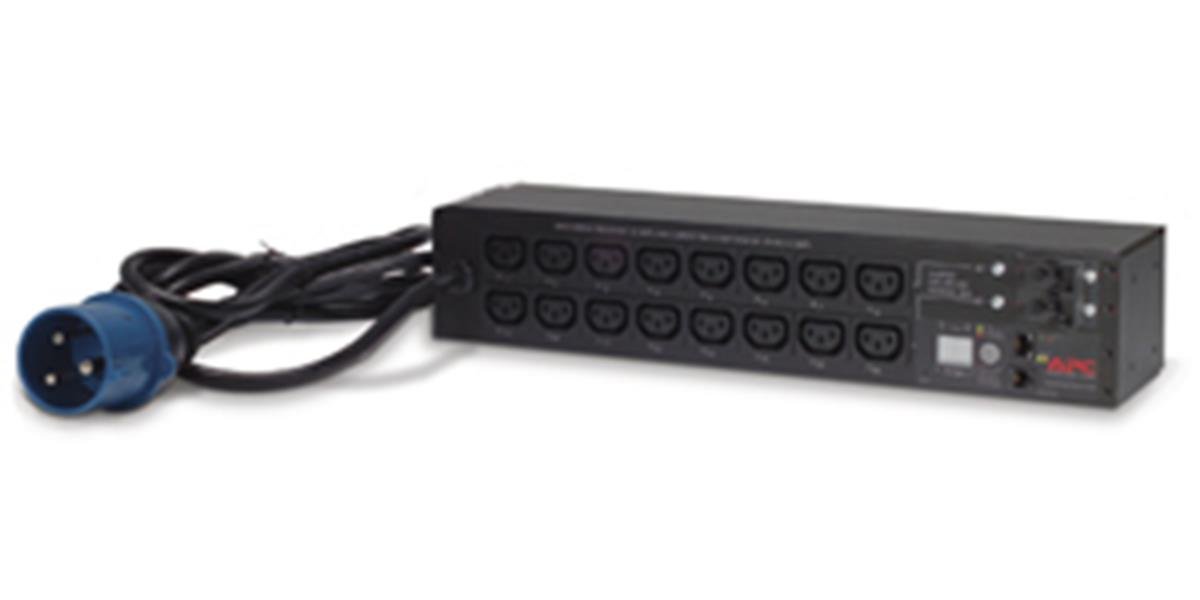
画像: 正面 view of the APC AP7922 Switched Rack PDU, showing the 16 C13 outlets and network interface.
セットアップ手順
1. ラックマウント
- Identify two available 2U spaces in your standard 19-inch equipment rack.
- Attach the provided rack-mounting brackets to the PDU using the screws supplied.
- Secure the PDU into the rack using appropriate rack screws. Ensure it is firmly seated and level.
2. 電源接続
- Connect the PDU's input power cord to a dedicated 230V, 32A power source. Ensure the power source is properly grounded.
- Do not overload the circuit. Verify that the total load of connected devices will not exceed 32 Amps.
3. ネットワーク接続
- Connect a standard Ethernet cable from the PDU's network port to your network switch or router.
- The PDU will obtain an IP address via DHCP by default. Refer to the full user manual for static IP configuration.
操作手順
Powering On/Off Connected Devices
Once the PDU is powered and connected to the network, you can manage its outlets remotely.
- Access the PDU's web インターフェイスの IP アドレスを入力して、 web ブラウザ。
- Log in using the default credentials (refer to the full manual for details).
- Navigate to the outlet control section. From here, you can individually switch on, switch off, or cycle power to each of the 16 C13 outlets.
Monitoring Current Draw
の web interface also provides real-time monitoring of the aggregate current draw. This allows you to ensure that the PDU and its connected circuit are not overloaded.
メンテナンス
- クリーニング: Periodically clean the exterior of the PDU with a soft, dry cloth. Do not use liquid cleaners or solvents.
- ファームウェアの更新: APCを確認する website for available firmware updates to ensure optimal performance and security. Follow the instructions provided with the firmware package for safe updating.
- ケーブル管理 Ensure all power and network cables are neatly routed and secured to prevent accidental disconnections or damage.
トラブルシューティング
| 問題 | 考えられる原因 | 解決 |
|---|---|---|
| PDU does not power on. | No input power; tripped circuit breaker. | Verify the power cord is securely connected. Check the building's circuit breaker for the PDU's power source. |
| アクセスできません web インタフェース。 | Incorrect IP address; network connectivity issue; PDU not powered. | Ensure the PDU is powered on. Verify network cable connection. Confirm the correct IP address. Check network settings. |
| Outlets do not switch. | Software issue; PDU fault. | Try restarting the PDU. If the issue persists, contact technical support. |
| 過負荷アラーム。 | Total current draw exceeds PDU rating. | Disconnect non-essential equipment to reduce the load. Redistribute equipment across multiple PDUs if necessary. |
技術仕様
| 特徴 | 詳細 |
|---|---|
| モデル番号 | AP7922 |
| ブランド | シュナイダーエレクトリックのAPC |
| フォームファクター | 2U Rack-mountable, 19-inch |
| 入力ボリュームtage | 230ボルトAC |
| 入力電流 | 32 Amps |
| 出力巻tage | 230ボルトAC |
| 出力電流 | 32 Amps(最大) |
| 店舗数 | 16 |
| コネクタタイプ | C13 |
| ネットワーク·インタフェース | イーサネット 10/100 |
| ワットtage | 7360ワット |
| 寸法(高さ×幅×奥行き) | 4.49 x 17.52 x 3.5インチ |
| 重さ | 0.7キログラム |
| 材料 | 金属 |
| 色 | 黒 |
保証とサポート
保証情報
APC製品には通常、メーカーによる標準保証が付いています。製品に付属の保証書をご覧いただくか、APCの公式ウェブサイトをご覧ください。 website for detailed warranty terms and conditions specific to the AP7922 model.
テクニカルサポート
For technical assistance, troubleshooting, or to report issues, please contact APC customer support. You can find contact information and additional resources on the official Schneider Electric webサイト: