
1. はじめに
The Rane RS-1 is a dedicated external power supply designed to provide reliable 120VAC power to a range of compatible Rane audio products. This manual provides essential information for the safe and correct setup, operation, and maintenance of your RS-1 power supply.
Please read this manual thoroughly before using the product to ensure proper function and to prevent damage to the unit or connected equipment.
2. 安全情報
- 電源: Connect the RS-1 only to a 120VAC, 60Hz power outlet. Ensure the outlet is properly grounded.
- 換気: 通気口を塞がないでください。電源装置の周囲に十分な空気の流れを確保してください。
- 水分: Do not expose the unit to rain, moisture, or excessive humidity. Keep liquids away from the power supply.
- 熱: ラジエーター、暖房送風口、ストーブ、その他の熱を発生する器具などの熱源の近くにユニットを置かないでください。
- ケーブル: 特にプラグ、コンセント、および装置から出ている部分で、電源コードが踏まれたり挟まれたりしないように保護してください。
- サービス: この製品を自分で修理しようとしないでください。 すべてのサービスを資格のあるサービス担当者に依頼してください。
- 切断: Unplug the power supply from the wall outlet during lightning storms or when unused for long periods.
3. セットアップ
Follow these steps to correctly set up your Rane RS-1 Power Supply:
- 互換性のあるデバイスを識別する: Ensure your Rane audio product requires the RS-1 power supply and has the appropriate RJ-45 style power input port.
- デバイスに接続します: Carefully insert the RJ-45 style connector from the RS-1 power supply into the designated power input port on your Rane audio device. Ensure a secure connection.
- 電源コンセントに接続します。 Plug the two-prong AC power cord of the RS-1 into a standard 120VAC, 60Hz wall outlet.
- 電源オン: Once connected, your Rane audio device should receive power. Refer to your Rane audio device's manual for specific power-on procedures.
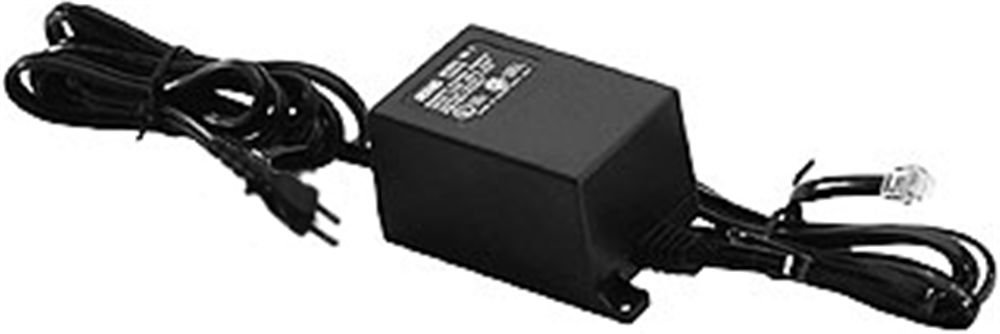
Image: Rane RS-1 Power Supply. This image displays the Rane RS-1 Power Supply, a black rectangular unit with an attached power cord featuring a two-prong North American plug on one end and an RJ-45 style connector on the other, designed to provide power to compatible Rane audio equipment.
4. 操作手順
The Rane RS-1 is an external power supply that operates automatically once connected to a power source and a compatible Rane device. It does not have user-adjustable controls.
- Ensure all connections are firm before applying power.
- The power supply is designed for continuous operation within its specified voltageとwattag制限があります。
- Always disconnect the power supply from the wall outlet before disconnecting it from the Rane audio device, especially if the device does not have its own power switch.
5. メンテナンス
The Rane RS-1 Power Supply requires minimal maintenance. Follow these guidelines to ensure longevity:
- クリーニング: Disconnect the power supply from the wall outlet before cleaning. Use a soft, dry cloth to wipe the exterior. Do not use liquid cleaners or aerosol sprays.
- 検査: Periodically inspect the power cord and connectors for any signs of damage, fraying, or loose connections. If damage is observed, discontinue use and seek professional servicing.
- ストレージ: 長期間使用しない場合は、電源装置を直射日光や極端な温度を避け、涼しく乾燥した場所に保管してください。
6。 トラブルシューティング
If you encounter issues with your Rane RS-1 Power Supply, refer to the following common troubleshooting steps:
| 問題 | 考えられる原因 | 解決 |
|---|---|---|
| No power to connected Rane device. |
|
|
| 断続的な電力。 |
|
|
If these steps do not resolve the issue, contact Rane customer support or a qualified service technician.
7. 仕様
| モデル | RS1 |
| ブランド | レーン |
| 入力ボリュームtage | 120ボルトAC |
| 電源 | AC |
| ワットtage | 1000ワット |
| 電源プラグタイプ | Type A - 2 pin (North American) |
| アイテム重量 | 1.3ポンド(0.59kg) |
| 寸法 | (Not specified in data) |
| 欧州連合 | 687499101045 |
| ASIN | B0002IU02S |
8. Compatible Rane Devices
The Rane RS-1 Power Supply is compatible with the following Rane audio products:
- AC22B
- AC23B
- AD 22d
- 13 円
- AVA 22d
- CP52
- CP64
- DA 216a
- DA26 ...
- DC 24
- DM22 ...
- GE 130
- GE 215
- GE 30
- HC 4
- HC 6
- マルチ商法42
- MLM 82a
- MM 8z
- MP 2
- MP 22z
- MP 24z
- MP 2016
- 1b の
- PE 17
- 詩篇1
- RA30
- SM26B
- SM 82
- 66 円
- SSE 35
- THX22 の最新バージョン
- THX44 の最新バージョン
- TTM 54i
- TTM56
- VP12
9. 保証とサポート
For information regarding warranty coverage, product registration, or technical support, please refer to the official Rane website or contact Rane customer service directly. Keep your purchase receipt as proof of purchase for warranty claims.
Rane Official Webサイト: www.rane.com