
1. はじめに
Thank you for choosing the M-Audio Radium 49 MIDI Controller Keyboard. This manual provides essential information for setting up, operating, and maintaining your device. The Radium 49 is a versatile 49-key MIDI controller designed to integrate seamlessly with your digital audio workstation (DAW) and other MIDI-compatible software and hardware.
It features 49 velocity-sensitive keys and 8 assignable controller knobs, offering expressive control over your musical productions.
2. 安全情報
- 電源: Connect the device only to the power source specified in the product documentation or marked on the product.
- 水と湿気: Do not expose this device to rain or moisture. Do not use near water or in damp 場所。
- 熱: ラジエーター、暖房送風口、ストーブ、その他の熱を発生する器具などの熱源の近くにデバイスを置かないでください。
- 換気: 適切な換気を確保してください。通気口を塞がないでください。
- クリーニング: Clean only with a dry cloth. Avoid liquid cleaners.
- サービス: この製品を自分で修理しようとしないでください。 すべてのサービスを資格のあるサービス担当者に依頼してください。
3. パッケージ内容
パッケージに以下のすべてのアイテムが含まれていることを確認してください。
- M-Audio Radium 49 MIDI Controller Keyboard
- USBケーブル
- ユーザーマニュアル(このドキュメント)
4.製品オーバーview
The M-Audio Radium 49 features a streamlined design with essential controls for MIDI performance and production.
4.1フロントパネル
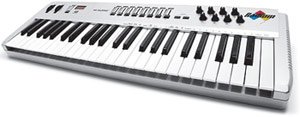
画像1:正面 view of the M-Audio Radium 49 MIDI Controller Keyboard. This image displays the 49 keys, 8 rotary knobs, and various buttons for control and navigation.
- 49 個のベロシティセンシティブ キー: Standard piano-style keys for playing notes and controlling MIDI instruments.
- 8 Assignable Controller Knobs: Rotary knobs that can be assigned to control various parameters in your software or hardware, such as volume, pan, filter cutoff, or effects.
- ピッチベンドホイール: リアルタイムのピッチ変調を可能にします。
- モジュレーションホイール: Provides real-time control over various parameters, commonly vibrato or tremolo.
- Octave Transpose Buttons: Buttons to shift the keyboard's octave range up or down by up to three octaves.
4.2 背面パネル
The rear panel typically houses the connectivity ports.
- USBポート: For connecting the Radium 49 to your computer, providing both power and MIDI data transmission.
- MIDI出力ポート: 外部 MIDI ハードウェアへの接続を可能にします。
- サステインペダル入力: オプションのサスティンペダルを接続します。
5. セットアップ
5.1 コンピュータへの接続
- コンピューターの電源がオンになっていることを確認します。
- Connect one end of the supplied USB cable to the USB port on the M-Audio Radium 49.
- Connect the other end of the USB cable to an available USB port on your computer. The Radium 49 will draw power directly from the USB connection.
- Your computer should detect the new hardware.
5.2 ドライバのインストール
For optimal performance, it is recommended to install the latest drivers for the M-Audio Radium 49. While many modern operating systems may offer class-compliant drivers, dedicated drivers often provide enhanced stability and features.
- Visit the official M-Audio web地点 (ホームページ) をクリックして、サポートまたはダウンロード セクションに移動します。
- Locate the drivers for the Radium 49 (Model: 9900-40825-00).
- Download the appropriate driver for your operating system (e.g., Windows, macOS). Note: This product is considered a legacy device. Compatibility with newer operating systems like Windows 7 and above may require specific drivers or may be limited. Refer to M-Audio's support resources for detailed compatibility information.
- Follow the on-screen instructions to install the driver. You may need to restart your computer after installation.
5.3ソフトウェア構成
After driver installation, configure your Digital Audio Workstation (DAW) or other music software to recognize the Radium 49 as a MIDI input device.
- Open your preferred DAW (e.g., Ableton Live).
- Navigate to the software's preferences or settings menu (often found under "Options," "Preferences," or the software's name).
- Look for a section related to MIDI devices, controllers, or external devices.
- Enable the M-Audio Radium 49 as a MIDI input. You may see it listed by its name or as a generic USB MIDI device.
- Consult your DAW's documentation for specific instructions on setting up MIDI controllers.
6. 操作手順
6.1 Playing Notes
Once connected and configured, simply press the keys on the Radium 49 to send MIDI note data to your software instruments. The velocity sensitivity of the keys will translate into dynamic variations in your sound.
6.2 Using Controller Knobs
The 8 assignable controller knobs can be mapped to various parameters within your DAW or software instruments. This allows for real-time control over sound characteristics.
- 割り当て: The method for assigning knobs varies by software. Typically, you will enter a "MIDI Learn" mode in your DAW, select the parameter you wish to control, and then turn the desired knob on the Radium 49.
- 一般的な用途: Control volume, pan, filter cutoff, resonance, effect send levels, or any other MIDI-mappable parameter.
6.3 ピッチベンドとモジュレーションホイール
- ピッチベンドホイール: Move this wheel up or down to temporarily raise or lower the pitch of the notes being played. It typically springs back to the center position.
- モジュレーションホイール: Move this wheel to add modulation effects, suchs as vibrato, tremolo, or filter sweeps, depending on how your software instrument is configured. This wheel usually stays in its last set position.
6.4 Octave Transposition
Use the dedicated Octave Transpose buttons to shift the entire keyboard's range up or down. This allows you to access a wider range of notes than the 49 physical keys provide.
- Press the "Octave Up" button to shift the keyboard's range higher.
- Press the "Octave Down" button to shift the keyboard's range lower.
- The Radium 49 supports up to +/-3 octave transposition.
7. メンテナンス
- クリーニング: Use a soft, dry, lint-free cloth to clean the surface of the Radium 49. Do not use abrasive cleaners, waxes, or solvents.
- ストレージ: When not in use for extended periods, store the device in a clean, dry environment, away from direct sunlight and extreme temperatures.
- 取り扱い: Avoid dropping or subjecting the device to strong impacts. Do not place heavy objects on the keyboard.
8。 トラブルシューティング
8.1 No Sound or MIDI Output
- USB接続を確認してください: Ensure the USB cable is securely connected to both the Radium 49 and your computer. Try a different USB port or cable.
- ドライバーの確認: Confirm that the correct drivers are installed and recognized by your operating system. Check Device Manager (Windows) or System Information (macOS) for the device status.
- DAW/ソフトウェア設定: Ensure the Radium 49 is selected as a MIDI input device in your music software's preferences. Verify that the track you are playing on is armed for recording or monitoring MIDI input.
- Software Instrument Loaded: Make sure a software instrument or sound generator is loaded and active in your DAW.
8.2 Inconsistent Velocity Sensitivity or Key Response
- クリーニング: Dust or debris under the keys can affect performance. Refer to the maintenance section for cleaning guidelines.
- ソフトウェア設定: Check if your DAW or instrument has velocity curve settings that might be affecting the response.
8.3 Compatibility Issues with Newer Operating Systems
The M-Audio Radium 49 is an older model. While it may function with newer operating systems, full compatibility and driver support can be limited. If you encounter issues:
- Check M-Audio Support: M-Audioをご覧ください website for any legacy driver updates or compatibility statements.
- コミュニティフォーラム: Search online forums for solutions or workarounds from other users who have successfully used the Radium 49 with your operating system.
- Consider a MIDI Interface: In some cases, using a separate, modern USB-to-MIDI interface to connect the Radium 49's MIDI Out port to your computer might resolve driver-related issues, though this would bypass the direct USB MIDI functionality.
9. 仕様
| ブランド | M-オーディオ |
| モデル番号 | 9900-40825-00 |
| キーの数 | 49 |
| 接続技術 | USB |
| 特集 | ポータブル |
| 含まれるコンポーネント | USBケーブル、ユーザーマニュアル |
| 対応デバイス | PC、ラップトップ |
| サポートされているソフトウェア | Ableton Live(およびその他のMIDI対応DAW) |
| プラットフォーム | Windows, Windows 7 (Note: Compatibility with newer OS may vary) |
| コントロールタイプ | Parameter Adjustment, Touch |
| ヒューマンインターフェイス入力 | キーボード |
| GTIN / UPC | 612391700706 |
10. 保証とサポート
M-Audio products are covered by a limited warranty. For detailed warranty terms and conditions, please refer to the warranty card included with your product or visit the official M-Audio webサイト。
For technical support, driver downloads, FAQs, and other resources, please visit the M-Audio support page:
サポートにお問い合わせいただく際は、製品のモデル番号 (9900-40825-00) とシリアル番号をご用意ください。