
1. はじめに
This manual provides essential information for the proper setup, operation, and maintenance of your Coby DVD-527 5.1 Channel Progressive Scan DVD Player. Please read this manual thoroughly before using the device to ensure optimal performance and safety. The Coby DVD-527 features a super-slim design, 5.1 channel audio output, and progressive scan video output for enhanced picture quality on compatible televisions.
2. 安全情報
- 電源: 電源がボリュームと一致していることを確認してくださいtagユニットに指定された要件。
- 換気: 通気口を塞がないでください。過熱を防ぐため、適切な空気の流れを確保するために、ユニットの周囲に十分なスペースを確保してください。
- 水分: ユニットを雨、湿気、または過度の湿度にさらさないでください。
- クリーニング: 清掃する前に、本体の電源プラグをコンセントから抜いてください。柔らかく乾いた布を使用してください。
- サービス: この製品を自分で修理しようとしないでください。 すべてのサービスを資格のあるサービス担当者に依頼してください。
3. パッケージ内容
パッケージにすべてのアイテムが揃っていることを確認します。
- Coby DVD-527 DVD Player
- フル機能のリモコン
- AVケーブル
- ユーザーマニュアル(このドキュメント)
- 保証情報
4.製品オーバーview
The Coby DVD-527 DVD Player and its accompanying remote control are designed for ease of use and integration into your home entertainment system.
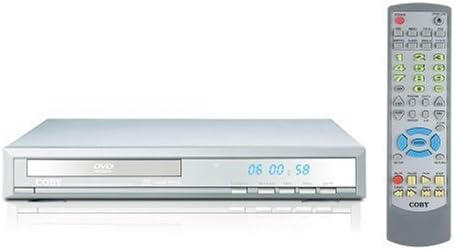
図1: Coby DVD-527 DVD Player (left) and its full-function remote control (right). The DVD player features a slim profile with a disc tray, display screen, and control buttons on the front panel. The remote control includes various buttons for playback, navigation, and special features.
フロントパネルコントロール
The front panel typically includes the disc tray, power button, play/pause, stop, and eject buttons, along with a digital display showing playback time or status.
背面パネルの接続
The rear panel houses various audio and video output ports for connecting to your television and audio system.
リモートコントロール
The included remote control provides full functionality for operating the DVD player from a distance, including power, playback controls, menu navigation, volume, and special features.
5. セットアップ
5.1 テレビへの接続
次のいずれかのビデオ接続方法を選択します。
- Component Video Output (Progressive Scan): For the highest quality picture on HD-capable televisions, connect the Y, Pb, and Pr component video outputs from the DVD player to the corresponding inputs on your TV using component video cables.
- RCAビデオ出力: Connect the yellow RCA video output from the DVD player to the video input on your TV using an RCA video cable.
- Sビデオ出力: Connect the S-Video output from the DVD player to the S-Video input on your TV using an S-Video cable.
5.2 オーディオシステムへの接続
次のいずれかのオーディオ接続方法を選択します。
- 5.1 Dolby Digital Output: For surround sound, connect the 5.1 channel audio outputs (Front Left, Front Right, Center, Surround Left, Surround Right, Subwoofer) from the DVD player to the corresponding inputs on your 5.1 channel receiver or amplifier。
- 同軸デジタルオーディオ出力: Connect the coaxial digital audio output from the DVD player to the coaxial digital audio input on your receiver or amplifier using a coaxial digital audio cable.
- 光デジタルオーディオ出力: Connect the optical digital audio output from the DVD player to the optical digital audio input on your receiver or amplifier using an optical digital audio cable.
- アナログ音声出力: Connect the red and white RCA analog audio outputs from the DVD player to the corresponding audio inputs on your TV or stereo system using an RCA audio cable.
5.3電源接続
After all audio and video connections are made, plug the DVD player's power cord into a standard AC power outlet.
6. 操作手順
6.1 基本的なディスク再生
- Turn on your television and select the correct input source for the DVD player.
- Press the Power button on the DVD player or remote control to turn on the unit.
- Press the Eject button (▲) on the front panel or remote to open the disc tray.
- Place a compatible disc (DVD, CD, CD-R/RW, MP3) gently into the disc tray with the label side facing up.
- Press the Eject button (▲) again to close the disc tray. The player will begin reading the disc.
- Playback should start automatically. If a disc menu appears, use the navigation buttons on the remote to select your desired option and press Enter.
- Use the Play (▶), Pause (▐▐), Stop (■), Fast Forward (►►), and Rewind (◄◄) buttons on the remote for playback control.
6.2つの特別な機能
- 画面上に表示: Press the OSD button on the remote to view playback information on your screen.
- ズーム操作: Use the Zoom button to magnify a portion of the picture.
- 複数 View角度: For discs that support it, press the Angle button to switch between different camera angles.
- 字幕: Press the Subtitle button to select available subtitle languages.
- Parental Lock Control: Access the setup menu to configure parental control settings, restricting playback of certain content based on rating.
6.3 システム設定
Press the Setup button on the remote to access the system menu. Here you can adjust video settings (e.g., aspect ratio, progressive scan mode), audio settings, language preferences, and parental control options. Refer to the on-screen menu for detailed navigation.
7. メンテナンス
7.1 ユニットのクリーニング
Wipe the exterior of the DVD player with a soft, dry cloth. Do not use liquid cleaners or aerosol sprays, as they may damage the finish or internal components.
7.2 ディスクケア
ディスクは端を持って扱ってください。ディスクは清潔に保ち、傷がつかないようにしてください。使用していないときは、ほこりや損傷を防ぐため、ケースに入れて保管してください。
8。 トラブルシューティング
If you encounter problems with your DVD player, refer to the following common issues and solutions:
- 電源なし:
• Ensure the power cord is securely plugged into both the DVD player and a working electrical outlet.
• Check if the power outlet is functional by plugging in another device. - 写真なし:
• Verify that the video cables are correctly connected between the DVD player and the TV.
• Ensure your TV is set to the correct input source (e.g., AV1, Component, HDMI).
• Check the TV's picture settings. - 音が出ない:
• Confirm that audio cables are properly connected to your TV or audio system.
• Check the volume level on both the DVD player and your TV/audio system.
• Ensure your TV/audio system is set to the correct audio input.
• If using digital audio, verify the audio settings in the DVD player's setup menu. - ディスクが再生されない / ディスクエラー:
• Ensure the disc is clean and free of scratches or smudges.
• Make sure the disc is inserted correctly with the label side facing up.
• Verify that the disc format is compatible with the player (DVD, CD, CD-R/RW, MP3). - リモコンが動作しない:
• Check and replace the batteries in the remote control.
• Ensure there are no obstructions between the remote and the DVD player's sensor.
• Point the remote directly at the DVD player.
9. 仕様
| モデル | DVD-527 |
| ブランド | コビー |
| 寸法(幅×奥行き×高さ) | 11 x 10 x 2インチ(約) |
| 重さ | 7ポンド(約) |
| Media Type Compatibility | DVD, CD, CD-R/RW, MP3 |
| ビデオ出力 | Component Video (Y, Pb, Pr), RCA Video, S-Video |
| オーディオ出力 | 5.1 Channel Dolby Digital, Coaxial Digital, Optical Digital, Analog RCA (L/R) |
| 特集 | Progressive Scan, Multiple Subtitles, Multiple Viewing Angles, On-Screen Display, Zoom Operation, Parental Lock Control |
| ビデオ互換性 | NTSC/PAL方式 |
10. 保証とサポート
This product is covered by a limited manufacturer's warranty. Please refer to the warranty information card included in your package for specific terms and conditions, including the warranty period and coverage details. Keep your purchase receipt as proof of purchase.
For technical assistance or customer support, please refer to the contact information provided in your warranty documentation or visit the official Coby web最新のサポート リソースについては、こちらのサイトをご覧ください。