
導入
This manual provides essential instructions for the safe and efficient use of your Olympus Note Corder 100 digital voice recorder. Please read this manual thoroughly before operating the device and retain it for future reference.
製品終了view
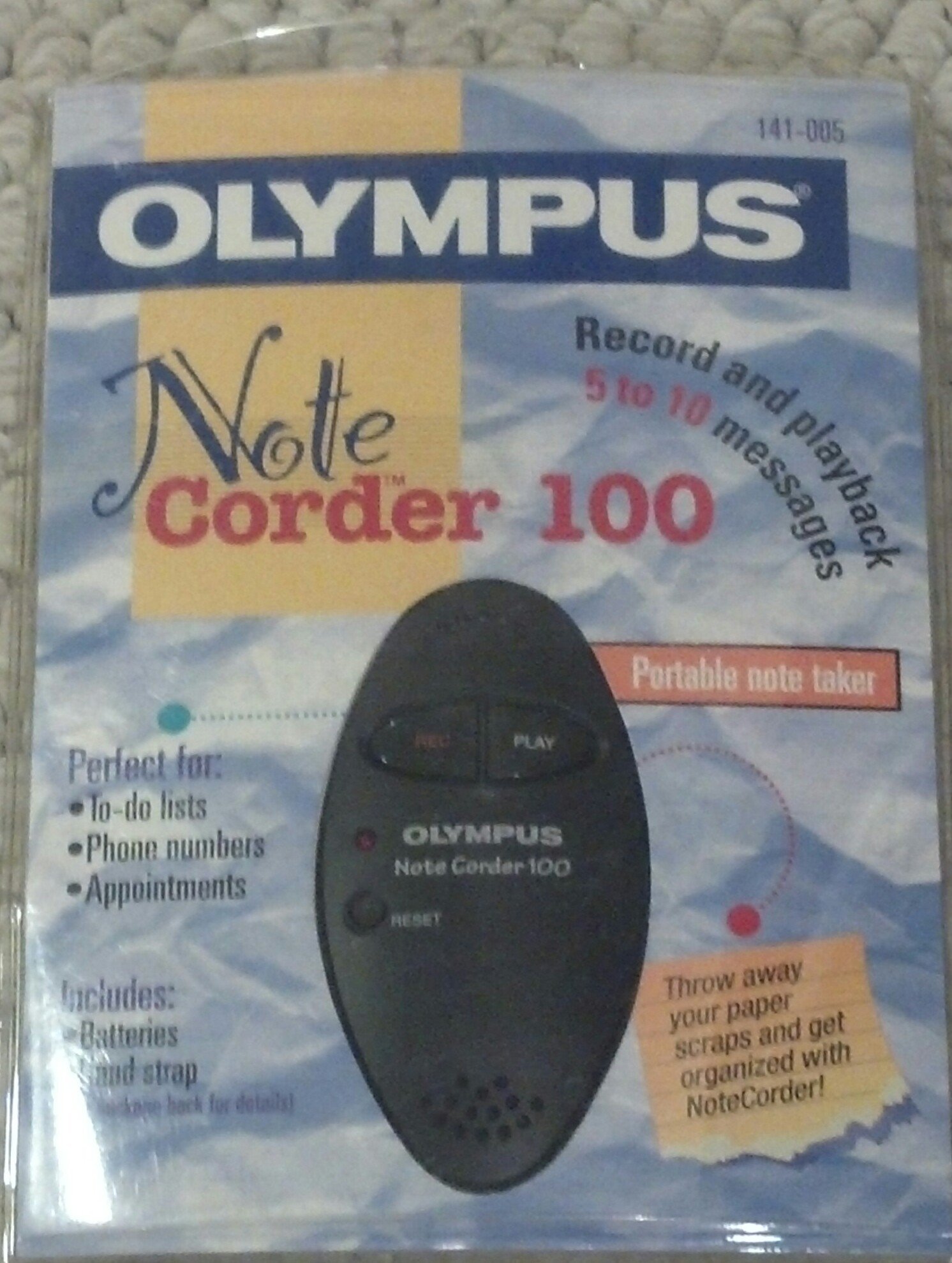
Image: The Olympus Note Corder 100 digital voice recorder, packaged. This image illustrates the product's compact design and highlights its primary features such as ergonomic design, 20-second recording time, and an LED indicator.
The Olympus Note Corder 100 is a compact, portable digital voice recorder designed for quick and convenient voice memos. Its ergonomic design ensures comfortable handling, making it ideal for recording short notes on the go.
主な特徴:
- 人間工学に基づいたデザイン: Fits comfortably in the palm of your hand.
- 20-Second Recording Time: Ideal for short, concise messages.
- LEDインジケーター: デバイスの状態に関する視覚的なフィードバックを提供します。
- 内蔵メモリー Stores recordings internally.
- Portable Format: 持ち運びが簡単でどこでも使用できます。
設定
1. バッテリーの取り付け
The Note Corder 100 requires two (2) CR2032 1.5V batteries for operation. Ensure correct polarity when inserting the batteries.
- デバイスの電池ボックスのカバーを見つけます。
- マークに従ってスライドまたは持ち上げてカバーを開きます。
- Insert two CR2032 batteries, observing the positive (+) and negative (-) terminals.
- 電池カバーをしっかりと閉じてください。
2. ハンドストラップの取り付け
Attach the included hand strap to prevent accidental drops and for convenient carrying.
- Locate the strap attachment point on the device.
- Thread the thin loop of the hand strap through the attachment point.
- Pass the main strap through the loop and pull firmly to secure it.
操作手順
1. メッセージの録音
The Note Corder 100 allows for quick voice recordings up to 20 seconds in length.
- を押し続けます 記録 ボタンを押します。LEDインジケーターが点灯します。
- 内蔵マイクに向かってはっきりと話してください。
- リリース 記録 button to stop recording. The LED indicator will turn off.
- If the recording exceeds 20 seconds, the device will automatically stop recording.
2. メッセージの再生
To listen to your recorded messages:
- を押す 遊ぶ button. The device will play back the last recorded message.
- 再生を停止するには、を押します 遊ぶ もう一度ボタンを押します。
3. LEDインジケーター
The LED indicator provides visual cues for the device's status:
- Illuminated during Record: 録音がアクティブであることを示します。
- オフ: Indicates standby or stopped recording/playback.
メンテナンス
1. バッテリーの交換
Replace batteries when the device's performance degrades or the LED indicator suggests low power.
- セットアップ セクションに記載されているバッテリーの取り付け手順に従ってください。
- Always use two new CR2032 1.5V batteries.
- 古い電池は、地域の規制に従って責任を持って処分してください。
2. 清掃
Keep your Note Corder 100 clean to ensure optimal performance.
- デバイスの外側を柔らかく乾いた布で拭いてください。
- 液体クリーナー、溶剤、研磨剤は使用しないでください。
- 開口部に湿気が入らないようにしてください。
トラブルシューティング
| 問題 | 考えられる原因 | 解決 |
|---|---|---|
| デバイスの電源が入りません。 | 電池が消耗しているか、正しく挿入されていません。 | Replace batteries with new CR2032 cells, ensuring correct polarity. |
| Cannot record messages. | Record button not held down, or batteries are low. | Ensure the Record button is pressed and held during recording. Check and replace batteries if necessary. |
| 再生中に音が出ない。 | No message recorded, or low battery. | Verify a message has been recorded. Replace batteries. |
仕様
- モデル: Olympus Note Corder 100 (Model No. 141-005)
- 録音時間: Up to 20 seconds per message
- 電源: 2 x CR2032 1.5V Lithium Batteries
- メモリ: Built-in (non-expandable)
- マイクロフォン: 統合された
- パソコン接続: サポートされていません
- 音声起動: サポートされていません
- 導入年: 1996
保証とサポート
The Olympus Note Corder 100 comes with a 90日間の限定保証 ご購入日から有効です。この保証は通常の使用における製造上の欠陥をカバーします。
For warranty claims or technical support, please contact Olympus America Inc. at the address below. Please have your proof of purchase and product model number ready.
Olympus America Inc.Two Corporate Center Drive
Melville, NY 11747-3157 USA
注記: This product was manufactured in China.


