
導入
ご購入ありがとうございますasing the Nyko AirFlo EX Controller for PlayStation 2. This controller is designed to enhance your gaming experience with its unique airflow feature, providing comfort during extended gameplay sessions. Please read this manual thoroughly before use to ensure proper setup and operation.
パッケージ内容
- Nyko AirFlo EX Controller for PlayStation 2
- ユーザーマニュアル(このドキュメント)
コントローラの機能
The Nyko AirFlo EX Controller integrates several features for an optimized gaming experience:
- AirFlo Cooling System: An integrated fan provides airflow to help keep hands dry and comfortable during intense gaming.
- 人間工学に基づいたデザイン: Shaped for comfortable grip and extended play.
- Standard PlayStation 2 Controls: Includes directional pad, action buttons (Triangle, Circle, Cross, Square), L1/R1/L2/R2 shoulder buttons, START, SELECT, and analog sticks (L3/R3 functionality).
- 振動フィードバック: Supports in-game vibration effects for enhanced immersion.
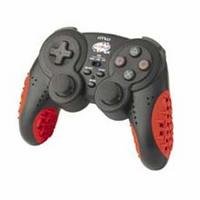
Image: Nyko AirFlo EX Controller for PlayStation 2. This image displays the front view of the controller, highlighting its button layout and ergonomic shape.
設定
- PlayStation 2に接続します: Locate an available controller port on your PlayStation 2 console.
- コネクタを挿入: Firmly insert the controller's connector cable into the chosen port. Ensure it is fully seated.
- コンソールの電源オン: PlayStation 2本体の電源を入れます。コントローラーは自動的に認識されるはずです。
- テスト機能: Navigate the PlayStation 2 menu or start a game to confirm all buttons and analog sticks are responsive.
操作手順
The Nyko AirFlo EX Controller operates similarly to standard PlayStation 2 controllers, with the added AirFlo feature.
- 基本的なコントロール: Use the directional pad or left analog stick for movement, and the action buttons (Triangle, Circle, Cross, Square) for in-game actions.
- Analog Stick Functionality: Pressing the analog sticks down activates L3 and R3 functions, if supported by the game.
- AirFlo Fan Activation: The AirFlo fan is typically activated by a switch or button on the controller itself. Refer to the controller's physical layout for the exact location of the fan control. Toggle this control to turn the fan on or off.
- 振動フィードバック: Vibration effects will automatically engage during gameplay when supported by the software.
メンテナンス
- クリーニング: コントローラーの表面を拭くときは、柔らかく乾いた布を使用してください。頑固な汚れには、軽く湿らせた布で拭いてください。amp 布などを使用し、開口部に水分が入らないようにしてください。刺激の強い化学薬品や研磨剤入りの洗剤は使用しないでください。
- ストレージ: コントローラーは、直射日光や極端な温度を避け、涼しく乾燥した場所に保管してください。損傷を防ぐため、ケーブルをコントローラーにきつく巻き付けないでください。
- ドロップを避ける: 内部コンポーネントを損傷する可能性のある落下や衝撃からコントローラーを保護します。
トラブルシューティング
| 問題 | 考えられる解決策 |
|---|---|
| コントローラーが応答しません。 |
|
| AirFlo fan not working. |
|
| Buttons or analog sticks are unresponsive or stiff. |
|
仕様
- モデル: AirFlo EX
- 互換性: プレイステーション2
- 商品の重量: 9.6オンス(約272グラム)
- パッケージ寸法: 6 x 4.8 x 2.7インチ(約15.2 x 12.2 x 6.9 cm)
- 接続性: 有線
- 特別な機能: Integrated AirFlo cooling fan
保証とサポート
For warranty information, technical support, or service inquiries regarding your Nyko AirFlo EX Controller, please contact Nyko customer support directly. Details can typically be found on the official Nyko webサイトまたは製品のパッケージ。
ニコ公式 Webサイト: www.nyko.com (注: これはプレースホルダーです URL. Please refer to your product packaging or official Nyko documentation for the most current support information.)