
1. はじめに
This manual provides detailed instructions for the installation, operation, and maintenance of your Creative Inspire T5400 5.1 Speaker System. Please read this manual thoroughly before using the product to ensure proper setup and optimal performance. Retain this manual for future reference.
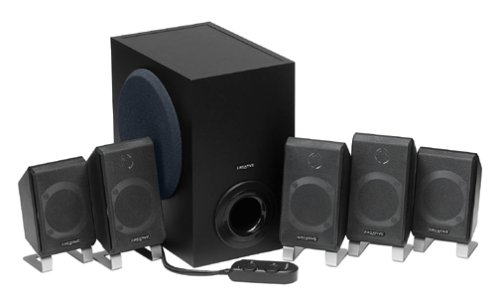
画像1.1: 以上view of the Creative Inspire T5400 5.1 Speaker System, showing the subwoofer and satellite speakers.
2. パッケージ内容
以下にリストされているすべてのコンポーネントがパッケージに含まれていることを確認してください。
- Creative Inspire T5400 Subwoofer
- Five (5) Satellite Speakers (Front Left, Front Right, Center, Rear Left, Rear Right)
- 有線リモコン
- 電源アダプター
- Audio Cables (3.5mm stereo to 3.5mm stereo cables for 5.1 connection)
- クイックスタートガイド(このデジタルマニュアルには含まれていません)
If any items are missing or damaged, please contact Creative customer support.
3. セットアップ手順
Follow these steps to set up your Creative Inspire T5400 5.1 Speaker System:
3.1 スピーカーの配置
Proper speaker placement is crucial for optimal 5.1 surround sound experience.
- フロント左および右スピーカー: Place these speakers on either side of your monitor or television, equidistant from your listening position.
- センタースピーカー: Position the center speaker directly above or below your monitor/television, centered with your listening position.
- リア左および右スピーカー: Place these speakers behind your listening position, ideally slightly to the sides and angled towards you.
- サブウーファー: The subwoofer can be placed on the floor, typically near the front speakers. Experiment with placement to find the best bass response for your room.
Image 3.1: Diagram illustrating optimal 5.1 speaker placement around a listening position. (Image not provided, conceptual description)
3.2 Connecting the Speakers to the Subwoofer
Each satellite speaker connects to the subwoofer using its integrated cable. Match the speaker to the corresponding port on the subwoofer:
- Identify the cables from each satellite speaker (Front Left, Front Right, Center, Rear Left, Rear Right).
- Locate the corresponding input jacks on the rear panel of the subwoofer. These are typically color-coded or labeled.
- Firmly insert each speaker cable into its designated jack.
Image 3.2: Close-up of the subwoofer's rear panel showing speaker input jacks. (Image not provided, conceptual description)
3.3 Connecting to an Audio Source (Computer/Television)
The Creative Inspire T5400 requires a 5.1 channel audio output from your source device. This typically involves three 3.5mm stereo jacks (Front, Rear, Center/Subwoofer).
- Locate the three 3.5mm audio input jacks on the rear panel of the subwoofer. These are usually color-coded (e.g., Green for Front, Black for Rear, Orange for Center/Subwoofer).
- Connect the provided audio cables from these jacks to the corresponding 5.1 audio output jacks on your computer's sound card or television.
- Ensure your computer's sound card drivers are installed and configured for 5.1 surround sound output.
Image 3.3: Illustration of connecting audio cables from the subwoofer to a computer sound card. (Image not provided, conceptual description)
3.4 有線リモコンの接続
The wired remote control connects to a dedicated port on the subwoofer.
- Locate the multi-pin connector for the wired remote on the subwoofer.
- Align the connector from the wired remote with the port and gently push until it clicks into place.
Image 3.4: Close-up of the wired remote control connector and the corresponding port on the subwoofer. (Image not provided, conceptual description)
3.5電源接続
Connect the power adapter to the subwoofer and then to a power outlet.
- Insert the DC plug of the power adapter into the "DC IN" port on the subwoofer.
- 電源アダプタを標準の電気コンセントに差し込みます。
これで、システムを操作する準備が整いました。
4. 操作手順
The wired remote control provides convenient access to the main functions of your speaker system.
4.1 電源オン/オフ
- を押す 電源ボタン on the wired remote control to turn the speaker system on or off. An indicator light on the remote will illuminate when the system is powered on.
4.2 ボリュームコントロール
- 大きな ボリュームノブ on the wired remote control clockwise to increase volume and counter-clockwise to decrease volume.
4.3 Bass Level Adjustment
- 使用 低音コントロールノブ on the wired remote control to adjust the subwoofer's bass output. Rotate clockwise for more bass, counter-clockwise for less bass.
4.4ヘッドフォンジャック
- A ヘッドホンジャック is located on the wired remote control. Plugging in headphones will automatically mute the speakers, allowing for private listening. Unplugging headphones will restore audio to the speakers.
Image 4.1: Close-up of the wired remote control showing power, volume, bass, and headphone jack. (Image not provided, conceptual description)
5. メンテナンス
Proper care ensures the longevity and performance of your speaker system.
5.1 クリーニング
- 掃除する前に電源を切ってください。
- Use a soft, dry, lint-free cloth to wipe the surfaces of the speakers and subwoofer.
- Do not use liquid cleaners, aerosols, or abrasive cleaning agents, as these can damage the finish or internal components.
5.2 ストレージ
- Store the speaker system in a cool, dry place away from direct sunlight and extreme temperatures.
- If storing for an extended period, it is recommended to pack the components in their original packaging to protect them from dust and physical damage.
6。 トラブルシューティング
If you encounter issues with your Creative Inspire T5400, refer to the following common problems and solutions:
| 問題 | 考えられる原因 | 解決 |
|---|---|---|
| どのスピーカーからも音が出ません。 |
|
|
| Sound from only some speakers (e.g., only front). |
|
|
| 音が歪んだり不明瞭になったりする。 |
|
|
If the problem persists after trying these solutions, please contact Creative customer support.
7. 仕様
Key technical specifications for the Creative Inspire T5400 5.1 Speaker System:
- ブランド: クリエイティブ
- モデル番号: 51MF4025AA002
- オーディオ出力モード: 5.1サラウンド
- オーディオチャンネルの数: 5.1
- 総システム電力: 115ワット
- Speaker Maximum Output Power (per satellite): 25ワット
- 接続技術: 有線
- 接続プロトコル: RCA, USB, aux (Note: Primary 5.1 audio input uses 3.5mm stereo jacks.)
- 制御方法: リモコン(有線)
- 対応デバイス: デスクトップ、ラップトップ、テレビ
- 電源: コード式電気
- 国際コード: 054651062153
8. 保証とサポート
8.1 保証情報
The Creative Inspire T5400 5.1 Speaker System comes with a 限定保証. Specific terms and conditions of the warranty may vary by region and retailer. Please refer to the warranty card included with your product or visit the official Creative web詳細な保証情報については、サイトをご覧ください。
8.2 カスタマーサポート
For technical assistance, troubleshooting beyond this manual, or warranty claims, please contact Creative customer support:
- オンラインサポート: Visit the official Creative web地点 (us.creative.com/support) for FAQs, driver downloads, and contact options.
- 電話サポート: Refer to your product packaging or the Creative web地域の電話サポート番号のサイト。
When contacting support, please have your product model number (T5400 or 51MF4025AA002) and proof of purchase readily available.