
重要な安全情報
Please read all safety and operating instructions carefully before using this VCR. Retain this manual for future reference.
- 電源: Connect the VCR only to the power supply indicated on the label.
- 換気: 十分な換気を確保してください。通気口を塞がないでください。
- 水と湿気: Do not expose the VCR to rain or moisture. Do not place objects filled with liquids on the VCR.
- クリーニング: Unplug the VCR from the wall outlet before cleaning. Use a dry cloth.
- サービス: この製品を自分で修理しようとしないでください。 すべてのサービスを資格のあるサービス担当者に依頼してください。
製品終了view
The Sharp VC-A422 is a 4-head VCR designed for reliable playback and recording of VHS tapes. It features a user-friendly interface for easy operation.
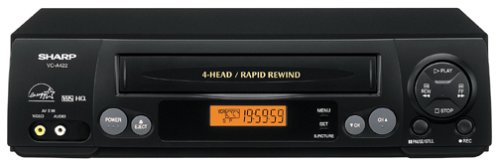
画像: 正面 view of the Sharp VC-A422 4-Head VCR, showing the tape slot, display, and control buttons.
設定
1. 開梱と設置
- VCR をパッケージから慎重に取り出します。
- Place the VCR on a stable, level surface. Ensure there is adequate space around the unit for ventilation.
- Avoid placing the VCR near heat sources, direct sunlight, or areas with high humidity.
2.テレビに接続する
To connect your VCR to a television, you will typically use RCA audio/video cables (red, white, yellow) or a coaxial cable.
- RCA Connection (Recommended for best quality):
- VCR の黄色のビデオ出力ジャックをテレビの黄色のビデオ入力ジャックに接続します。
- VCR の白いオーディオ出力ジャックをテレビの白いオーディオ入力ジャックに接続します。
- VCR の赤いオーディオ出力ジャックをテレビの赤いオーディオ入力ジャックに接続します。
- Select the corresponding AV input on your television (e.g., Video 1, AV1, Input 1).
- 同軸接続:
- Connect a coaxial cable from the "RF Out" or "Antenna Out" jack on the VCR to the "Antenna In" or "RF In" jack on your TV.
- Connect your antenna or cable TV signal to the "RF In" or "Antenna In" jack on the VCR.
- Tune your television to channel 3 or 4 (depending on the VCR's output setting) to receive the VCR signal.
3. 電源接続
- Plug the VCR's power cord into a standard electrical outlet.
- The VCR should enter standby mode, indicated by a clock display or power light.
操作手順
1. 基本的な再生
- Ensure the VCR is powered on and your TV is set to the correct input.
- VHSテープをテープスロットに挿入します。VCRが自動的にテープを読み込みます。
- を押す 遊ぶ VCR またはリモコンのボタン。
- 再生を停止するには、を押します 停止 ボタン。
- 再生を一時停止するには、 一時停止 ボタン。もう一度押すと再開します。
- 早送りまたは巻き戻しするには、 FF (Fast Forward) or 戻る (Rewind) button. Press 遊ぶ 通常の再生を再開します。
- テープを取り出すには、 排出 ボタン。
2. プログラムの録画
The Sharp VC-A422 allows for recording television programs. Ensure a blank or recordable VHS tape is inserted and its safety tab is intact.
- Tune the VCR to the desired channel using the VCR's tuner.
- を押す 記録 ボタンを押します。VCRが録画を開始します。
- 録音を停止するには、を押します 停止 ボタン。
- For timed recordings, refer to the VCR's on-screen programming guide (if available) or consult the full manual for detailed timer recording instructions.
メンテナンス
適切なメンテナンスを行うことで、VCR の寿命が長くなり、最適なパフォーマンスが確保されます。
- 外装清掃: Wipe the exterior of the VCR with a soft, dry cloth. Do not use liquid cleaners or abrasive materials.
- ヘッドクリーニング: If picture quality degrades (e.g., snowy picture, lines), the video heads may be dirty. Use a dry-type VCR head cleaning cassette sparingly. Excessive use can wear down the heads.
- テープのお手入れ: Store VHS tapes in their cases, away from dust, direct sunlight, and strong magnetic fields. Avoid exposing tapes to extreme temperatures.
- 換気: Keep the VCR's ventilation slots clear of obstructions to prevent overheating.
トラブルシューティング
If you encounter issues with your Sharp VC-A422 VCR, refer to the following common problems and solutions:
| 問題 | 考えられる原因 | 解決 |
|---|---|---|
| 電源なし | 電源コードが外れており、電源コンセントがアクティブではありません。 | 電源コードの接続を確認してください。別の機器でコンセントをテストしてください。 |
| 画像も音声も出ない | 間違ったテレビ入力が選択されています。A/V ケーブルが緩んでいるか、正しく接続されていません。 | Select correct TV input (e.g., AV1, Video 1). Ensure A/V cables are securely connected to matching color ports. |
| Snowy or distorted picture | Dirty video heads; poor tape quality; incorrect channel for coaxial connection. | Use a VCR head cleaning cassette. Try a different tape. If using coaxial, ensure TV is on channel 3 or 4. |
| Tape will not eject | Power failure; mechanical issue. | Ensure VCR is powered on. If problem persists, seek professional service. |
| 録音できません | Tape's safety tab removed; VCR not tuned to a channel. | Check if the safety tab on the VHS tape is intact (cover the notch with tape if removed). Ensure VCR tuner is set to the desired channel. |
仕様
- ブランド: シャープ
- モデル: VC-A422
- ヘッド: 4-Head (Video)
- 商品の重量: 6ポンド
- パッケージ寸法: 15.55 x 11.02 x 5.24インチ
- ASIN: B00005LABU
- 発売日: 4年1999月XNUMX日
注:仕様は予告なく変更される場合があります。
保証情報
This Sharp product is covered by a limited warranty. For specific details regarding warranty coverage, duration, and terms, please refer to the warranty card included with your purchase or visit the official Sharp webサイトでご確認ください。保証請求に備えて購入証明書を保管してください。
カスタマーサポート
For further assistance, technical support, or service inquiries, please contact Sharp customer support. You can find contact information on the official Sharp webサイトまたは製品に付属のドキュメントをご覧ください。
Visit the official Sharp store for more information: シャープ公式ストア
免責事項
消費者への警告: This television receiver has only an analog broadcast tuner and will require a converter box after February 17, 2009 to receive over-the-air broadcasts with an antenna because of the U.S.'s transition to digital broadcasting. Analog-only TVs should continue to work as before with cable and satellite TV services, gaming consoles, VCRs, DVD players, and similar products. For more information, call the Federal Communications Commission at 1-888-225-5322 (TTY: 1-888-835-5322), or visit the commission s digital-television Web サイト: www.dtv.gov.


