
導入
The Canon EOS Elan 7 is a sophisticated 35mm Single-Lens Reflex (SLR) camera designed for both advanced enthusiasts and professionals. It features a highly advanced autofocus system, precise metering capabilities, and robust construction, making it suitable for a wide range of photographic situations. This manual provides detailed instructions for the proper setup, operation, and maintenance of your camera.
カメラコンポーネント
Familiarize yourself with the main components of your Canon EOS Elan 7 camera.

図1: 前面 view of the Canon EOS Elan 7 camera with the lens cap attached. This view shows the camera body, grip, and strap attachment points.

図2:上 view of the Canon EOS Elan 7 camera. This perspective highlights the mode dial, shutter button, and top LCD panel for settings display.

図3:背面 view of the Canon EOS Elan 7 camera. Visible elements include the viewfinder, various control buttons, and the main command dial.
設定
バッテリーの取り付け
The Canon EOS Elan 7 requires Lithium batteries for operation. Ensure the camera is powered off before installing or replacing batteries.
- Locate the battery compartment cover, typically on the bottom of the camera body.
- Open the cover by sliding or rotating the latch.
- Insert the new Lithium batteries, ensuring correct polarity (+/-) as indicated inside the compartment.
- 電池ボックスのカバーを、ロックがかかって固定されるまでしっかりと閉じます。
レンズアタッチメント
The EOS Elan 7 uses Canon EF mount lenses. Always handle lenses by their barrel and avoid touching the glass elements or electrical contacts.

図4: 前面 view of the Canon EOS Elan 7 camera with the lens cap removed, revealing the EF lens mount and mirror box.
- カメラのボディキャップとレンズのリアキャップを外します。
- レンズの赤いインデックスマークをカメラのレンズマウントの赤いインデックスマークに合わせます。
- Rotate the lens clockwise (when viewed from the front) until it clicks into place. Do not force the lens.
To detach a lens, press the lens release button on the camera body and rotate the lens counter-clockwise until it stops, then remove it.
フィルムの読み込み
The EOS Elan 7 uses standard 35mm film cartridges.
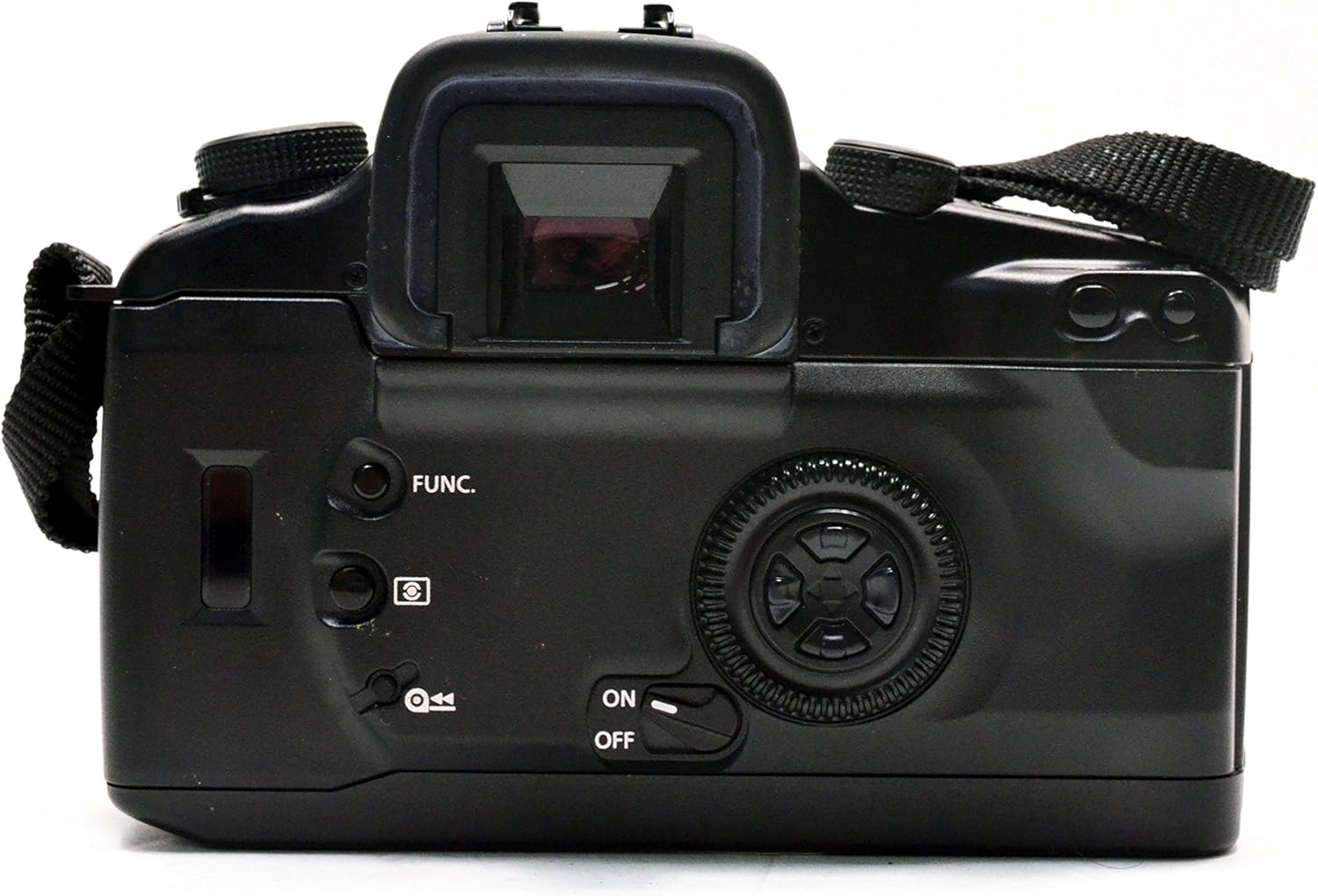
図5:背面 view of the Canon EOS Elan 7 camera with the film compartment door open, showing the film chamber and take-up spool.

図 6: 拡大図 view of the film compartment, detailing the film take-up spool, film pressure plate, and film guides.
- フィルムドアリリースラッチ(通常は側面にあります)をスライドさせて、カメラの背面を開きます。
- フィルムカートリッジを左側のフィルム室に挿入します。
- Pull the film leader across to the right, aligning it with the red mark on the take-up spool.
- Ensure the film perforations engage with the sprockets.
- カメラの裏蓋を、ロックがかかるまでしっかりと閉じてください。カメラが自動的にフィルムを最初のコマまで送ります。
カメラの操作
電源のオン/オフ
Use the ON/OFF switch, typically located near the main control dial, to power the camera on or off.
フォーカスシステム
The EOS Elan 7 features a 7-point wide-area autofocus system with a central cross-type sensor. This system provides fast and accurate focusing even with off-center subjects or in low-light conditions.
- Automatic Focus Point Selection: The camera automatically selects the optimal focus point.
- Manual Focus Point Selection: Use the focusing-point selection keys (often a multi-controller on the back) to manually choose one of the seven focus points.
- フォーカスモード: The camera supports Continuous-Servo AF (AI Servo AF) for moving subjects and One-Shot AF for stationary subjects.
測光モード
The camera's 35-zone evaluative metering system is linked to the focusing points, ensuring accurate exposure. Available metering modes include:
- 評価測光: Measures light across the entire scene, giving priority to the active focus point.
- Partial Metering: Measures approximately 10% of the viewfinder area around the center, useful for backlit subjects.
- Center-Weighted Average Metering: Measures the entire scene with a greater emphasis on the central area.
露出コントロール
The command dial allows for various exposure control options:
- プログラムAE(P): Camera automatically sets both shutter speed and aperture for optimal exposure.
- シャッター優先AE(Tv): シャッタースピードを選択すると、カメラが絞りを自動で設定します。モーションブラーの抑制に最適です。
- 絞り優先AE(Av): You select the aperture, and the camera automatically sets the shutter speed. Useful for controlling depth of field.
- マニュアル露出(M): You set both shutter speed and aperture independently.
Shutter Speed and Aperture Adjustment
Adjust these settings using the main dial and sub-dial, typically located near the shutter button and on the back of the camera, respectively. The maximum shutter speed is 1/4000 second.
Film Advance and Rewind
The camera automatically advances film after each shot. Once a roll is complete, the camera will automatically rewind the film. You can also manually initiate rewind, with options for high-speed or silent rewind modes.
セルフタイマー
Activate the self-timer function for a delayed shutter release, typically 10 seconds, allowing the photographer to be included in the shot.
高度な機能
撮影モード
Beyond the basic exposure modes, the Elan 7 may offer specialized shooting modes such as 'Sports' mode, optimized for capturing fast-moving subjects with appropriate shutter speeds.
ホワイトバランス設定
While film cameras primarily rely on film type for color balance, the Elan 7 may offer settings to optimize exposure for different light sources, such as Auto, Cloudy, Daylight, and Flash torch, influencing the metering system.
フラッシュの使用
The camera includes a built-in flash with various modes:
- 自動: Flash fires automatically in low light.
- フィルフラッシュ: Flash fires regardless of ambient light, useful for brightening shadows.
- Flash Override: フラッシュを無効にします。
お手入れとメンテナンス
適切な手入れを行うことで、カメラの寿命と性能が長持ちします。
- クリーニング: Use a soft, lint-free cloth to clean the camera body. For lenses, use a specialized lens cleaning solution and cloth. Avoid touching the mirror or shutter curtain.
- ストレージ: Store the camera in a cool, dry place, away from direct sunlight and extreme temperatures. If storing for extended periods, remove the batteries.
- バッテリー交換: Replace batteries promptly when the low battery indicator appears to avoid interruption during shooting.
- フィルムの取り扱い: Store film in a cool, dry place. Load and unload film in subdued light to prevent accidental exposure.
トラブルシューティング
If you encounter issues with your Canon EOS Elan 7, refer to the following common problems and solutions:
| 問題 | 考えられる原因 | 解決 |
|---|---|---|
| カメラの電源が入らない | 電池切れまたは電池の取り付け間違い | Replace batteries or re-install them with correct polarity. |
| フィルムが進まない | Film not loaded correctly; film leader not engaged | Open camera back in subdued light, re-load film ensuring leader is properly engaged with take-up spool. |
| オートフォーカスが遅い、または不正確 | Low light conditions; low contrast subject; dirty lens contacts | Use flash or focus assist lamp; try manual focus; clean lens and camera contacts. |
| フラッシュが発光しない | Flash disabled; insufficient charge; camera mode prevents flash | Check flash settings; allow time for flash to recharge; switch to a flash-compatible shooting mode. |
仕様
Key technical specifications for the Canon EOS Elan 7 35mm SLR Camera.
- モデル名: Canon EOS Elan 7
- モデル番号: 4587A005
- 互換性のあるマウント: キヤノンEF
- フォトセンサー技術: N/A (35mm FILM SLR camera)
- アスペクト比: 3:2
- 拡張 ISO 最小値: 100
- メータリングの説明: Average, Center Weighted, Multi-Zone, Partial, Spot
- 最大シャッタースピード: 1/4000秒
- 最小シャッタースピード: 30秒
- オートフォーカスポイント: 7
- フォーカスタイプ: Manual-and-Auto
- 連続撮影: 4FPS
- セルフタイマー: 10秒
- ホワイトバランス設定: Auto, Cloudy, Daylight, Flash torch
- カメラのフラッシュ: Built-In (Automatic, Fill Flash, Flash Override)
- Viewファインダ: 光学
- 電池のタイプ: リチウム
- 商品の重量: 約0.01ポンド(本体のみ)
- 色: 黒
保証とサポート
For information regarding warranty coverage, service, or technical support for your Canon EOS Elan 7 camera, please refer to the warranty card included with your purchase or visit the official Canon support website. Contacting Canon customer service directly will provide the most accurate and up-to-date assistance.