
導入
The Learning Resources Gearbotics Robot Motorized Set provides a hands-on experience in constructing robotic models. This set includes 118 color-coded components, such as gears, cogs, and connectors, along with a motorized unit. Users can design and build robots capable of movement and sound production via a controller.
This manual provides essential information for the assembly, operation, and maintenance of your Gearbotics Robot Motorized Set. Please read these instructions carefully before use.

Image: The product packaging for the Gearbotics Robot Motorized Set, illustrating the assembled robot and its remote controller.
パッケージ内容
The Gearbotics Robot Motorized Set includes the following components:
- 118 color-coded pieces (gears, cogs, connectors)
- Motorized unit with sound capabilities
- コントローラ
- Robot head
- Grabber arms
- ホイール
- Instruction booklet for building models
注記: Four AA batteries are required for the motorized unit and two AA batteries for the controller, and are not included in the set.
セットアップと組み立て
1. バッテリーの取り付け
- Locate the battery compartment on the motorized unit and the controller.
- 小さなドライバー(付属していません)を使用して、電池ボックスのカバーを開きます。
- Insert four (4) AA batteries into the motorized unit, observing the correct polarity (+/-).
- Insert two (2) AA batteries into the controller, observing the correct polarity (+/-).
- 電池ボックスのカバーを元に戻し、ネジで固定します。
重要: Always use new batteries of the same type. Do not mix old and new batteries, or different types of batteries. Remove batteries if the product will not be used for an extended period.
2. 初期組み立て
The Gearbotics set is designed for creative construction. Refer to the included instruction booklet for detailed steps on building specific robot models. The general assembly process involves:
- Connecting Base Components: Begin by connecting the main structural pieces using the various connectors.
- Integrating Gears: Attach gears and cogs to create rotational movement. Ensure gears mesh properly for smooth operation.
- Attaching the Motorized Unit: Securely connect the motorized unit to the robot's structure, ensuring its output shaft aligns with the gears intended for movement.
- アクセサリの追加: Attach the robot head, grabber arms, wheels, and other decorative elements as desired or as instructed by the model guide.

Image: A fully assembled Gearbotics robot, showcasing its transparent gears, cogs, and structural components.
操作手順
Once your robot is assembled and batteries are installed, you can begin operation using the controller.
- Ensure the motorized unit is securely connected to the robot and its power source (batteries).
- Use the directional controls on the controller to make the robot move forward or backward.
- Activate the sound function via the designated button on the controller to hear the robot's sounds.
- Experiment with different gear configurations and robot designs to observe varied movements and functions.
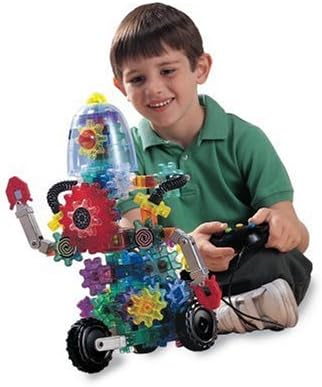
Image: A child interacting with the Gearbotics robot, using the remote controller to activate its functions.
メンテナンス
Proper maintenance ensures the longevity and optimal performance of your Gearbotics set.
- クリーニング: 部品を乾いた布か軽く拭いてくださいamp cloth. Do not immerse the motorized unit or controller in water. Avoid harsh chemicals.
- ストレージ: Store all pieces in a clean, dry place away from direct sunlight and extreme temperatures.
- バッテリーのケア: Remove batteries from the motorized unit and controller if the set will not be used for an extended period to prevent leakage.
- コンポーネントの検査: Periodically inspect gears and connectors for any signs of wear or damage. Replace any broken or worn parts to maintain functionality.
トラブルシューティング
If you encounter issues with your Gearbotics Robot Motorized Set, refer to the following common solutions:
- Robot Does Not Move or Motor is Silent:
- Check if batteries are correctly installed in both the motorized unit and the controller, observing polarity.
- 電池が新品で、完全に充電されていることを確認してください。必要に応じて交換してください。
- Verify that all connections between the motorized unit and the robot's gears are secure and properly aligned.
- Gears Do Not Turn Smoothly or Jam:
- Inspect for any foreign objects or debris obstructing the gears.
- Ensure all gears are correctly meshed and not forced into position.
- Check for any damaged or worn gear teeth that might prevent smooth rotation.
- コントローラーが応答しない:
- Confirm batteries in the controller are fresh and correctly inserted.
- Ensure there are no obstructions between the controller and the robot's receiver.
If problems persist after attempting these solutions, please contact Learning Resources customer support.
仕様
| 特徴 | 詳細 |
|---|---|
| 製品寸法 | 15 x 5 x 14インチ |
| アイテム重量 | 4.06ポンド |
| モデル番号 | LER9188 |
| ASIN | B00004WGJS |
| メーカー推奨年齢 | 6歳以上 |
| 電池が必要 | 4 AA batteries (not included) for motorized unit, 2 AA batteries (not included) for controller. |
| 発売日 | 1年2007月XNUMX日 |
| メーカー | 学習リソース |
保証とサポート
For warranty information, replacement parts, or further assistance, please contact Learning Resources directly. Their official website or customer service contact details can typically be found on the product packaging or by searching online for "Learning Resources customer support".
Please have your product model number (LER9188) and purchase information available when contacting support.